- Empty cart.
- Continue Shopping
Add a Light Switch Without Damaging Walls: Your 2026 Australian Guide
- Posted on
 Strong Digital
- 0
- Categories: Uncategorized
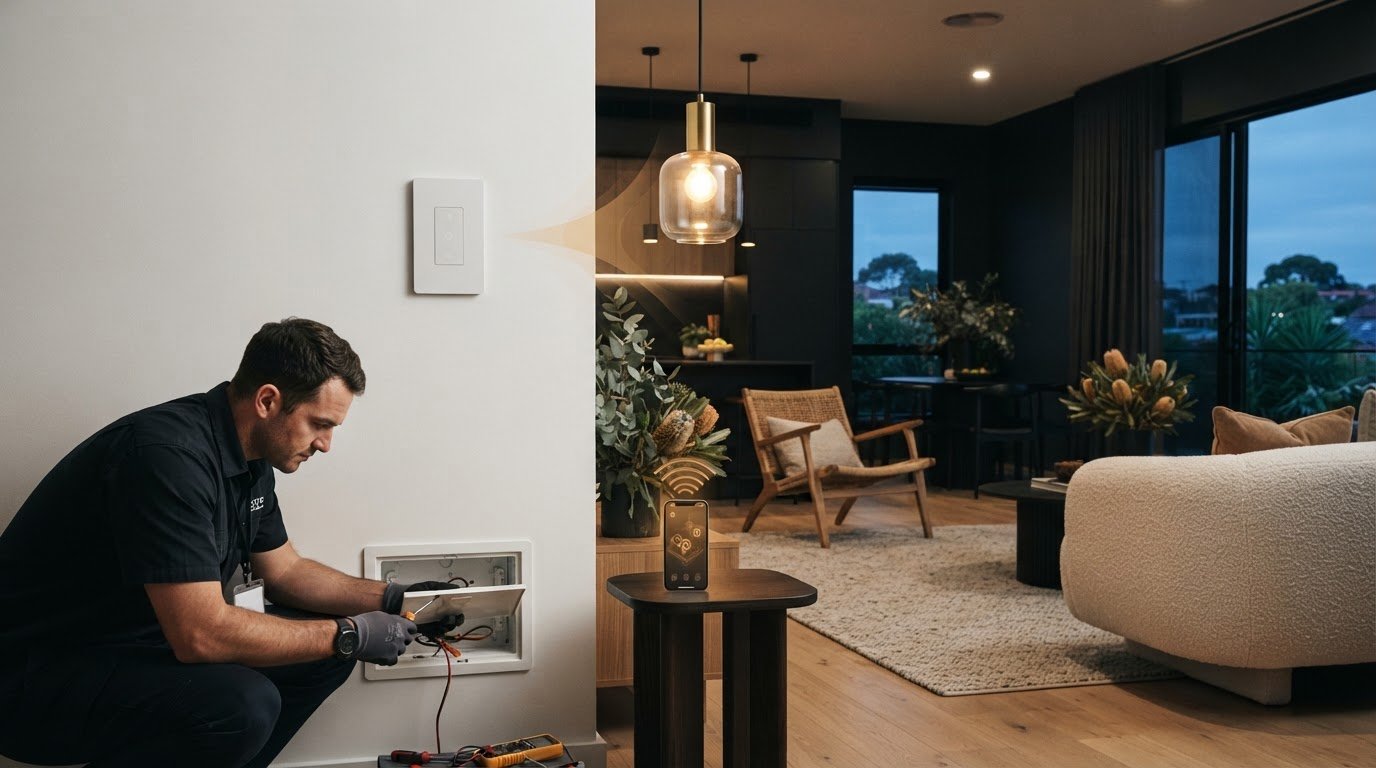
What if you could add a light switch without damaging walls or repainting afterwards? If you need a switch in a more convenient spot, cutting a channel through finished plaster can feel like the only option. It isn’t. Wireless switching can add control while helping preserve your walls.
It makes sense to consider dust, repairs and whether a wireless setup will work with your existing light. There’s also an important safety line: a wireless control may be wall-mounted without wiring, but any mains-powered receiver connected to the lighting circuit must be installed by a licensed electrician.
This guide compares wall-friendly ways to add switching, explains what wireless control can and can’t do, and outlines what to consider before choosing a setup. You’ll also learn how switching modules can work with existing switches and lights, and where professional electrical work fits in. That way, you can plan a practical upgrade without taking on unsafe work or unnecessary wall repairs.
Key Takeaways
- A wireless control setup can help you add light switch without damaging walls when it suits the existing lighting arrangement.
- Compare wireless control with conventional rewiring to understand the likely wall access, finish repairs and switch placement for each option.
- Note how the light is currently controlled and record any unusual behaviour before looking for a compatible option.
- Avoiding plaster repairs doesn’t remove electrical safety requirements: mains-powered work must be handled by a licensed electrician.
- Gem Wireless switching solutions are designed to work with existing switches and lights without rewiring, offering a practical way to add control.
Add a light switch without damaging walls: what are your options?
If your goal is to add light switch without damaging walls, a wireless control setup can provide another switching point without chasing a new cable through the wall. It’s a practical option when you want to operate a light from a more convenient spot while preserving finished plaster, paint or another surface. Less wall disruption doesn’t mean electrical work can be skipped. In Australia, work on mains wiring and lighting circuits must be carried out by a licensed electrician.
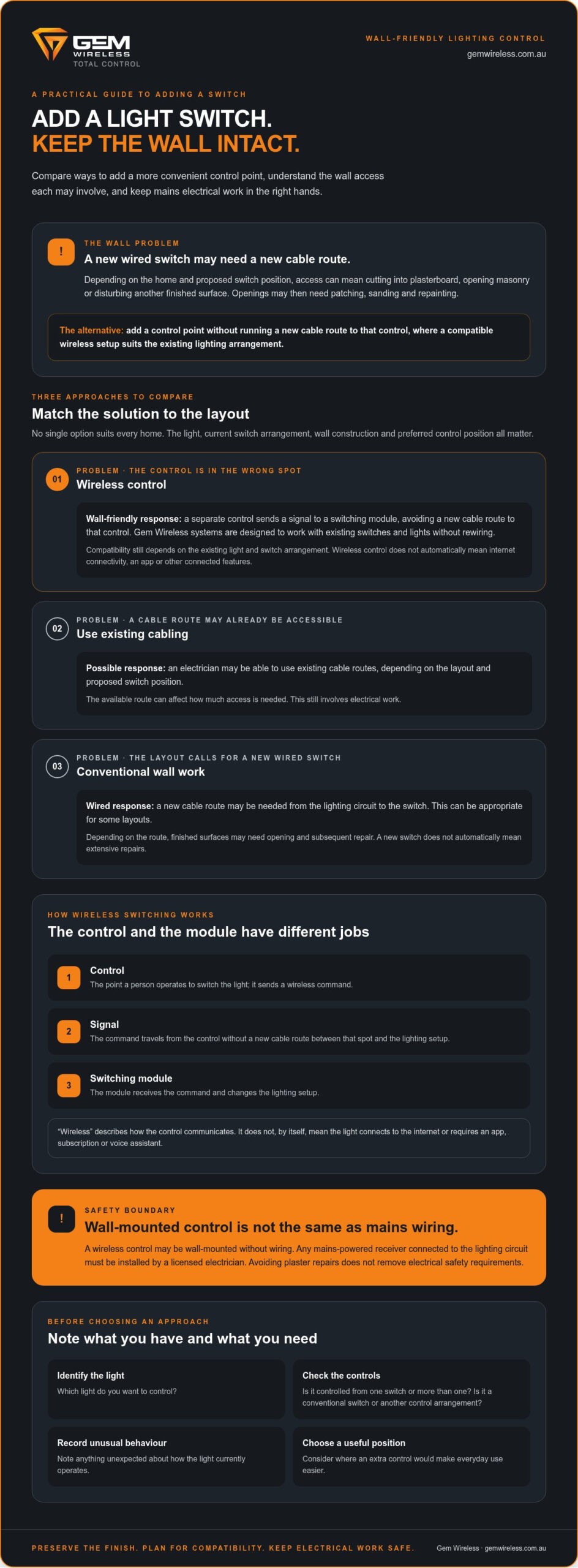
There are three broad approaches to consider:
- Wireless control: A separate control communicates with a switching component, avoiding the need for a new cable route to that control. Gem Wireless systems are designed to work with existing switches and lights without rewiring.
- Using accessible existing cabling: An electrician may be able to use existing cable routes, depending on the layout and proposed switch position. This can affect how much access is needed, but it still involves electrical work.
- Conventional wall work: A new wired switch may require a cable route through the wall. This can be appropriate for some layouts, but may involve opening and repairing finished surfaces.
No single option suits every home. The light, current switch arrangement, wall construction and preferred control position all affect what’s practical. Start by identifying the light you want to control and where an extra switch would make daily use easier. These details give you a clearer basis for comparing approaches.
When does adding a conventional switch damage a finished wall?
Adding a wired switch in a new location can require a cable route from the lighting circuit to the switch. Depending on the existing layout, access may involve cutting into plasterboard, opening a section of masonry or disturbing another finished surface. Once the electrical work is complete, openings may need patching, sanding and repainting. The amount of access depends on the home and proposed route, so a new switch doesn’t automatically mean extensive repairs, but the wall may need attention.
What can wireless switching change?
A wireless control provides another switching point without running a new cable route to that control. In general, the control sends a signal, while a switching module responds and changes the light’s operation. The module’s connection to the lighting circuit is a separate electrical matter, not a DIY task. For a plain-language overview of different approaches, see this guide to the wireless light switch.
Compatibility still matters. Note how the light is currently controlled and record any unusual behaviour when planning an upgrade. For homeowners looking to add light switch without damaging walls, the key is choosing an approach that suits both the wall and the existing electrical arrangement. Wireless control can preserve finished surfaces where it’s compatible; an existing cable route or conventional wiring may be more suitable for a different setup.
How wireless switching adds control without cutting into walls
Wireless switching separates the place you press from the electrical component that changes the light’s state. The control sends a signal to a switching module, so adding another control point doesn’t require a new cable route between that spot and the existing lighting setup. Gem Wireless systems are designed to work with existing switches and lights without rewiring.
Wireless switching can add a control point without chasing a new cable channel through a finished wall. That makes it worth considering when an existing switch works but isn’t in the most useful spot, such as when you want another way to operate the same light from a more convenient position.
Wireless describes how the control communicates with the switching component. It doesn’t automatically mean the light connects to the internet or that you need an app, smart-home subscription or voice assistant. The setup can focus on switching without adding internet-connected functions. Features vary between systems, so be clear about your goal: adding control, not necessarily adding connected features.
What do the control and switching module each do?
The control is the point a person operates to switch the lighting. It sends a command wirelessly rather than relying on a new cable running from that control to the light. A switching module receives the command and changes the lighting setup. These are different roles, even when they work together as one system. Their placement and any electrical connections aren’t DIY instructions.
What does no rewiring mean for the wall?
Where a compatible setup avoids a new cable route to the added control, the wall finish along that route may stay intact. That can help avoid cutting into a finished surface just to extend control to a more convenient position. It doesn’t mean every setup needs no drilling, mounting or electrical work. The existing light and switch arrangement still determines what’s suitable.
Before choosing a system, consider how the light currently operates. Is it controlled from one switch or more than one? Does it use a conventional switch or another control arrangement? These details help clarify what the wireless control needs to do and whether the selected system suits the existing lighting.
- Control: The point where someone operates the light.
- Switching module: The component that responds to the control’s command.
- Existing setup: The light and switch arrangement that affects compatibility.
Wireless control can reduce the need to disturb finished walls, but it doesn’t remove electrical safety requirements. Any work involving mains wiring or a mains-powered module must be handled by a licensed electrician in Australia. Gem Wireless offers wireless switching products designed to work with existing switches and lights without rewiring, providing a wall-friendly option to consider for your lighting setup.
Wireless switch or conventional rewiring: which avoids more wall disruption?
If you want another control point while keeping a finished wall intact, wireless switching is generally the less disruptive option, provided it suits the existing lighting setup. Conventional rewiring can still be the right choice when a project changes the fixed electrical installation. Compare the practical differences before deciding which route fits your home.
| Consideration | Wireless control | Conventional rewiring |
|---|---|---|
| Wall access | Can avoid a new cable route to the added control. | May require access through plasterboard, masonry or another finished surface to run cable. |
| Finish repairs | Can help preserve the wall finish where no new route is needed. | Cut-outs may need patching, sanding and repainting. |
| Switch placement | Can provide an additional control point where a compatible system suits the layout. | Placement depends on a practical cable route and the existing electrical arrangement. |
| Electrical work | Wall-friendly doesn’t mean work-free. Any mains-powered component connected to the lighting circuit needs licensed electrical work. | Changes to fixed wiring must be carried out by a licensed electrician. |
The table compares likely disruption, not a guaranteed result. Wall construction, cable access, the light and the existing switching arrangement all affect the work involved. Wireless control isn’t automatically the better choice for every project. It’s most useful when you want to add control to a compatible setup, rather than replace or significantly alter the fixed electrical installation.
When is wireless control the more wall-friendly choice?
Picture a living room that’s already painted, furnished and in use. You’d like another way to operate the same light from a more convenient spot. If the existing lighting arrangement is compatible, wireless control may provide that extra point without a new cable route across the finished wall. That can be appealing after decorating or when preserving a completed renovation matters. Explore the Australian wireless light switch kit guide for more context on this type of setup.
When might conventional electrical work still be needed?
Adding a control point is different from changing the fixed electrical installation. A project that requires a new circuit, a different lighting configuration or other changes to existing wiring may call for conventional electrical work. The right approach depends on the current wiring, how the light is controlled and what you want to change. Don’t open walls or handle fixed wiring yourself. In Australia, electrical requirements can vary by jurisdiction, so a licensed electrician should carry out and assess the relevant electrical work.
In short, wireless control can help you add light switch without damaging walls when the existing setup is compatible and the aim is an extra control point. If the project involves broader electrical changes, wall access may be part of the work. Choose based on what the light needs, not on an assumption that one method suits every home.
Plan a wall-friendly light switch upgrade safely
A little planning helps you choose a control that suits the light, room and existing switch arrangement. Keep the early work observational: note what you want to control, where you want the control and how the current setup behaves. That gives you a clearer basis for exploring how to add light switch without damaging walls, without opening a switch plate or handling wiring.
- Identify the light. Record the individual light or group you want the additional control to operate. If several lights work together, describe them as a group rather than assuming each has a separate control.
- Map the control location. Choose a practical position and note nearby obstacles, the wall surface and whether there’s a suitable place to mount a control. These details can affect the options available.
- Check compatibility. Compare your notes with the selected product’s published compatibility and operating specifications. Consider the existing light and switch arrangement, not just the control’s appearance.
- Plan safe work. Separate choosing the product from any electrical installation. If the selected setup involves fixed wiring or a mains-powered component, plan for a licensed electrician to handle that work.
What should you check before choosing a wireless setup?
Write down how the light behaves in normal use. Note whether it’s controlled from one switch or more than one, whether switches operate lights together, and anything unusual, such as a light that responds inconsistently. Don’t try to diagnose the cause by removing a switch plate. A clear description of what you observe is more useful than a guess about what’s behind the wall.
Then consider the control’s intended position and any physical mounting constraints. Compare those needs with the product’s published specifications, including its stated compatibility and operating requirements. Wireless switching products can differ, so don’t assume that a setup suited to one light or switch arrangement will suit another.
Where does DIY planning stop?
Your planning can cover requirements, observations and product research. It shouldn’t extend to opening switch plates, connecting conductors or altering fixed wiring. Those tasks involve electrical work, not simply choosing where a control should go. Australian requirements can vary by jurisdiction, so the relevant local rules apply to electrical work in your home.
Any work on fixed wiring should be handled by a licensed electrician. This includes electrical installation work required for a wireless setup. The product and the installation are separate parts of the plan: choosing a wall-friendly control doesn’t make mains work a DIY task.
Once you’ve recorded the light, control location and current switch behaviour, you’ll have a more useful starting point for selecting a compatible option. Explore Gem Wireless switching kits as one way to add control while working with existing switches and lights without rewiring.
Add wall-friendly lighting control with Gem Wireless
If you want another way to control a light but would rather avoid a new cable route through a finished wall, Gem Wireless offers wireless switching products designed to work with existing switches and lights without rewiring. This can make wireless control worth considering when you want more flexibility while keeping the room’s existing finish intact.
Gem Wireless supplies several types of switching products and kits:
- Switch module kits
- Mains-powered switches
- Long-range switches
- Switching modules
These are product options, not an electrical installation service. The right choice depends on the light you want to control, its current switch arrangement and the control point you have in mind. Any work involving fixed wiring must be handled by a licensed electrician.
What makes a wireless retrofit a practical option?
Wireless switching can suit a decorated room where a new cable route could disturb the wall finish. It may also be worth considering during a renovation when you want more flexibility without planning a new cable run to the control. The existing lighting setup still matters, so compare your requirements with the system’s published information. For component-level detail, see the wireless switching modules guide.
What is the next step for your lighting setup?
Before selecting a solution, note which light or group you want to operate, where you’d prefer the control and how the switches behave now. Include any unusual lighting behaviour, then compare those observations with the product’s compatibility information. This keeps your decision focused on the actual setup rather than assumptions about what’s behind the wall.
Keep product selection separate from installation planning. A wireless control may avoid a new cable route, but it doesn’t remove electrical safety requirements or guarantee compatibility with every setup. If the system involves mains-powered components or changes to fixed wiring, leave that work to a licensed electrician. Your role is to define the need and research the product; electrical work belongs with a qualified professional.
Gem Wireless products are available directly and through stockists across Australia. If you’re weighing up how to add light switch without damaging walls, the no-rewire lighting control guide can help you understand how this approach relates to existing lighting.
Explore Gem Wireless switching solutions to compare the product range with your lighting control needs.
Choose your next step with confidence
The best upgrade starts with a clear goal: decide which light you want to control and where an extra control would make the room work better. Then use those details to explore a suitable option. If you want to add light switch without damaging walls, a wireless setup is worth considering when it’s compatible with your existing lighting.
Gem Wireless solutions are designed to work with existing switches and lights without rewiring. You can explore the range directly or find products through stockists across Australia, then plan any required electrical work separately with a licensed electrician.
Take the next step by exploring Gem Wireless switching solutions and comparing the products with your lighting control needs.
Frequently Asked Questions
Does a wireless light switch need Wi-Fi?
No, wireless switching doesn’t automatically require Wi-Fi. “Wireless” describes communication without a cable between components; internet access is a separate feature that depends on the particular system. A control may operate lighting locally without connecting to a home network. Check the product’s published operating details to see whether it requires Wi-Fi or offers internet-connected functions. Don’t assume app control is included just because a switch is wireless.
Will a wireless light switch work through brick or concrete walls?
It depends on the system and layout. Signal performance can be affected by distance, building materials and obstacles between components, so there’s no universal guarantee that a signal will pass through a particular brick or concrete wall. Compare your intended control and light locations with the product’s published operating specifications. If the signal path is uncertain, use the product guidance rather than relying on a general range estimate.
Can I mount a wireless light switch on a tiled wall without drilling?
Possibly, but the mounting method depends on the switch design, tile surface and instructions supplied with that product. Don’t assume adhesive mounting is supported or that a control can be removed later without marks. Follow the product guidance for the specific surface and mounting method. Mounting a control is separate from electrical work: if the setup involves fixed wiring or a mains-powered component, a licensed electrician must handle that work.
Do wireless light switches need batteries?
Some wireless switches use batteries, while others use a different power source. The answer depends on the design, so check the specifications for the particular control rather than assuming it needs batteries or is battery-free. Look for details about the stated power source, any maintenance involved and whether replacement is required. This can help you compare ongoing upkeep as well as how the switch fits your preferred location and use.
Can one wireless switch control more than one light?
It depends on the control system, receiver configuration and lighting circuit. A setup may be intended for one light, a group of lights or separate controls, but don’t assume a particular switch or kit supports every arrangement. First decide whether you want the lights to operate together or independently. Then compare that requirement with the product documentation, which should describe the supported configuration for the selected system.
Can I add a wireless switch without changing my existing wall switch?
Some wireless arrangements are designed to work alongside existing switches, but the exact setup depends on compatibility and how the lighting is currently controlled. Gem Wireless systems are designed to work with existing switches and lights without rewiring, though not every configuration will suit every installation. Check the selected product’s specifications. Choosing a compatible control is separate from altering fixed wiring, which should be handled by a licensed electrician.
electrical safetyhome improvementlight switch installationplaster repairrenovation tipssmart homewireless lighting