- Empty cart.
- Continue Shopping
Australia Smart Home Regulations in 2026: What Homeowners Need to Know
- Posted on
 Strong Digital
- 0
- Categories: Uncategorized
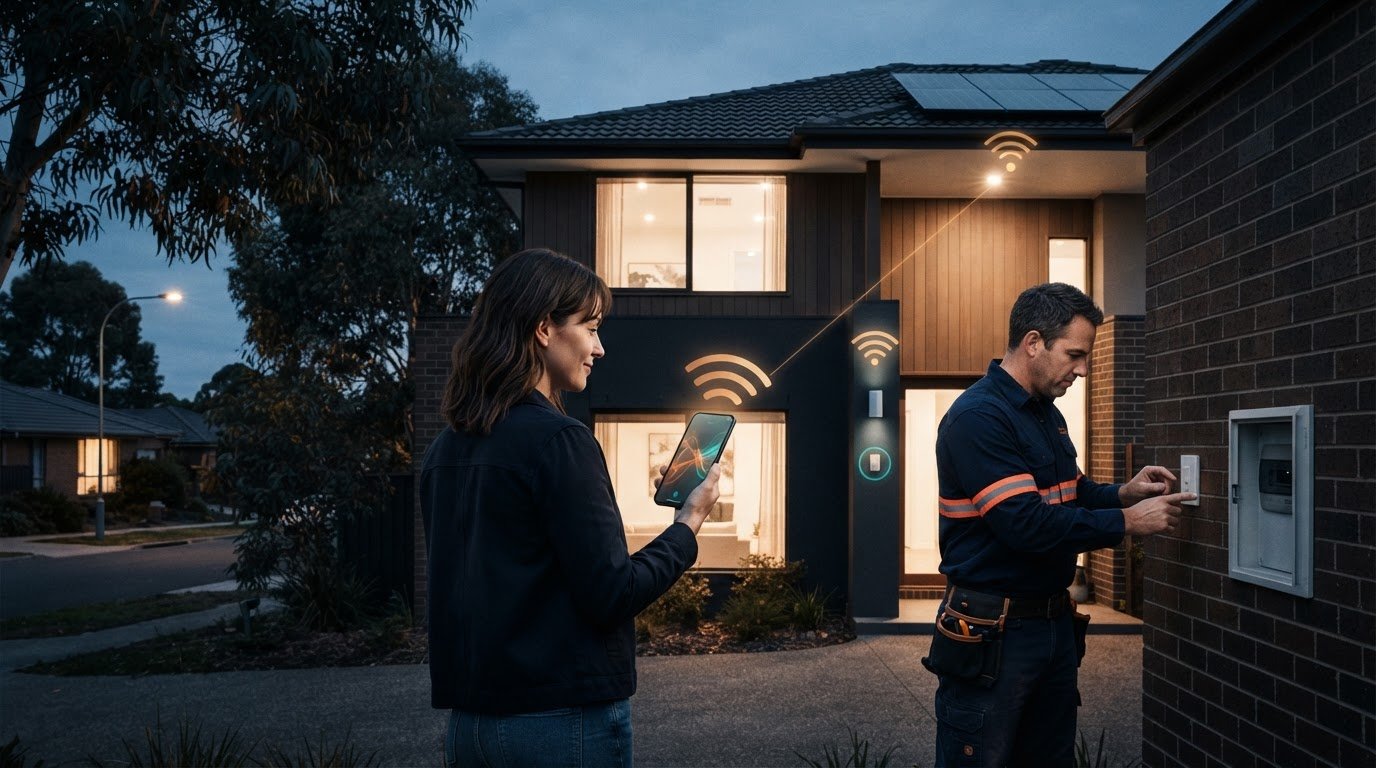
What if a smart device meets Australia’s security rules but still isn’t safe to install yourself? That distinction is central to australia smart home regulations. Since 4 March 2026, mandatory cyber security standards have applied to most consumer-grade smart devices manufactured on or after that date and sold in Australia. They set baseline requirements for features such as passwords, vulnerability reporting and security-update information. But product compliance doesn’t make mains-voltage electrical work a DIY job. Installing in-wall smart switches requires a licensed electrician.
It can be hard to know which rules apply to a new device, an older one or a particular installation. This guide covers the main compliance areas, who is responsible and what to consider before buying or adding connected technology. It also explains how wireless lighting controls can support a practical retrofit. They can avoid rewiring, but that doesn’t remove the need for a licensed electrician when electrical work is required. Understanding the difference helps you plan an upgrade and identify the checks that matter.
Key Takeaways
- australia smart home regulations cover separate areas, including cyber security, electrical safety and wireless communications. Meeting one set of requirements doesn’t automatically meet them all.
- Know which security responsibilities sit with manufacturers and suppliers, and what information to look for when comparing connected devices.
- Use a buying, installation and connection checklist to distinguish household decisions from obligations that apply to businesses and licensed workers.
- Product compliance and installation safety are separate considerations, and requirements can vary by device and setting.
- Wireless switching can support lighting control with existing switches and lights as one component of a wider smart-home setup.
Australia smart home regulations in 2026: which rules apply?
Australian smart-home compliance spans several distinct areas. A connected light, switch or hub may involve product cyber security, electrical safety, radio communications and installation rules, but these requirements aren’t interchangeable. A device’s security compliance doesn’t establish that it’s safe to wire into a wall. Likewise, correct installation doesn’t by itself show that its wireless functions meet applicable requirements.
This national overview explains the main areas homeowners may encounter. The rules depend on the product, how it connects and how it’s installed. Smart homes can include devices with very different roles, as the general Smart Home Technology Overview illustrates. Consider each device and activity separately rather than assuming one approval covers the whole setup.
What changed for smart devices on 4 March 2026?
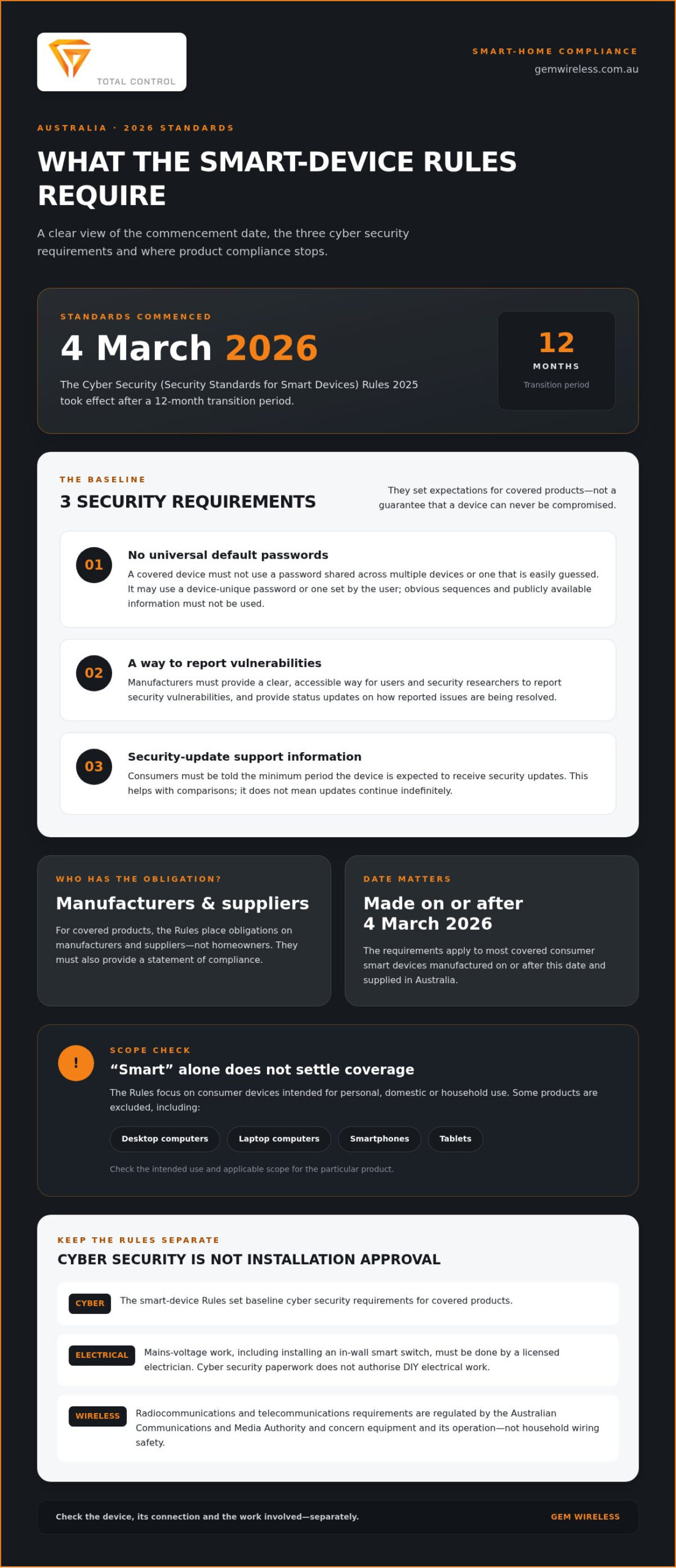
The Cyber Security (Security Standards for Smart Devices) Rules 2025 commenced on 4 March 2026, following a 12-month transition period. They set cyber security requirements for most consumer smart devices intended for personal, domestic or household use that are manufactured on or after that date and supplied in Australia. The Rules place obligations on manufacturers and suppliers of covered products, not homeowners.
The manufacture date matters. A device made before 4 March 2026 isn’t brought within these new requirements solely because it’s still used in a home after that date. This doesn’t establish that every older device is secure or exempt from other requirements that may apply. The Rules also exclude some electronic products, including desktop and laptop computers, smartphones and tablets. For a particular product, check its intended use and the applicable scope rather than relying on the broad label “smart”.
Which other compliance areas matter in a smart home?
Electrical safety concerns both equipment and the work needed to connect it. Australia’s AS/NZS 3000:2018 Wiring Rules apply to electrical installations, and product requirements can also matter for mains-powered equipment. Mains-voltage work, including installing an in-wall smart switch, must be done by a licensed electrician. Cyber security paperwork doesn’t authorise DIY electrical work.
Wireless products bring another layer. The Australian Communications and Media Authority regulates radiocommunications and telecommunications. Requirements can apply to radio equipment or devices connecting to communications networks. These obligations concern equipment and its operation, not the safety of household wiring.
Planning during a build or renovation is different again. Thinking about device locations, control points and network access can help shape a workable setup, but it doesn’t replace product compliance or safe installation. Wireless switching can support lighting control with existing switches and lights without rewiring. Where electrical work is required, the usual installation requirements still apply. That’s the practical distinction behind australia smart home regulations: identify the device, its connection and the work involved, then consider the relevant rules for each.
What the 2026 smart-device cyber security standards require
The Cyber Security (Security Standards for Smart Devices) Rules 2025 took effect on 4 March 2026. They set baseline cyber security requirements for covered smart devices, with obligations falling on manufacturers and suppliers rather than householders. For homeowners, the practical step is to understand what information to look for and what the standards do, and don’t, promise.
Since 4 March 2026, the Rules have set cyber security requirements for most covered smart devices made for personal, domestic or household use and manufactured on or after that date.
The three security requirements in plain English
The Rules address passwords, reporting security issues and communicating security-update support. They don’t certify that a device is risk-free or prescribe every part of how a household must secure its network.
- No universal default passwords: a covered device must not use a password that is the same across multiple devices or easily guessed. A password can be unique to the device or set by the user, and must not rely on obvious sequences or publicly available information.
- Vulnerability reporting: manufacturers must provide a clear, accessible way for users and security researchers to report security vulnerabilities. They must also provide status updates about how reported issues are being resolved.
- Security-update information: consumers must be told the minimum period during which the device is expected to receive security updates. This helps buyers compare support periods, but it doesn’t mean updates will continue indefinitely.
There is also a statement-of-compliance requirement. Manufacturers and suppliers must provide a statement for covered products. It gives consumers compliance information, but it isn’t a guarantee that a product can never be compromised.
Which products and dates are within scope?
The Rules focus on consumer smart devices intended for personal, domestic or household use. “Smart device” can cover different connected products, so the category alone doesn’t settle whether a particular model is covered. The Rules include exclusions, such as desktop and laptop computers, smartphones and tablets.
The manufacturing date is important. The requirements apply to covered products manufactured on or after 4 March 2026 and supplied in Australia. A product made before that date isn’t brought within the new standards solely because it remains in use. That doesn’t establish that it meets the same security baseline or settle any other obligations that may apply. Check the product information for its manufacture date and compliance statement rather than assuming every device on a shop shelf follows the same rules.
These standards are one part of australia smart home regulations, not a complete security plan. For another perspective on how connected technology can support household energy decisions, the Australian Government’s Energy Efficiency and Smart Homes in Australia resource covers smart homes and energy efficiency.
For lighting upgrades, wireless switching hardware can work with existing switches and lights without rewiring as one component in a wider setup. It doesn’t replace electrical safety requirements where electrical work is needed. Explore wireless lighting-control hardware as a practical option alongside your device and installation plans.
Cyber, electrical and wireless compliance: what is the difference?
A smart-home product can involve several compliance questions, and passing one check doesn’t answer the others. Cyber security concerns protections built into a covered device. Electrical safety concerns equipment and installation work. Wireless and communications requirements concern how radio or network-connected equipment operates. These distinctions help homeowners identify the issues, but they aren’t a complete legal assessment of every product or installation.
Device-level security requirements address how a product protects against cyber risks; electrical rules govern the safe performance of electrical work. A secure device isn’t automatically safe to wire into a wall, and correct installation doesn’t automatically establish compliance with every cyber or radio requirement.
| Compliance area | What it concerns | Who is generally responsible |
|---|---|---|
| Cyber security | Security features and information required for covered smart devices | Manufacturers and suppliers of covered products |
| Electrical safety | Electrical equipment and the safety of installation work | Suppliers and manufacturers for applicable product obligations; licensed electrical workers for regulated installation work |
| Radio and communications | Radio emissions, communications equipment and connection to networks | Suppliers and manufacturers, according to the requirements that apply to the product |
Electrical safety, installation and the Wiring Rules
Electrical installation requirements are administered under state and territory rules. AS/NZS 3000:2018, known as the Wiring Rules, sets requirements for electrical installations and is relevant to work such as adding equipment to a household circuit. The precise obligations depend on the work and jurisdiction. Mains-voltage work, including installing an in-wall smart switch, must be carried out by a licensed electrician.
Wireless control doesn’t change that boundary. A wireless module may reduce the need for rewiring in a lighting upgrade, but it doesn’t authorise anyone to handle mains wiring without the required licence. The installation method matters as much as the device’s wireless function.
Wireless products, communications and product marking
Radio equipment can have separate Australian requirements. The Australian Communications and Media Authority regulates radiocommunications and telecommunications, and applicable equipment may also need to meet relevant technical and labelling obligations. The Regulatory Compliance Mark (RCM) is used for products subject to applicable Australian regulatory requirements. Its relevance depends on the product and the obligations involved.
An RCM mark isn’t proof that a device meets the smart-device cyber security standards, nor does it show that an installation has been performed safely. Treat it as one product-compliance indicator, not a universal approval covering every aspect of a connected home.
For homeowners, start by identifying the product type, its power source, its wireless functions and whether installation involves fixed wiring. This helps clarify which parts of australia smart home regulations may apply, without assuming one mark or claim settles every question.
A practical Australian smart-home compliance checklist
Use this sequence to turn the rules into manageable decisions. Start with the device and the work involved, then separate checks you can make at home from obligations that sit with manufacturers, suppliers or licensed workers. The australia smart home regulations that apply can depend on the product’s purpose, manufacture date, connection type and installation.
- Define what the device does. Is it intended for household use? Does it connect by Wi-Fi, Bluetooth, another radio technology or a communications network? Note whether it runs on batteries, plugs into a socket or connects to fixed wiring. These details help identify relevant compliance areas, but they don’t provide a complete legal determination.
- Review security information before buying. For a covered smart device, look for clear information about its security-update support period, a way to report vulnerabilities and a statement of compliance. The manufacturer and supplier carry the relevant obligations under the cyber security Rules. Use the available information to compare products and understand the stated support period.
- Read markings and instructions in context. Check the product label, supplied documentation and installation instructions for relevant Australian compliance information. A mark such as the RCM may relate to applicable product obligations, but it isn’t universal approval. On its own, it doesn’t show that a device meets cyber security standards or that its installation is safe.
- Work out what installation involves. If an upgrade involves mains wiring or an in-wall switch, arrange for a licensed electrician to carry out the work. Don’t treat wireless control as permission to work on fixed wiring. In an existing home, note the switches, lights and wiring already in place before choosing a retrofit. A wireless light switch kit guide can help you consider lighting-control options.
- Plan how the device will connect and sit in the home. Check the instructions for network or hub requirements and consider placement before fixing equipment in place. For a new build or renovation, plan control locations, wiring and connectivity together. In an existing home, map proposed device locations and connection needs first. A no-rewire lighting control approach may suit some lighting upgrades, but any electrical work still needs to meet applicable requirements.
Assign each check to the right person. Householders can compare product information, identify how a device connects and plan where it will go. Manufacturers and suppliers handle applicable product obligations; licensed workers handle electrical work that requires a licence. If you’re considering a wireless lighting-control upgrade, explore Gem Wireless switching hardware as one component of a wider smart-home setup.
Choosing a compliant smart-home upgrade without overcomplicating it
Compliance is a planning framework, not a reason to avoid useful smart-home upgrades. Not every connected device is the same kind of project. Identify what the product does, how it connects and whether installation involves electrical work. Then focus on the requirements that apply to those details.
Lighting can be a practical place to start. Gem Wireless supplies switching hardware and kits designed to work with existing switches and lights, enabling lighting-control upgrades without rewiring. The hardware is one component of a wider smart-home setup, not an installation service or a software subscription. Any mains electrical work required must still be handled by a licensed electrician.
When wireless switching can simplify a lighting retrofit
In an existing home, changing how a light is controlled doesn’t always mean running new switch wiring. Wireless switching hardware offers a retrofit option using existing switches and lights. The right approach depends on the lighting points and control changes you have in mind. Wireless control may simplify the project, but it doesn’t remove electrical requirements or make mains wiring a DIY task.
Plan the next step with the right information
Before choosing components, write down which lights you want to control, where their existing switches are and what you want to change. Note practical constraints, such as rooms where adding or changing wiring would be disruptive. This gives you a clearer picture of the retrofit and helps identify where licensed electrical work may be needed.
For component context, Gem Wireless’s wireless switching modules guide explains how switching modules fit into retrofit control. Use it alongside the product instructions and details of your existing lighting, rather than assuming every device or installation follows the same rules.
- List the lighting points you want to control, such as the lights in a particular room.
- Record existing switches and note the control change you’re aiming for.
- Separate the product choice from the installation so you can plan for any work involving fixed wiring.
- Consider the wider setup, including how the lighting controls will fit with your other connected devices.
This preparation makes australia smart home regulations easier to apply in practice. Focus on the relevant product information, installation requirements and connection needs without turning a straightforward lighting upgrade into a whole-home overhaul. If wireless lighting control suits your plans, explore Gem Wireless switching options.
Make your next smart-home upgrade a considered one
Start your next upgrade with a clear goal, not a long list of devices. Choose one lighting change that would make daily life easier, then note the lights and switches involved and the control you want. This gives you a practical starting point for weighing product information, connectivity and installation needs under australia smart home regulations.
For homes and commercial spaces, Gem Wireless supplies wireless switching kits and hardware for lighting control. The systems are designed to work with existing switches and lights without rewiring. Wireless switching can be one option as part of a wider upgrade, while product choices and any required electrical work remain separate decisions.
When you’re ready to explore lighting-control options, explore Gem Wireless switching solutions. Start with the lighting change you want to make, then choose the hardware and plan any required electrical work.
Frequently Asked Questions
Do Australia’s smart device security rules require a companion app?
No. The security rules don’t generally require a covered smart device to have a companion app. They set requirements around matters such as passwords, vulnerability reporting and security-update information. An app may still be needed for a particular product’s setup or everyday controls, so check the manufacturer’s instructions before buying. If an app is required, review its permissions and account settings as part of your own security decisions.
Do smart home devices have to use Matter in Australia?
No. Australia’s smart-device security rules don’t require devices to use Matter. Matter is a connectivity and interoperability standard, not a substitute for applicable Australian security, electrical or radio requirements. A device using another protocol isn’t automatically non-compliant, and Matter support doesn’t establish that a product meets every relevant obligation. Before choosing a device, consider whether it works with the other equipment you plan to use and check its product information.
Do the 2026 smart-device rules apply to business premises?
Not simply because a device is installed at a business. The Rules focus on covered smart devices intended for personal, domestic or household use, so a product’s intended purpose matters as well as where it’s used. A household smart device used in a home office may still need to be assessed by its product scope; equipment designed specifically for commercial use may be treated differently. Check the Rules and product documentation for the specific device.
Can I install a wireless light switch myself in Australia?
Not if the job involves mains-voltage wiring that must be handled by a licensed electrician. “Wireless” describes how a control communicates; it doesn’t necessarily mean the switch or module can be installed without touching fixed electrical wiring. For example, a module fitted behind a wall switch may involve mains connections. Read the installation instructions and distinguish simple setup from electrical work before starting.
Can older smart devices still be used in Australian homes?
Yes, the 2026 cyber security Rules don’t automatically make devices manufactured before 4 March 2026 unusable. But older products may not have the same required security information or support period as covered newer devices. Check whether the manufacturer still provides security updates, change any default credentials and consider whether the device remains suitable for its role. The rules’ date treatment doesn’t guarantee an older device is secure.
What should I do if I discover a security vulnerability in a smart device?
Report it through the manufacturer’s published vulnerability-reporting channel, if one is provided, and include useful details such as the device model, software version and steps to reproduce the issue. Avoid posting technical details publicly before the manufacturer has had a chance to assess the report. Keep a record of your report and any status updates. If you can’t find a reporting route, check the manufacturer’s support or security information.
Does a smart home need internet access to comply with Australian regulations?
No general requirement says a home must have internet access to comply with australia smart home regulations. The relevant obligations concern particular products, communications functions and installation work, rather than requiring every household to connect its devices online. However, some products may rely on internet access for setup, remote control or updates. Check the device instructions and consider whether its core functions still suit your needs if the connection drops.
australia smart home regulationscyber security standardselectrical safetyhome renovation AustraliaIoT compliancesmart home automationsmart switches