- Empty cart.
- Continue Shopping
Automated Lighting for Accessibility: A Practical Guide
- Posted on
 Strong Digital
- 0
- Categories: Uncategorized
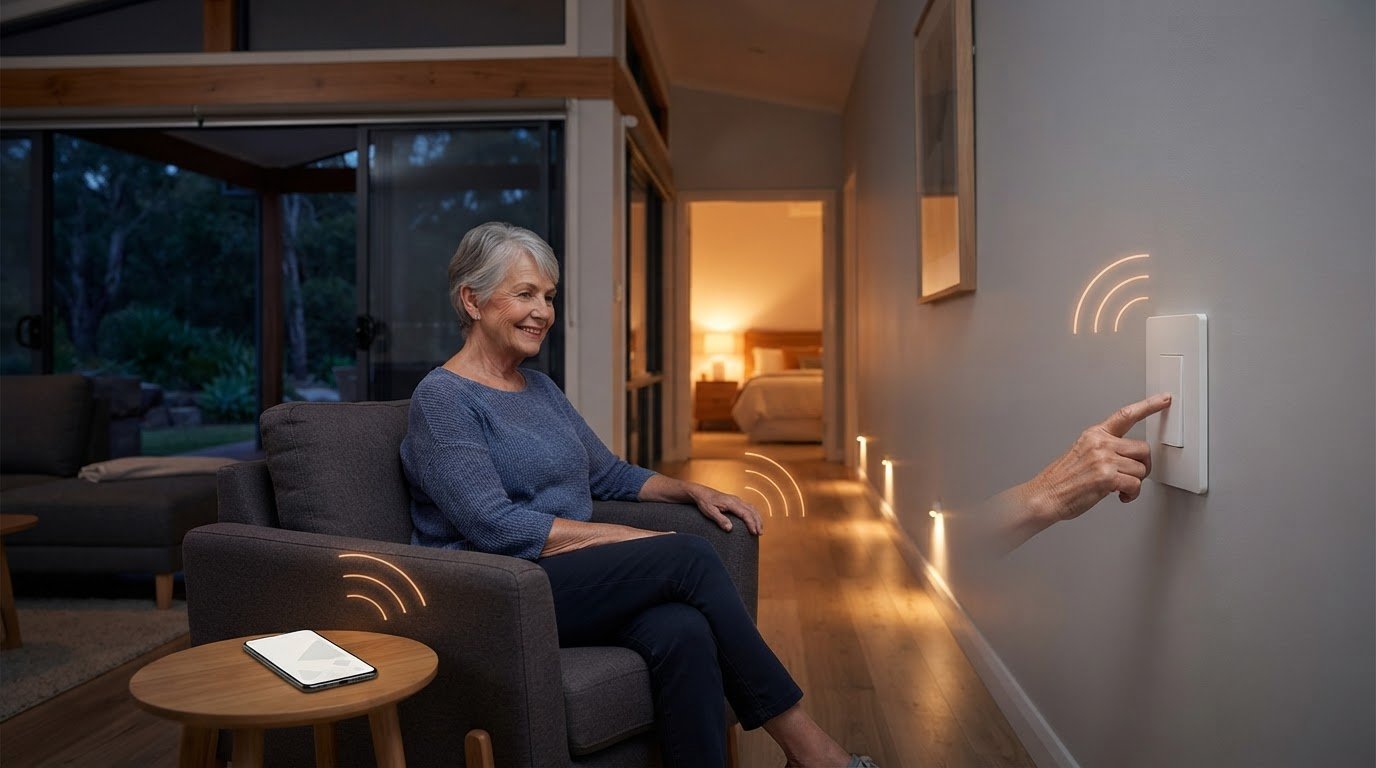
What if making a room easier to use starts with moving the control, not replacing the lights? A switch that’s hard to reach or operate can add effort to familiar routines. The right automated lighting for accessibility starts with the person’s needs and the lighting barriers they want to address, rather than adding technology for its own sake.
Smart-home terms can make the options feel complicated, but accessible control doesn’t have to mean a whole-home system or a phone app. This guide will help you identify lighting barriers in everyday routines, compare control options and decide what may be practical for the person using them.
Control placement, a simple switch and broader automation can each suit different needs. Wireless switching offers another way to operate lighting. Gem Wireless systems work with existing switches and lights and require no rewiring, making them a practical retrofit option to consider. The aim is straightforward: choose controls that make everyday tasks easier without assuming one solution suits everyone.
Key Takeaways
- Note where reaching, identifying or operating a light control makes a daily routine harder.
- Compare wireless switches, voice control, sensors and schedules by effort, reach, predictability and personal preference.
- Choose automated lighting for accessibility around the person’s routines. More automation isn’t always a better fit.
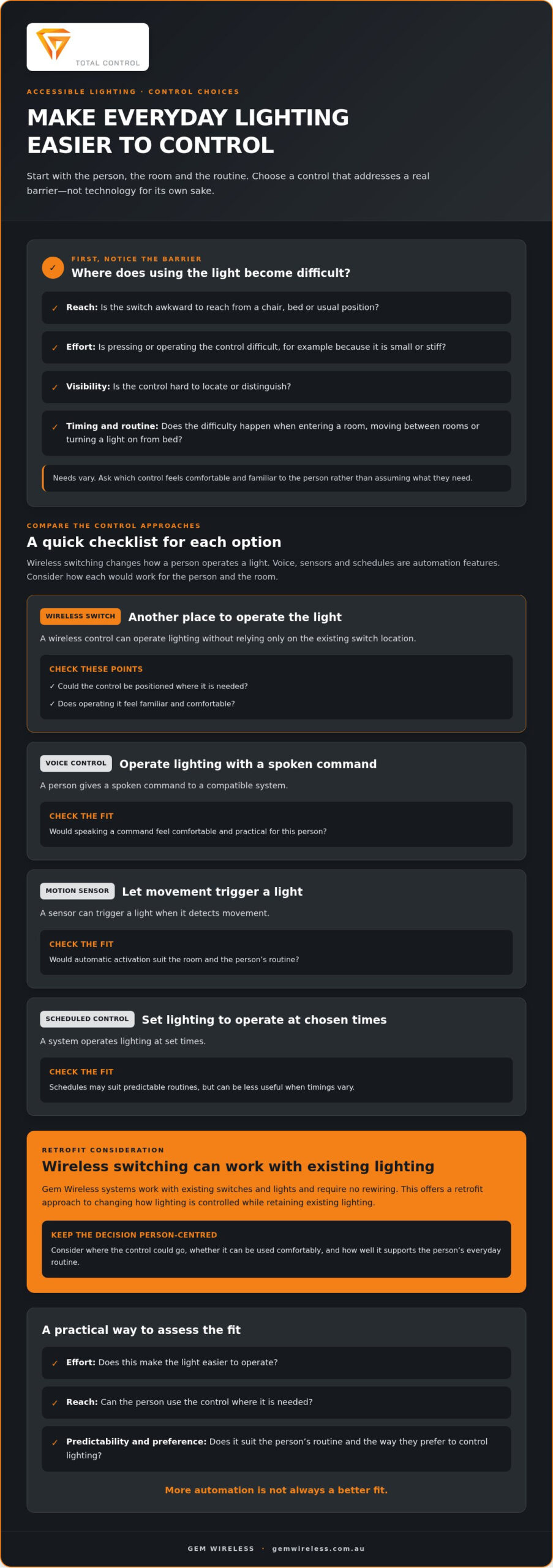
- Plan room by room: observe routines, identify barriers, prioritise spaces, choose controls and review how they work in practice.
- Consider wireless switching as a retrofit approach that retains existing lights and switches without rewiring.
Why automated lighting for accessibility begins with everyday control
A light switch can be a small but persistent obstacle. Reaching it may mean stretching from a chair, crossing a dark room or asking someone else to operate it. Finding the right control or pressing it can also take extra effort. These details matter because lighting is part of everyday routines, not just a technical feature to add to a home.
Accessible lighting control means making light easier for a person to activate, adjust or manage in a way that suits them. That might involve changing where a control sits, using a different type of switch or adding automation. Accessible lighting control is about making light easier to use, not turning the whole home into an automated system.
Needs vary from person to person and can change with the task, room or time of day. Someone may prefer a familiar physical switch, while another person may find a different control easier. The broader Lighting Control Systems overview describes ways systems can manage lighting, including automated control. For accessibility, start with a simpler question: what makes this particular light harder to use?
Which lighting tasks can become difficult?
Think about ordinary transitions. A person entering a room may need to find a switch before they can see clearly. Moving between rooms can involve reaching for controls at several points. Operating a switch from bed may be difficult if it’s across the room, while a control within easier reach may suit the person better.
Different factors can shape the experience. Limited mobility may make distance or reach a barrier; reduced dexterity may make a small or stiff switch harder to operate. A person with low vision may have trouble locating or distinguishing controls, while someone who finds multi-step tasks confusing may prefer a clear, consistent way to turn lights on and off. These are possibilities to consider, not assumptions about what any individual needs.
What does accessible lighting aim to improve?
A useful setup aims to make lighting control more manageable and predictable. The person should be able to use a control where it’s needed and operate it in a way they understand and prefer. This can reduce unnecessary steps in a routine, though the value of a particular change depends on the person and their environment.
Start by noticing where control feels awkward. Is the switch difficult to reach, hard to identify or inconvenient at a particular time? Would the person prefer a physical control within easier reach, or another approach? Consider the room layout, existing lights and the person’s preferences together. A setup that feels simple in one home may not suit another.
- Notice which light controls the person uses most often.
- Identify whether reach, effort, visibility or timing causes difficulty.
- Ask which control feels comfortable and familiar to the person.
- Consider whether the change should support one specific task or several routines.
This needs-first view keeps automated lighting for accessibility practical. The goal isn’t to add the most features. It’s to make everyday lighting easier to manage while preserving the person’s choice over how their home works.
Automated lighting and wireless switches: understand the difference
These terms describe different ways to control a light. Automation triggers or manages lighting for you, while a wireless switch gives the person another way to operate it. They can address different barriers, so compare how each approach works before choosing one.
A wireless switch is a control method. Voice control, motion sensors and scheduled automation are features of some smart-lighting systems. They may require compatible devices, configuration or a particular way of interacting with the system. The table outlines the basic differences. The experience depends on the equipment chosen and the person using it.
| Control option | How it works | Considerations |
|---|---|---|
| Wireless switching | A wireless control operates lighting without relying only on the existing switch location. | Consider where the control could be positioned and whether its operation feels familiar. |
| Voice control | A person gives a spoken command to a compatible system. | Speaking a command may suit some people, but may not be comfortable or practical for everyone. |
| Motion sensors | A sensor can trigger a light when it detects movement. | Think about whether automatic activation suits the room and the person’s routine. |
| Scheduled automation | A system operates lighting at set times. | Schedules may suit predictable routines, but can be less useful when timings vary. |
How do wireless switches support accessible control?
In plain language, wireless switching lets a person operate lighting through a wireless control rather than relying solely on the switch already on the wall. Gem Wireless systems work with existing switches and lights and require no rewiring. This makes wireless switching a retrofit option for changing how lighting is controlled while retaining existing lighting. When planning, consider where a control could be placed and whether the person can use it comfortably.
Placement matters as much as the type of control. Consider where the person needs light during a routine, the route they take and which controls they can comfortably reach. A no-rewire lighting control guide explains the retrofit approach in more detail.
When might automation features be useful?
Voice, motion and scheduled controls can reduce the need to operate a wall switch in some situations. Their usefulness depends on the person’s preference, routine and chosen system. For instance, a schedule may not fit a changeable daily routine, while sensor activation may not suit someone who wants to decide exactly when a light turns on.
These features work differently from wireless switching. Voice commands, sensors and schedules automate when or how lighting responds; a wireless switch provides another way to operate it. Gem Wireless supplies switching hardware for lighting control. If a straightforward alternative control is the priority, explore wireless switching hardware as one option. The best fit is a control the person can use comfortably and predictably.
Compare accessible lighting options against the person’s needs
There’s no single control that suits every person or every room. Compare options against the task they need to support, rather than choosing by how advanced the technology sounds. Weigh the physical effort involved, how easy the control is to reach, how predictable it feels, whether the person wants to use it and what setup it requires.
Match the lighting control to the individual barrier, not to a label or assumption. A familiar, straightforward switch may be a better fit than a more automated system if it solves the problem with fewer steps.
Match the control method to the access need
For reach or dexterity barriers, consider whether a switch-based control could be positioned somewhere more convenient. Wireless switching can provide another way to operate a light, but its practical value depends on where the control can be placed and whether the person can use it comfortably.
Voice control may suit someone who prefers hands-free operation and is comfortable speaking commands to a compatible system. Sensor-triggered lighting may be worth considering where a person wants a light to respond to movement between spaces. Neither option is automatically easier. The person may prefer to activate the light themselves or may not want the system to respond to every movement.
Weigh simplicity, reliability and preference
Look beyond the initial setup. Can the person understand and use the control without help? Does it behave in a way they can anticipate? If a system depends on connectivity, consider what the person can do if that connection is unavailable. A fallback is useful only if it’s reachable and workable for them, not simply present in the room.
Try the preferred option in the routine it’s meant to support. The person who uses the lighting should guide the choice and decide whether it feels comfortable. Household members can help assess practical details, but shouldn’t automatically take over control. The aim is to provide an option that fits the user’s preference, including the choice to keep familiar controls where they work well.
- Effort: How many actions does the control require, and are they manageable?
- Reach: Can the person get to the control from where they need to operate the light?
- Predictability: Does the light respond in a way the person expects?
- Preference: Does the person want a physical switch, hands-free operation or another approach?
- Setup: What equipment or configuration does the selected control need?
Try the simplest option that addresses the specific barrier, then review how it works in practice. A setup can combine approaches if different rooms or tasks call for different controls. If you’re considering a switch-based option, Gem Wireless wireless switching hardware works with existing switches and lights without rewiring.
This is the practical test for automated lighting for accessibility: choose a control the person can operate, understand and rely on for the routine it’s meant to support.
Plan an accessible lighting setup room by room
A room-by-room plan turns a general idea into clear, practical decisions. Start with the person who uses the lighting. Ask what feels awkward, which control they prefer and what they’d like to change. Their experience should guide the plan, including any trial of a new control before it becomes part of a daily routine.
Start with routines and control points
Map the lights used during an ordinary day, from entering the home to settling into bed. Note where each control is, how it’s operated and whether the person can reach and use it comfortably. Include their preferred method, such as a physical switch or a hands-free option. Focus first on barriers that happen regularly rather than changing every light at once.
- Observe routines. Follow the person’s usual path through the home and note when they use each light.
- Identify barriers. Record controls that are hard to reach, find, press or use at the right time.
- Prioritise rooms. Start with spaces where a control issue has the clearest effect on a regular task.
- Select controls. Compare suitable options with the person, considering preferred operation and the room’s layout.
- Review use. Try the planned control in the relevant routine, then adjust if it feels confusing or inconvenient.
Use each room as a prompt, not a prescription. In a bedroom, ask whether the person can operate the light from the places they use at night; a wireless bedroom light switch is one option to explore. In a hallway, consider where light is needed along the route and which control point feels workable. At an entrance, look at whether the person can operate the light as they arrive. In a bathroom, consider the approach to the room and the person’s preferred way to control its lighting. The right choice depends on the individual and setting.
Build in safe, practical operation
Lighting should support clear movement and familiar routines. Consider whether the person can tell which control operates which light, whether the control is reachable from where it’s needed and whether its operation is consistent. Keep the plan focused on how the person uses the space, rather than adding features that create extra steps or change an established routine without a clear reason.
For work involving mains wiring or electrical alterations, use a licensed electrician. Don’t make compliance claims based on assumptions: applicable Australian requirements depend on the work and should be checked against reliable, current guidance.
Once the person’s priorities are clear, compare Gem Wireless switching options as one way to consider wireless control within a room-by-room plan. A considered setup doesn’t need to change the whole home. It can begin with one clearly identified barrier, then develop as the person reviews what works for them.
How Gem Wireless supports accessible lighting retrofits
Once the person’s access needs, preferred control and room priorities are clear, consider whether wireless switching could suit the existing lighting. Gem Wireless supplies wireless switching systems that work with existing switches and lights and require no rewiring. This provides a retrofit approach for changing how lighting is controlled while retaining the existing lights and switches.
A no-rewire option for changing how lights are controlled
Wireless switching is hardware for operating lighting, not a complete smart-home automation system. Its role is to provide another way to control a light. Whether that helps depends on the person’s needs, the room and the control arrangement they find comfortable. Voice commands, sensors, schedules and app controls are separate automation functions.
Gem Wireless offers switch module kits, mains-powered switches, long-range switches and switching modules. Compare these product categories with the planned lighting setup. Consider what the person needs to operate, how they prefer to use a control and how the existing switches and lights fit into the plan.
The no-rewire aspect is relevant when reviewing a home that already has working lights and switches. Wireless switching hardware can be considered as part of a retrofit without rewiring. That keeps the discussion focused on changing the control approach, rather than assuming the whole lighting setup needs replacing. The person’s preferences and the details of the existing setup should guide the choice.
Choose a practical next step
Before exploring hardware, bring the planning decisions together. Be clear about the access need, the control method the person prefers, the room where it matters and the existing lighting arrangement. These details keep the choice grounded in a real routine, instead of adding features that don’t address the barrier.
If you’re considering a switching module as part of a retrofit, the wireless switching module information can help you understand this hardware category. Compare it with the person’s priorities and the lighting already in place. Keep the person involved as you narrow down options; their experience is the clearest guide to whether a control feels usable.
For automated lighting for accessibility, the aim isn’t to automate every light. It’s to find a practical control approach that reflects how the person uses a room and what they want to change. A considered retrofit can begin with one lighting barrier and a clear preference, then build from there if needed.
Explore Gem Wireless switching solutions to review switching hardware for your lighting setup.
Make your next lighting change a practical one
The best next step doesn’t have to be a whole-home project. Choose one routine the person would like to make easier, then use their feedback to decide whether a different control could help. That keeps automated lighting for accessibility grounded in their preferences, not assumptions about which technology they should use.
If a wireless switch seems worth exploring, Gem Wireless systems work with existing switches and lights and require no rewiring. Products are available direct and through stockists across Australia, giving you a practical starting point for considering switching hardware within the person’s needs and existing setup.
Explore Gem Wireless switching solutions and consider which option could suit the routine you’ve identified. Start with the person’s priorities and review the available switching hardware.
Frequently Asked Questions
Is automated lighting covered by the NDIS?
It may be, but automated lighting for accessibility isn’t automatically funded for every participant. Funding depends on the person’s individual circumstances, support needs and current plan arrangements. Before choosing equipment, describe the specific lighting barrier and how a proposed control relates to the participant’s needs. Discuss it with their NDIS contact or support coordinator and check current NDIS guidance before making a purchase, as funding decisions and eligibility depend on the participant’s situation.
Can accessible lighting be installed in a rental home?
Yes, but the approach should suit the tenancy and any changes the property needs. Ask the landlord or property manager for written permission before altering a fixed switch or electrical fitting. A no-rewire option may still involve hardware changes, so don’t assume it’s automatically permitted. Renters can first list the access problem and preferred control, then discuss practical options that avoid permanent changes where possible.
What happens to automated lights if the Wi-Fi stops working?
It depends on how the chosen system communicates. Features that rely on Wi-Fi or an internet connection may become unavailable, while other control functions may continue. Check what the system does offline before relying on it for a daily routine. In particular, identify whether the person can still operate the light using a physical control, and make sure that option is accessible to them.
Can smart bulbs work with a wireless light switch?
Sometimes, but compatibility depends on the bulb and switch design. Many smart bulbs need a continuous power supply to remain available to their control system. If a switch cuts power to the bulb, app or smart features may stop working until power returns. Check the product specifications for the exact combination before pairing them, and consider whether a conventional bulb would better suit a simple switching setup.
Does lighting-control installation require a licensed electrician in Australia?
If the work involves mains wiring or changes to fixed electrical fittings, use a licensed electrician. The exact requirements can vary between Australian states and territories, so don’t treat a wireless control as permission to work on fixed wiring yourself. A control that doesn’t require rewiring may still need to interact with existing electrical equipment. Keep the distinction clear between choosing a control and carrying out electrical work.
What happens to automated lighting during a power outage?
Mains-powered lights generally won’t operate while the home has no power. Battery-powered controls may remain on, but that doesn’t mean they can switch a light without power to the light itself. What happens after electricity returns depends on the equipment and its settings. If lighting is needed for a particular routine, plan a suitable alternative and check the system’s guidance for its behaviour during and after an outage.
accessibilityautomated lightingdisability supporthome automationindependent livingretrofit lightingsmart homewireless switches