- Empty cart.
- Continue Shopping
Wireless Remote for Dust Collectors: Australian Guide
- Posted on
 Strong Digital
- 0
- Categories: Uncategorized
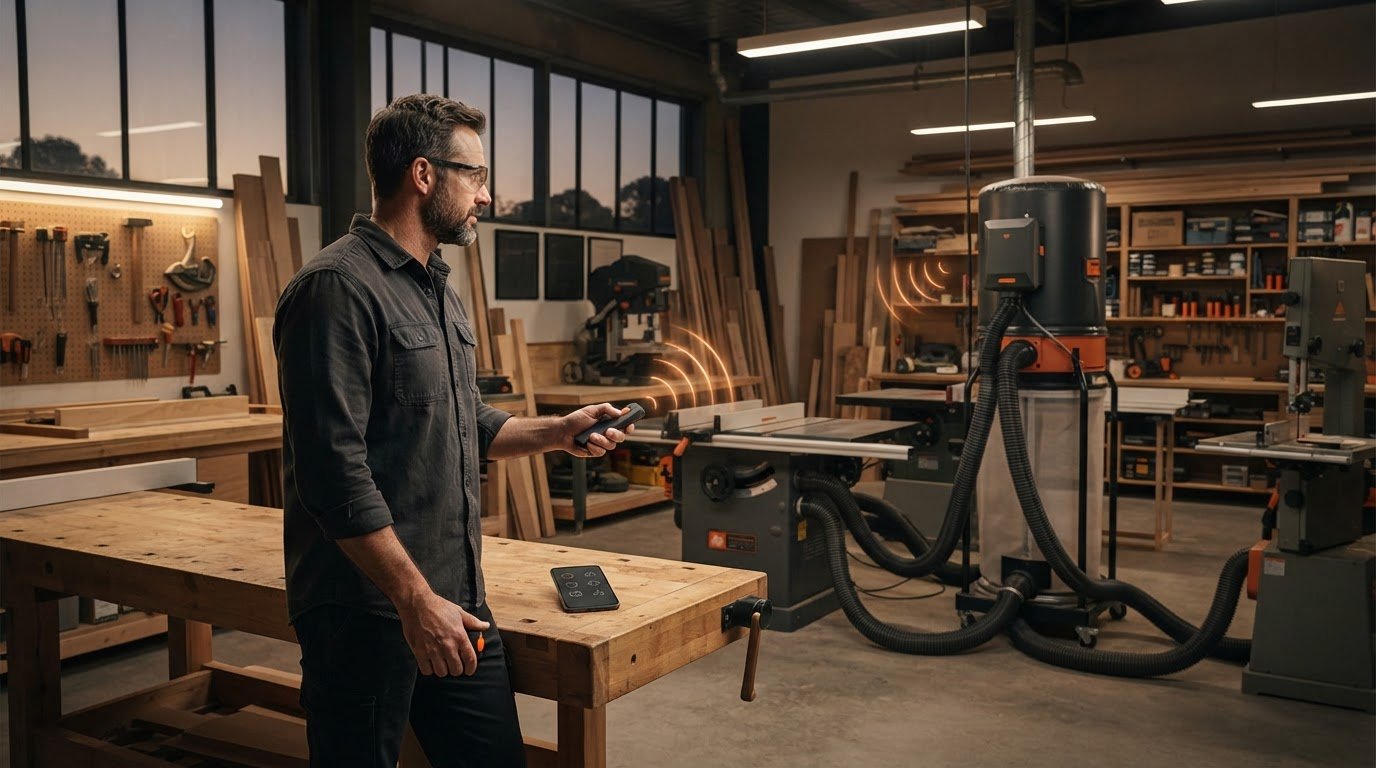
What if you could start or stop your dust collector without leaving the machine you’re using? A wireless remote switch for dust collector control can make that simple, but the right setup depends on how your extractor is switched.
Walking across the workshop to operate extraction can interrupt your workflow. Remote switching puts control within reach, but it’s different from automatic dust control: a remote responds when you operate it, while an automatic system may switch extraction in response to a connected tool.
This guide explains how remote switching works and what to consider before choosing a setup. You’ll learn which details of your extractor matter, including its switching arrangement, and why voltage, plug compatibility and workshop layout deserve attention. Gem Wireless offers switching modules, mains-powered switches, long-range switches and switch module kits for wireless control. Use the information here to identify a practical next step and make a decision based on your workshop and equipment.
Key Takeaways
- Compare local manual, wireless remote and automatic tool-triggered switching to find the control method that best suits your workflow.
- Understand how a wireless remote switch for dust collector control sends a command through a receiver to operate the switching equipment.
- Use your extractor’s documentation to identify its model and control arrangement. Record the relevant electrical details rather than guessing from appearance.
- Consider the switching hardware and dust collector motor as separate parts of the control setup.
- Explore switching modules, mains-powered switches, long-range switches and switch module kits as categories of wireless workshop control hardware.
Why use a wireless remote switch for a dust collector?
A wireless remote switch lets you control equipment without walking back to its local switch. In a workshop, that can make dust extraction easier to operate as you move between a workbench, a machine and the collector. The practical benefit is less interruption when you need to change the equipment’s state, with a control point that better suits the way you work.
Imagine preparing a piece at the bench, moving to a saw, then returning to check the cut. If the collector’s switch is across the room, each change takes you away from the task. A reachable remote can make starting or stopping extraction more convenient. Choose its position with your layout in mind, including where you stand while operating machinery and where the collector is located.
It helps to distinguish control from collection. A remote switch sends a command to switching equipment; it doesn’t move air, capture dust or filter it. Those jobs belong to the dust collector and its connected extraction setup. For background on the equipment itself, see Dust collector.
When does remote control improve a workshop workflow?
Remote control can suit a routine that involves moving between stations or operating a collector that isn’t beside the machine. You still decide when to switch it on or off, but can do so from a more convenient position. Automatic operation is different: a separate control approach triggers extraction in response to another piece of equipment. Convenience alone doesn’t make a setup automatic.
What does a wireless remote switch do?
The control path has two basic parts: a transmitter and a receiver. You operate the transmitter, which sends a wireless signal. The receiver is the switching component that responds by changing the connected equipment’s switching state, as supported by the chosen arrangement.
Remote switching changes equipment’s switching state using a wireless control, instead of requiring you to operate its local switch directly. The remote is not the dust collector motor, and it doesn’t determine how well the collector captures dust.
Before choosing a wireless remote switch for dust collector control, consider how your extractor is operated now. Suitability depends on the extractor, its existing controls and the switching arrangement used with it. Check the equipment documentation and control details before selecting a solution.
- Think about your routine: Where do you need to start or stop extraction during a typical task?
- Locate the control point: Would a remote be within reach from your usual working position?
- Keep the distinction clear: A remote gives you control. Automatic tool-triggered operation uses a different control approach.
This assessment gives you a useful starting point. Map your workflow, then match the control method to the extractor’s existing arrangement. That keeps the decision grounded in your workshop rather than assuming every remote switching setup works with every collector.
How a wireless dust collector switch communicates and controls equipment
A wireless control setup follows a simple path: you operate a transmitter, it sends a wireless signal, and a receiver responds by changing the state of the connected switching equipment. That switching action controls the extractor through an arrangement designed for the equipment. The transmitter is the user control; the receiver is the switching component. Neither does the job of the dust collector motor.
Keeping those parts distinct makes the setup easier to understand. The motor moves air through the extraction system. Wireless switching equipment provides a way to control the motor’s operation through the extractor’s existing controls or an appropriate switching arrangement. A wireless remote switch for dust collector control must suit that arrangement; the word “wireless” alone doesn’t establish compatibility.
Signal performance depends on the setup and workshop environment. The distance between transmitter and receiver, their positions and obstacles in the space can all matter. Don’t assume a signal will behave identically in every shed or workshop, or rely on a range figure without checking the details for the particular equipment. When planning the layout, consider where the receiver would sit and where you’d use the transmitter.
Remote switching versus automatic dust extraction
Remote switching is user-initiated: you press a control to send a command. Automatic dust control works differently. A separate control approach detects or responds to a tool’s operation, then triggers extraction according to its design. It isn’t simply a remote that acts on its own.
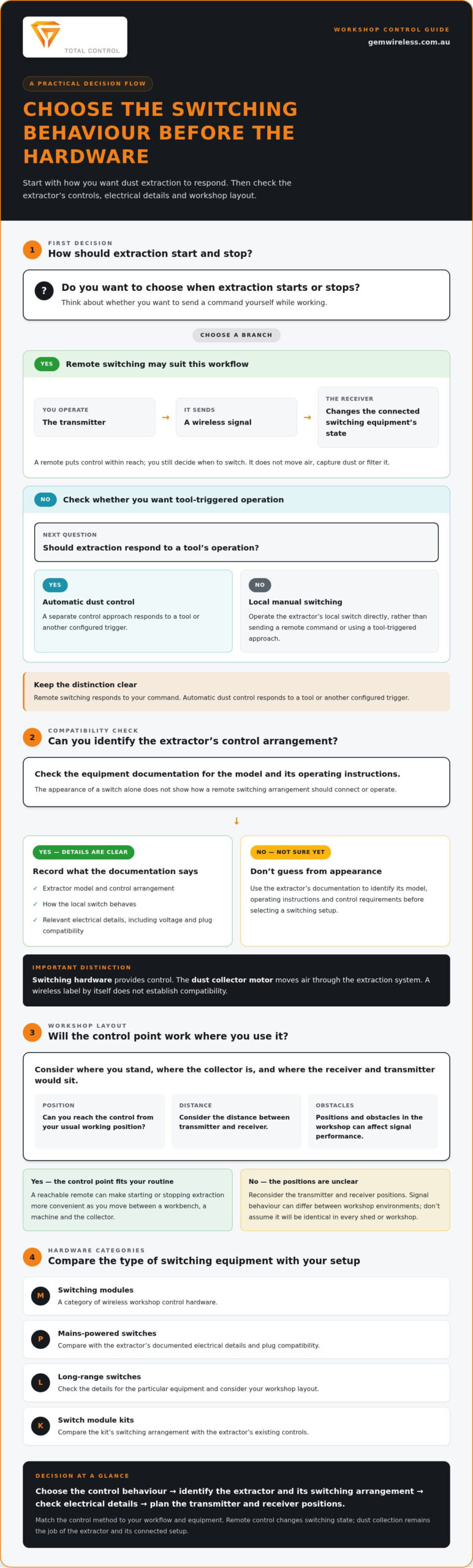
Remote switching responds to a person’s command; automatic dust control responds to a tool or another configured trigger. Decide which behaviour you want before comparing equipment. If you prefer to choose when extraction starts and stops, remote control may suit the task. If you want extraction to respond to tool use, you’re considering an automatic approach instead.
Why the existing extractor controls matter
The receiver has to work within the extractor’s control arrangement, so start by checking what is already fitted. Read the manual for the model and its operating instructions. Note how the local switch behaves and whether the documentation describes control requirements. A switch’s appearance alone doesn’t show how a remote switching arrangement should connect or operate.
You may also encounter the term No Voltage Reset (NVR) in dust extraction discussions. It refers to a type of control arrangement associated with how equipment behaves when power is interrupted and restored. Treat “NVR” as a prompt to consult the extractor documentation, not proof that a particular remote system will suit it. Compatibility depends on the equipment and switching design.
Remote control should make operation more convenient without bypassing safe machine use. OSHA’s Machine Guarding Standard is a US reference, not Australian guidance. Use relevant Australian requirements and equipment instructions for your workshop. For a practical next step, explore Gem Wireless switching hardware and compare its arrangement with your extractor documentation.
Compare remote switching options for your dust collector
There’s no single control method that suits every workshop. Choose the one that matches your extractor’s controls and the way you move through a job. Compare how much input each option needs from you, where it fits your workflow and what the setup depends on.
| Control method | User involvement | Workflow fit | Setup considerations | Equipment dependence |
|---|---|---|---|---|
| Local manual switching | You operate the extractor’s local switch each time. | Works well when the switch is easy to reach as you work. | Uses the existing local control, subject to the extractor’s instructions. | Depends on the extractor’s own switch and controls. |
| Wireless remote switching | You press a remote control to change the switching state. | Useful when you want user-operated control from another position. | Consider the switching arrangement, remote location, distance and obstacles. | Depends on the extractor controls and the selected switching equipment working together. |
| Automatic tool-triggered control | Extraction responds to a tool or configured trigger rather than each remote button press. | May suit a workflow where you want extraction to follow tool operation. | Requires a suitable automatic control approach and an arrangement designed for the equipment. | Depends on the tools, extractor and trigger system involved. |
Which control method suits your workshop routine?
If the local switch is close to your working position, manual control may be straightforward. If you regularly operate the extractor from elsewhere in the workshop, a wireless remote switch for dust collector control can provide a user-operated alternative. Choose automatic control if you want extraction triggered by tool use. It’s a separate approach, not simply a remote switch with a different label.
What should you compare before choosing?
Start with the extractor’s documentation and control arrangement. Then map the intended sequence: what starts extraction, who operates the control, and when should the collector stop? For remote control, consider where you’d place and use the controls, the distance between them and possible obstructions. These factors help you plan the setup, but don’t guarantee a particular signal range or compatibility.
For broader context on how switching modules can be used in retrofit control, explore the wireless switching modules guide. It can help clarify the role of a module. Your extractor’s own documentation remains central when assessing a particular arrangement.
Workshop dust can also raise safety questions, including combustible dust. The NFPA 660 Combustible Dust Standard is a US reference, not a substitute for applicable Australian guidance or equipment instructions. Make safety part of your comparison, not an afterthought.
Check compatibility and safety before installing a remote switch
Before choosing a wireless remote switch for dust collector setup, gather information about your extractor and how it is controlled. This gives you a clearer basis for assessing the switching arrangement and helps avoid assumptions based on a plug, switch or casing that only looks familiar.
What details should you gather about the dust collector?
Start with the manufacturer’s information and operating instructions. Record the model and note how the collector starts and stops, including what the existing switch does. Use the equipment documentation for electrical details, such as the stated supply information and any listed ratings. Don’t estimate these from appearance or apply details from a different model.
Use this checklist to organise the information:
- Identify the extractor. Write down its manufacturer and model from the equipment label or documentation.
- Read the instructions. Look for the specified operating method, control requirements and safety warnings.
- Inspect the existing control arrangement. Note the local switch and any control terms described in the manual, including a No Voltage Reset (NVR) arrangement if mentioned.
- Record documented electrical details. Use the label and manual, not visual guesses. Keep the information available for an electrician’s assessment.
- Describe the intended operation. Explain whether you want to start and stop the collector manually from another position or use a different control approach.
Keep built-in protection and manufacturer instructions intact. Don’t bypass a safety feature or alter the extractor’s controls based on guesswork. A note in the manual about an NVR switch is useful context, but it doesn’t by itself show that a particular remote arrangement is suitable.
When should a licensed electrician be involved?
Involve a licensed electrician to assess mains-connected switching, the proposed arrangement and the applicable electrical requirements in your state or territory. The assessment should be based on the extractor’s documented details and the switching equipment being considered. Avoid opening, modifying or wiring mains-connected equipment yourself. Using a remote control doesn’t remove the need to assess the electrical side of the setup.
Use equipment documentation and an electrical assessment to guide safe switching decisions, rather than assumptions about how a control looks. This keeps the decision focused on the actual extractor, its intended operation and the requirements that apply to the work.
Once you’ve gathered the details, compare them with the type of wireless switching hardware you’re considering. Gem Wireless offers switching modules, mains-powered switches, long-range switches and switch module kits as wireless control options. Explore Gem Wireless switching hardware as you plan the next step for your workshop.
Explore Gem Wireless switching hardware for workshop control
Once you’ve identified how your extractor is controlled and what type of operation you want, consider wireless switching hardware as a workshop control option. Gem Wireless supplies switching modules, mains-powered switches, long-range switches and switch module kits. These are hardware categories to consider alongside your equipment’s control arrangement.
Think about the control job each category needs to do. A module is a switching component within a broader arrangement. A mains-powered switch or long-range switch is another category to consider. The category name alone doesn’t establish electrical suitability, compatibility or performance. Use the equipment details and intended use to assess the switching hardware.
Choose hardware around the control job
Start with the extractor’s model and documented controls. Then define where you need to operate it from and whether you want manual remote control or another method. Consider the distance and likely obstacles between the control and switching equipment. For more context on workshop distance and signal considerations, see the long-range wireless switching guide.
Keep these practical points in mind as you compare options:
- Equipment: Use the extractor’s documentation to understand its existing switching arrangement.
- Control task: Decide whether you want to operate extraction yourself from another position.
- Workshop layout: Note where you’d use the control and what sits between it and the switching equipment.
- Electrical assessment: Have mains-connected switching assessed by a licensed electrician against the equipment details and applicable requirements.
This process keeps the decision focused on your workshop rather than a general product label. A wireless remote switch for dust collector control is useful when the switching arrangement suits the extractor and the way you intend to operate it.
Take the next step with Gem Wireless
Follow a clear sequence: understand the extractor, choose the control method that fits your working routine, then address electrical safety before any mains-connected work. With that groundwork in place, you can explore wireless switching hardware with a clearer sense of the role it needs to play. Gem Wireless offers modules and switch categories for wireless control.
Ready to explore the available hardware categories? Explore Gem Wireless switching solutions and plan a control setup around your equipment and workshop.
Make your next workshop control decision
Turn the idea into a practical next step: write down how you want to operate extraction during a typical task, then use your extractor’s documentation to guide the decision. That gives you a clearer basis for considering a wireless remote switch for dust collector control without assuming every switching arrangement suits every machine.
Gem Wireless wireless switching hardware and kits are available through direct sales, with retail stockists across Australia and New Zealand. Explore the options and keep your equipment details in view as you consider what may suit your workshop.
Explore Gem Wireless switching solutions and take the next step towards a more convenient way to control workshop equipment. A well-matched setup starts with understanding your needs, and you’re now better placed to make that choice with confidence.
Frequently Asked Questions
Can a wireless remote switch work with any dust collector?
No. A wireless remote switch for dust collector control needs to suit the extractor’s control arrangement, so it isn’t a universal fit. For example, a collector with a particular start-stop control may need a different switching approach from one with another arrangement. Check the model’s instructions and equipment details before choosing hardware. Don’t infer suitability from a matching-looking plug, switch or product category.
Does a wireless remote switch automatically start the dust collector when a tool turns on?
No, not by itself. A remote switch responds to a person’s command, such as pressing a button. Tool-triggered extraction uses a separate automatic control approach that detects or responds to tool operation. If you want extraction to start when you switch on a saw, choose a system designed for that sequence rather than assuming a remote control will do it.
Can multiple remotes control one dust collector?
Possibly, but only if the particular switching system supports multiple transmitters and they’re set up to operate with its receiver. Don’t assume two remotes will work together simply because they look similar or use the same type of control. Check the equipment instructions for pairing or configuration details. If several people use the workshop, include who needs control and where they’ll operate it in your setup planning.
What happens if a wireless signal is interrupted while switching equipment?
The result depends on the switching equipment and how it handles a missed or interrupted signal. Don’t assume the collector will switch on, switch off or remain in a particular state. Check the instructions for the system’s behaviour and identify how to operate the extractor locally if needed. For a critical task, don’t rely on a remote command unless you can confirm the equipment has responded.
Will a wireless remote switch reduce workshop dust on its own?
No. A remote changes how you control equipment; it doesn’t capture, extract or filter dust. Dust control still depends on the collector, ducting or hose, and how extraction is used with the tool. For instance, switching the collector on remotely won’t help if the extraction hose isn’t connected to the machine producing dust. Treat remote switching as a control convenience, not a dust-management solution.
Do I need an electrician to install a wireless remote switch for a dust collector?
If the proposed setup involves mains-connected switching, have a licensed electrician assess the work and applicable requirements in your state or territory. Don’t open or modify mains-connected equipment yourself. Before the assessment, gather the extractor’s model details and instructions, along with information about its existing controls. This gives the electrician useful context to assess the switching arrangement and work involved.
dust collectorsdust extractionremote switchingwireless controlwoodworking toolsworkshop automationworkshop safety