- Empty cart.
- Continue Shopping
Automated Lighting for Strata Buildings: Practical Guide
- Posted on
 Strong Digital
- 0
- Categories: Uncategorized
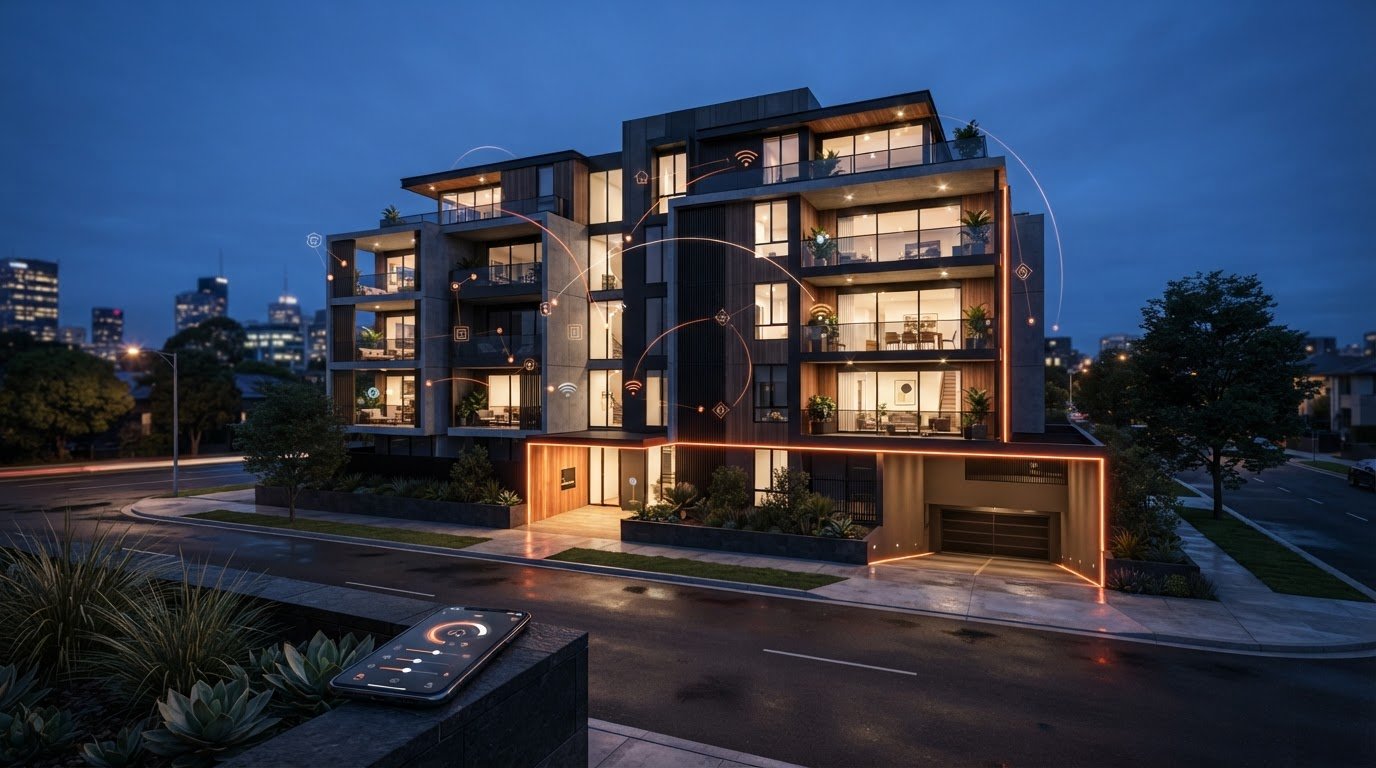
What if modernising shared lighting didn’t mean opening walls or replacing every fitting? Automated lighting for strata buildings can start with a simpler question: can wireless switching suit the building’s existing lights and switches? Gem Wireless wireless switching hardware is designed to add control without rewiring in compatible installations.
It’s understandable to worry that an upgrade could disrupt residents, complicate shared-space lighting or create expectations the system can’t meet. Start with the building’s actual needs, whether that means clearer control of corridors, garages or other common areas, then assess the existing setup.
This guide explains the main lighting control considerations for strata, what to plan before proposing an upgrade, and how wireless switching can offer a lower-disruption retrofit option in suitable installations. You’ll also see why compatibility matters, how to balance convenience with energy use and resident expectations, and where switch module kits, mains-powered switches, long-range switches and switching modules fit. That way, your next discussion can focus on practical choices, not assumptions about a major rewiring project.
Key Takeaways
- Match the lighting control approach to the shared-space problem, rather than assuming every area needs the same upgrade.
- Understand how automated lighting for strata buildings differs across manual switches, sensor controls, central systems and wireless switching.
- Wireless switching hardware is designed to work with existing switches and lights without rewiring in compatible installations.
- Use a clear planning process to map current controls, define resident and staff needs, and assess the existing setup.
- See where switch module kits, mains-powered switches, long-range switches and switching modules fit a strata retrofit.
What automated lighting for strata buildings can, and cannot, do
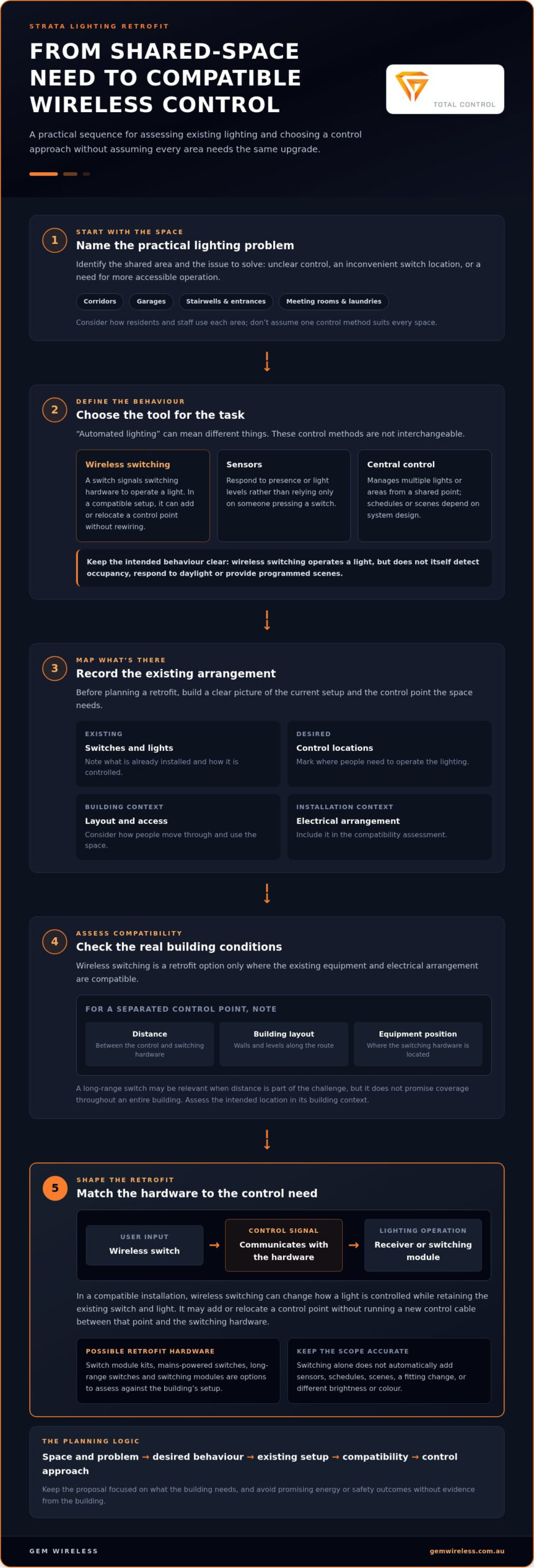
“Automated lighting” covers different ways to control when lights turn on, how they operate and who can adjust them. It could mean a straightforward switch, a sensor that responds to movement or daylight, or a central system that runs programmed schedules or scenes. Each approach addresses different needs, so first define what control a shared space requires.
Wireless switching changes how a light is switched; it doesn’t detect whether someone is in the room. A wireless switch communicates with switching hardware that controls the connected lighting. In a compatible installation, it can add a control point without rewiring. Occupancy detection, daylight response and programmed scenes are separate functions that require their own compatible equipment and system design.
This distinction matters when assessing lighting control systems. The term covers different control methods and components, but not every system includes sensors, schedules or central management. Wireless switching can be a focused control option rather than a complete building automation system.
Which strata spaces may benefit from improved lighting control?
Start by considering how people use each area. A corridor may need simple, familiar switching that residents and cleaning staff can operate easily. Stairwells and entrances have changing patterns of use, so consider where controls are placed and whether people can reach them naturally as they move through the building. The right arrangement depends on the layout and existing lighting.
Shared facilities have different rhythms. A meeting room or communal laundry may be used intermittently, making clear, accessible controls useful for residents and staff. Lights may also be difficult to reach, or switches may not be where users expect them. Identify the practical issue first. Don’t assume a sensor or schedule is automatically the better answer, and don’t promise a particular energy or safety outcome without evidence from the building.
Wireless switching, sensors and central control are different tools
Choose the control method based on the task, not the label “automated”. Each option offers a different balance of user control, responsiveness and operating complexity.
- Wireless switching: A switch communicates with switching hardware to operate a light. In a compatible setup, it can add or relocate a control point without rewiring.
- Sensors: Devices respond to presence or light levels, rather than relying only on someone pressing a switch. Their suitability depends on the space and equipment.
- Central control: A system manages multiple lights or areas from a shared point and may support schedules or scenes, depending on its design.
These tools aren’t interchangeable. A corridor where residents want a clearly located switch has a different need from a room where lights should respond to occupancy. Combining switching with sensors or central control requires equipment and system design that support that arrangement. Define the desired behaviour before choosing a control approach. This keeps the proposal focused on what the building needs, and what it doesn’t.
How wireless switching can support a strata lighting retrofit
A lighting upgrade doesn’t always need to start with new fittings. In a compatible existing setup, wireless switching hardware can change how a light is controlled while retaining the existing switch and light. It’s a practical retrofit option when the issue is the location or convenience of switching, rather than the fitting itself.
A basic setup uses a wireless switch to send a control signal to a receiver or switching module, which operates the connected light. The switch provides the user’s input; the module handles the switching. Gem Wireless hardware is designed to work with existing switches and lights without rewiring. Suitability depends on the building’s equipment and electrical arrangement.
What a wireless switching setup changes
The key change is the control point. Wireless control can add or relocate a switching point without running a new control cable between it and the switching hardware. For example, a control might be needed closer to a common-area entrance. This changes how users operate the light, not necessarily the fitting, brightness or colour.
Keep the distinction clear in the proposal. Switching hardware operates lighting; it doesn’t automatically add sensors, schedules or programmed scenes. For an overview of how these components fit together, see this guide to wireless switching modules. Before planning a retrofit, map the existing switches and lights, the desired control locations and the electrical arrangement. Compatibility is specific to the setup.
Where long-range control may be relevant
Distance matters when a control point is separated from the light or switching hardware. Building layout matters too: walls, levels and equipment position can affect whether a wireless arrangement suits the intended location. A long-range switch is relevant when greater distance is part of the control challenge, but it doesn’t promise coverage throughout an entire building.
Note where the control needs to be used and what lies between that point and the switching hardware. This gives the compatibility assessment a real building context, rather than relying on a general assumption about range. The long-range wireless switching guide explores this product category in more detail.
For strata committees, the useful question is whether the proposed control arrangement solves a specific operating problem and fits the existing installation. Wireless switching can support automated lighting for strata buildings as a focused retrofit control option, but it isn’t a substitute for checking equipment compatibility or planning a complete lighting redesign. Gem Wireless offers switch module kits, mains-powered switches, long-range switches and switching modules. Explore the wireless switching hardware range to compare the available categories.
Compare strata lighting control options before recommending an upgrade
There’s no single control method that suits every shared area. A corridor used throughout the day has different needs from a meeting room that residents switch on only when they book it. Compare options against how the space is used, the existing installation and how simple the controls need to be for residents and building staff.
This table is a planning aid, not a compatibility guarantee or a savings calculation. Retrofit impact depends on the building’s equipment and electrical arrangement.
| Option | Control method | Likely use case | Retrofit impact | Operational complexity |
|---|---|---|---|---|
| Manual switching | A person operates a local switch. | Spaces where users expect direct control, such as shared facilities. | May retain the existing arrangement; changes depend on the current setup. | Generally straightforward for users, but someone must operate the switch. |
| Sensor control | A sensor responds to presence or light levels. | Areas with passing users or changing daylight, if that response suits the space. | Requires compatible sensor equipment and a suitable system design. | Operation is more automatic, so settings and behaviour need to suit users. |
| Central systems | Lighting is managed through a shared control point, with functions shaped by the system. | Buildings seeking coordinated control across areas. | May involve changes to control infrastructure; scope varies by system. | Can require more planning and familiarity for ongoing operation. |
| Wireless switching | A wireless switch operates lighting through switching hardware. | Spaces where a different or additional switching point would be useful. | Designed for existing switches and lights without rewiring, subject to compatibility. | Provides switch-based control; day-to-day use depends on the chosen arrangement. |
Match the control approach to how each shared space is used
For frequent pass-through areas, consider whether users need to press a switch each time or whether a sensor response better fits the space. In a room used for meetings or shared activities, residents may prefer direct control and a clearly accessible switch. Operating hours, natural light and the location of preferred controls all affect the decision. Don’t assume one method will suit every common area.
Assess retrofit impact and day-to-day operation
Compare what each option changes: the light fitting, the switching arrangement or the wider control infrastructure. Then consider who will use and manage it. Will residents understand how to operate the controls? Can building staff manage the system’s day-to-day requirements? Include compatibility, maintenance and access to controls in the project discussion, rather than treating them as afterthoughts.
For broader commercial context, the commercial wireless lighting retrofit guide explores wireless control in retrofit settings. Use that perspective alongside a building-specific review to identify which approach fits each area. A well-planned proposal for automated lighting for strata buildings should explain both the control method and its practical effect on everyday use.
Plan a strata lighting upgrade in clear, manageable steps
A clear plan helps a strata committee move from a general complaint to a defined lighting brief. It also separates what residents need from what the existing installation can support. Work through these steps before selecting hardware or scheduling work.
- Document the issue. Record the space, what users experience and when the problem occurs. For example, note whether a shared room’s switch is inconveniently located or whether users are unsure which switch operates its lights.
- Map the controls. List the affected areas, fittings, switches and existing control behaviours. Mark where controls are now and where residents or building staff need access. Include operating patterns, such as regular cleaning or occasional room bookings.
- Define the outcome. Be specific about what should change: a more accessible switching point, a simpler arrangement for a shared facility, or another clearly stated need. Consider resident preferences and staff routines so the proposed controls make sense in daily use.
- Assess compatibility and scope. Compare the proposed control hardware with the existing equipment and electrical arrangement. Record technical or safety questions for qualified electrical assessment before settling the project scope.
Document the building’s current lighting and control arrangement
Build a simple inventory for each affected area: its fittings, switches, current control method and relevant operating behaviour. Add brief notes about recurring frustrations and when they happen, such as a control being hard to reach during routine use. Keep observations separate from assumptions about the cause. Questions about wiring, equipment condition or safety need qualified electrical assessment, not guesswork from a walk-through.
Scope the upgrade, approvals and installation responsibilities
Once the need is clear, identify the common-property areas affected and describe the intended result. Map the decision points for the committee, owners and building management, including who needs to review the proposal and how approval is handled. Strata arrangements differ, so verify the building’s approval procedures and applicable Australian requirements before work begins. Don’t assume one approval pathway applies to every building or project.
Keep hardware selection distinct from electrical installation and project approval. Wireless switching products are designed for existing switches and lights without rewiring, but compatibility depends on the actual installation. Gem Wireless sells switching hardware and kits. Make sure the project plan identifies who is responsible for hardware decisions, approvals and installation, without treating those as the same task.
A well-defined brief makes it easier to assess automated lighting for strata buildings against practical needs, rather than choosing controls on features alone. Explore wireless switching hardware as you shape the control options for your project.
Explore Gem Wireless switching hardware for strata retrofits
Once the building’s needs and existing setup are clear, wireless switching hardware is one option to consider. Gem Wireless offers switch module kits, mains-powered switches, long-range switches and switching modules for lighting control. The systems are designed to work with existing switches and lights without rewiring, making them relevant to retrofits where the goal is to change or add switching control rather than replace fittings.
Not every product suits every installation. The right choice depends on the equipment already in place, the electrical arrangement and the control change the building wants. Treat compatibility as part of the selection process, not an assumption based on the building being a strata property.
Where Gem Wireless hardware fits in the decision
Match the product category to the issue recorded in the building assessment. A need for an additional switching point is different from a need to coordinate controls across multiple areas. Consider the spaces involved, where residents and staff need access to controls, and whether distance affects the proposed arrangement. These details help keep the discussion focused on suitable switching hardware.
- Switch module kits and switching modules are options to consider when assessing how switching hardware fits an existing control setup.
- Mains-powered switches and long-range switches are further options to compare against the building’s control requirements and layout.
These are switching products, not sensor control, app control, building-management software or electrical installation. The no-rewire design is intended for existing switches and lights; it doesn’t remove the need to assess the specific installation. Gem Wireless products are sold directly and through stockists across Australia.
Take the next step with a clearer project brief
Before selecting hardware, bring the essentials into one place: the shared spaces involved, the current switches and lights, the problem residents or staff experience, and the change they want. Note known compatibility questions and the intended locations for controls. A concise brief makes it easier to compare the retrofit requirement with the available switching categories.
For a broader introduction to choosing a kit, the Australian wireless light switch kit guide can help clarify the factors to consider. Use it alongside the strata building’s own assessment, since a guide for Australian homes doesn’t replace a review of a shared-property installation.
With the project brief in hand, you can judge whether wireless switching is a suitable part of your plans for automated lighting for strata buildings. Explore Gem Wireless switching solutions to view the available hardware categories.
Make the next lighting decision easier
Give the strata committee a practical starting point: choose one shared area where lighting control causes a clear, recurring frustration. Describe what users need to be able to do differently, then use that outcome to guide the next discussion. A focused proposal is easier to assess than a broad request to modernise every common area at once.
That small step can turn automated lighting for strata buildings from a general idea into a considered project. It gives residents, building staff and decision-makers a specific need to discuss, while leaving room to weigh suitable control options and the building’s requirements before work is planned.
If wireless switching is part of that discussion, explore the available options and consider how they relate to your building’s priorities. Explore Gem Wireless switching solutions and take the next step towards a more considered lighting plan.
Frequently Asked Questions
Can wireless switching work with existing lights in a strata building?
It can if the existing lights, switches and electrical arrangement are compatible with the switching hardware. Before proposing a change, note the type of fitting and switch in the affected area, along with any unusual controls or shared circuits. This gives a qualified electrical assessment a useful starting point. Wireless switching is designed for existing lighting setups, but not every fitting or building arrangement will suit it.
Does automated lighting for strata buildings always require motion sensors?
No. Automated lighting for strata buildings can use switching hardware without motion sensors. A resident or staff member can operate a wireless switch to control lights, while sensors are a separate option that responds to presence or light levels. For example, a residents’ meeting room may suit direct user control, while another space may have a different operating need. Choose the control method to match how people use the area.
Can wireless switching add another light switch without running new wiring?
It can add a switching point without running a new control cable when the hardware and existing installation are compatible. That can be useful if a light is currently controlled from a point that’s awkward for residents or staff to reach. The new control point doesn’t necessarily mean changing the light fitting. Have the actual electrical arrangement assessed before deciding how the hardware can be used in the building.
Who is responsible for approving lighting changes in a strata building?
Responsibility depends on the building’s governance arrangements, the affected property and the proposed work. A change involving common property may need a different approval process from work inside an individual lot. Start by reviewing the strata plan, relevant records and the building’s procedures with the strata committee or manager. Confirm applicable Australian requirements and approvals before work begins, rather than assuming one process applies to every scheme.
Can one lighting control approach suit every shared area?
Shared spaces usually have different users and patterns of use, so a single approach may not meet every need. A foyer used by residents, visitors and delivery personnel may call for straightforward access, while a bookable common room may need occupants to control lights themselves. Consider opening hours, daylight and who needs to operate the controls in each area. That makes it easier to plan controls space by space.
Does wireless lighting control replace a building’s existing lighting system?
Not necessarily. Wireless switching hardware can change how existing lights are switched without replacing every fitting or the full lighting system. The scope depends on the current equipment and the intended control change. For example, a project might focus on adding a more convenient control point in one shared area. It shouldn’t be treated as a whole-building replacement unless that’s what the project specifically requires.
What information should a strata committee gather before planning a lighting upgrade?
Gather a short record of the affected areas, existing fittings and switches, the controls people use now, and the specific problem they experience. Note when the issue occurs, who uses the space and whether staff have different requirements from residents. Include available product or maintenance records, along with questions about compatibility and approvals. This information helps the committee define a practical scope before considering hardware or scheduling work.
automated lightingcommon property lightingenergy efficiencysmart lightingstrata managementstrata retrofitwireless switching