- Empty cart.
- Continue Shopping
Control Multiple Lights with One Switch: 2026 Guide
- Posted on
 Strong Digital
- 0
- Categories: Uncategorized

What if adding another point of control didn’t mean opening a finished wall? If you want to control multiple lights with one switch, the right approach depends on how the lights are wired and whether you want to change the existing electrical arrangement or add wireless control.
A shared circuit and wireless control aren’t the same thing. A wired switch operates lights grouped through the electrical arrangement, while wireless switching links a control point with compatible switching hardware. The right fit depends on the lights, switches and wiring already in place, so map the setup before choosing components.
This guide explains practical ways to group lights, compares wired and wireless approaches, and shows what to note before you decide. You’ll also learn how wireless switching hardware can provide a retrofit option when running new cables through finished walls isn’t desirable. By the end, you’ll have a clearer plan for a lighting setup that suits the space and the people using it.
Key Takeaways
- To control multiple lights with one switch, first check whether the lights can be grouped through existing wiring or compatible wireless switching components.
- Compare wired grouping with wireless retrofit control by considering wiring changes, disruption and whether you want to add control points.
- Map each light, its current switch and the group you want before choosing a control approach.
- Wireless switching can coordinate compatible existing lights without running new switch wiring through finished walls.
- Switch Module Kits, Mains Powered Switches, Long Range Switches and Switching Modules offer different hardware options for planning a lighting setup.
Can One Switch Control Multiple Lights? Start with the Existing Setup
Yes. Several lights can respond together when their controls are grouped appropriately. The grouping may already be part of the electrical arrangement, or it may use compatible wireless switching components. First identify which lights you want to operate as a group and how they’re controlled now. That helps you tell whether the existing setup already does what you want or needs a different control arrangement.
Multi-light control means one action operates a group of lights together, either through existing circuit wiring or compatible wireless switching components.
What does it mean to control several lights together?
Imagine switching on the ceiling lights in a living room with one action. That’s a group of lights responding together. The control could be a conventional wall switch connected to lights grouped through the electrical arrangement, or a wireless control point that signals compatible switching hardware. The connection between the control point and lights differs between these setups.
This is different from having two or more switches operate the same light. That arrangement is commonly called multi-way switching. It gives you more than one place to control a light, rather than grouping several lights under one action. The Light switch reference outlines different switch arrangements, including multi-way switching.
So, “one switch” can mean one physical wall switch. “One control point” can also mean a wireless switch sending a signal to compatible switching modules or receivers. Either arrangement can make lights respond together, but the underlying setup is different.
What should you identify before choosing a method?
Start with how people use the space, rather than with a particular switch. A simple map clarifies the group you want and helps you compare control options.
- List the lights. Note each fitting you want included, such as the ceiling lights and wall lights in one room. Mark which ones already operate together and which have separate controls.
- Mark current switch locations. Record which switch operates each light, including switches in another part of the room or at an entrance. Don’t assume two switches operate separate groups. One light may already have more than one control point.
- Describe the controls people need. Decide whether the group should respond from one wall switch, an additional wireless point, or controls in more than one location. Keep the intended outcome practical for everyone using the space.
- Note the project type. A new fit-out can plan light groups and controls from the outset. In a retrofit, the existing wiring, switches and finished walls help determine what’s practical.
Once you’ve mapped these details, compare the existing circuit arrangement with wireless control. The goal may be the same, but a wireless control point signals compatible switching hardware rather than making separate lights part of one wired circuit.
How Wired Circuits and Wireless Switching Control Multiple Lights
Wired circuits and wireless switching can both make several lights respond to one control. The difference is how the instruction reaches them. With circuit grouping, the lights operate through the existing electrical arrangement. With wireless switching, a control sends a signal to compatible switching hardware. Understanding the difference helps you assess what the setup needs and how much disruption it may involve.
How does controlling lights on one circuit work?
Lights already grouped through the electrical arrangement may respond together when their switch is operated. For example, one switch might already operate several fittings in a room. If so, those fittings share a control arrangement, and you may not need to add another switch to operate them as a group.
Changing which lights operate together can involve changing the circuit arrangement, not simply moving or adding a wall switch. This work involves mains wiring, so it isn’t a matter of trying different switch connections yourself. First establish whether the existing switch controls the lights you want. If it doesn’t, compare a wiring change with a wireless approach.
How can wireless switching group lights without new switch wiring?
Wireless switching separates the control point from the switching hardware. A wireless switch sends an instruction, and compatible receiving components act on that signal so the selected lights can respond. A wireless receiver accepts the control signal and switches compatible lighting hardware so the intended lights can operate together.
In a retrofit, existing lights and switches can remain part of the arrangement while compatible switching modules or receivers provide another way to coordinate control. This can avoid running new switch wiring through walls to add a control point. Setups still vary: receiver count, compatibility and other limits depend on the system and selected components.
Keep the distinction clear. A wireless control signal links a control point to compatible switching hardware; it doesn’t, by itself, reconfigure the home’s electrical circuit. Plan which lights each receiver controls and how people will operate them. For more detail on this hardware approach, explore the wireless switching modules guide.
To control multiple lights with one switch, start with the group you want and check whether the existing circuit arrangement already achieves it. If you want to add a control point without running new switch wiring, wireless switching hardware offers a retrofit option designed to work with existing switches and lights. Compare the options against your wiring, preferred switch locations and the components the setup requires.
Wired or Wireless Control: Which Suits Multiple Lights Best?
There isn’t one best option for every room. If the lights already operate together, the existing circuit arrangement may be enough. If you want another control point without running new switch wiring, a wireless retrofit may suit the layout. Compare what the installation does now with the change you want to make.
| What to compare | Existing circuit grouping | Wireless retrofit control |
|---|---|---|
| Wiring changes | May not need a change if the lights already respond together. | Can add a control point without running new switch wiring; compatible switching hardware is needed. |
| Adding control points | May involve changes to the fixed wiring or switch arrangement. | A wireless control can provide another way to operate the planned group. |
| Disruption | Depends on whether the current arrangement needs to change. | Can be useful where finished walls make new switch wiring undesirable. |
| What it depends on | The existing circuit and how the lights are grouped. | Compatibility between the control, receivers or modules, and lights. |
When may existing circuit grouping be the simpler fit?
If one switch already operates all the lights you want grouped, keeping that arrangement may be the simplest approach. There’s no need to add a separate control method just to achieve an outcome the existing setup already provides. Observe which lights respond to each switch in normal use, then compare those groups with the result you want.
If the fixed wiring needs to change, that’s electrical work, not simply a switch-position decision. Changes to mains wiring require suitable electrical expertise. Focus on the control you want and the existing arrangement rather than attempting to plan or carry out wiring changes yourself.
When may wireless control be useful for a retrofit?
Wireless control can be useful in a finished room, hallway or other layout where adding switch wiring is undesirable. A wireless control point can signal compatible switching hardware, providing another convenient way to operate the planned lights while existing switches and lights remain part of the retrofit arrangement.
The setup depends on compatible components and the control you want. For a closer look at avoiding new switch wiring, see this no-rewire lighting control guide. Gem Wireless switching hardware is designed to work with existing switches and lights without rewiring, making it a retrofit option to consider.
To control multiple lights with one switch, weigh up the existing circuit, the switch locations people need and whether new wiring is suitable for the space. If a wireless retrofit better fits the layout, wireless switching hardware offers a way to plan additional control without running new switch wiring. Base your choice on the installation and the components the arrangement requires.
Plan a Multi-Light Switch Setup with This Practical Checklist
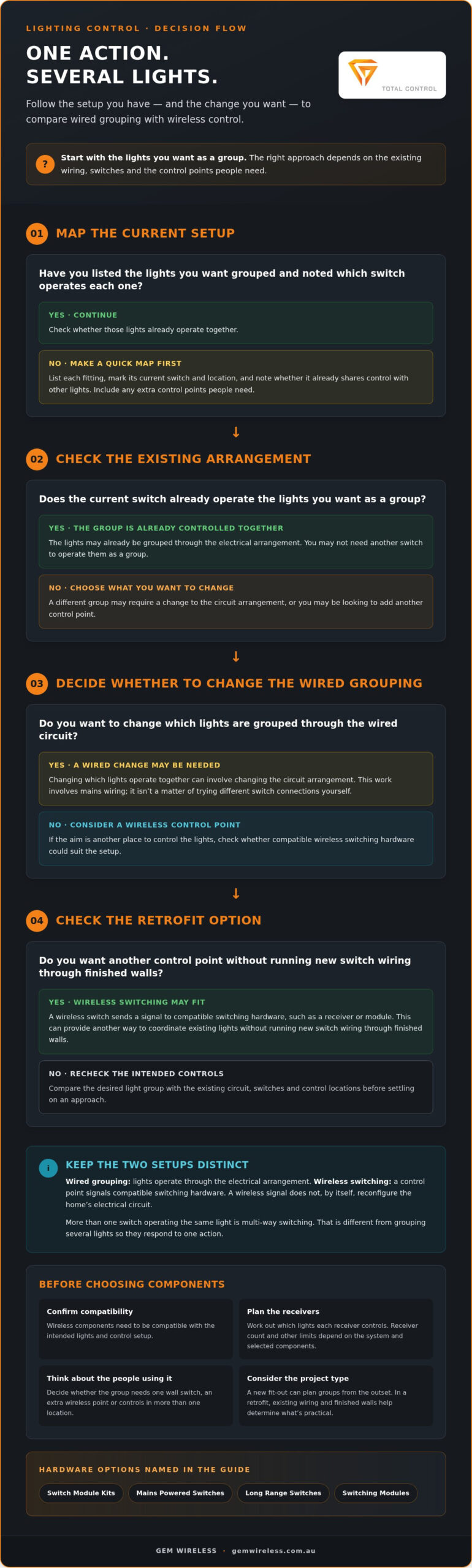
A clear plan helps you choose a control approach that fits the room, rather than selecting hardware before you know what needs to happen. Map the lights, switches and desired groups first. This gives you a practical basis for comparing existing circuit grouping with wireless control and identifying where fixed wiring may need attention.
Map the lights and the control points
Walk through the room and note how people use its lighting. You might want the main lights to operate together while a feature light stays independent. Record every light, its current switch and any extra control point that would make daily use easier, such as a switch near another entry.
Then use this sequence:
- List each light. Give fittings a simple label, such as “main ceiling” or “hallway wall light”, so the intended group is clear.
- Record what operates now. Note which switch controls each light and whether any light already has more than one control point.
- Mark the groups you want. Specify which lights should respond together and which should remain independent.
- Add desired control locations. Mark existing switch positions and any new places where users would benefit from control.
- Note the room and project context. Sketch the layout and consider how people move through the space. Record whether this is a new fit-out or a retrofit in a finished room.
A simple room sketch is enough. The aim is to describe the result clearly, not to draw wiring or open a fitting.
Check compatibility and plan safe next steps
With the map complete, compare the planned control arrangement with the existing lights and switches. For wireless control, the switching hardware and control point need to be compatible with the intended setup. Receiver numbers and other limits depend on the system, so don’t assume one arrangement will suit every group.
Keep planning separate from electrical work. You can document the lights, preferred groups and control locations without handling mains wiring. If the plan involves changing fixed wiring, leave that work to a suitably qualified electrical professional. A wireless light switch kit guide can help you understand how wireless control may fit into a retrofit plan.
Before selecting hardware, check the lights to group, current switch locations, desired control points, project type and compatibility of the proposed arrangement.
Use your checklist to compare control options against the actual room layout. If a wireless retrofit suits your plan, explore wireless switching kits designed to work with existing switches and lights.
Use Gem Wireless to Add Convenient Multi-Light Control
If your lights and switches work but you want another way to control them, wireless switching can offer a practical retrofit route. Gem Wireless supplies switching hardware and kits designed to work with existing switches and lights without rewiring. A wireless control sends an instruction to compatible switching hardware, which can operate the planned lighting group.
Start with your lighting map: which lights should respond together, which should stay independent, and where people need control. This clarifies the arrangement before you select components. It also keeps the goal clear, whether you’re adding a control point in a hallway or coordinating lights across an existing room.
How wireless switching can fit a multi-light plan
For a retrofit, compatible switching modules or receivers can work with a wireless control point as part of a planned setup. This provides a way to add control without running new switch wiring through finished walls. The arrangement depends on the selected system and component compatibility, so don’t assume a particular receiver count or configuration will suit every group.
Gem Wireless offers Switch Module Kits, Mains Powered Switches, Long Range Switches and Switching Modules. These hardware categories suit different setup plans, rather than promising a one-size-fits-all solution. Match the category and compatible components to your planned lights and controls. To control multiple lights with one switch, let the intended group and how people will operate it guide the arrangement.
Choose a straightforward next step
Use your lighting map to narrow the decision. Identify the lights to group, existing switches to retain and any additional control point you want. Then explore wireless switch kit options as a retrofit approach. This keeps selection focused on the control outcome and required components, without making assumptions about product limits or how a particular room is wired.
Planning doesn’t mean handling electrical work yourself. If the setup requires changes to fixed wiring, arrange for a suitably qualified electrical professional to carry out that work. Wireless switching can avoid running new switch wiring, but appropriate expertise is still needed where mains wiring is involved.
For a practical next step, explore wireless switch kit options and compare them with the light groups and control points in your plan.
Make Your Lighting Work Better for Everyday Life
The most useful setup is one that feels natural to everyone using the space. Think beyond switching the lights on: consider how lighting needs change when the room is used for relaxing, entertaining or moving through the house at night. That everyday perspective can help you choose a convenient control arrangement.
Gem Wireless kits and switching hardware are available to purchase directly and through stockists across Australia. Explore the options with your planned light groups in mind, then choose a setup that suits how you want to control multiple lights with one switch.
Explore wireless switching options for your lights and plan a lighting setup that’s simpler to use.
Frequently Asked Questions
Can one switch control multiple lights on separate circuits?
A conventional wired switch generally operates the circuit it’s connected to, so don’t join separate circuits at a switch to make them act as one. A wireless system may coordinate compatible receivers associated with different lighting circuits, but the arrangement depends on the system and must preserve the circuits’ separate electrical connections. For example, one control could send an instruction to separate receivers rather than electrically combining the circuits.
How do wireless switches control more than one light?
A wireless switch sends a control signal to compatible receiving hardware, which then operates the lights in the planned group. The receiving components determine which lights respond; the wireless switch itself doesn’t carry the lighting load. For instance, a control point could signal hardware assigned to a set of fittings. The system’s supported components and configuration determine how that group behaves.
Can I add a switch to control multiple lights without rewiring?
Yes. Wireless switching can add a control point without running new switch wiring through walls. This can suit a finished room where you want a switch in a more convenient spot. Depending on the arrangement, receiving hardware may still need to connect with the lighting. That work can involve fixed wiring, so have a suitably qualified electrical professional handle any mains wiring.
Do all lights need to be on the same circuit to work together?
No, not necessarily. Lights on one circuit can be grouped through a wired arrangement, while wireless control may coordinate compatible switching hardware without electrically combining different circuits. For example, separate lighting zones could each have receiving hardware that responds to a shared control signal. Whether that arrangement is suitable depends on the system and how the lights are set up.
Can one wireless switch control multiple receivers?
It can if the selected wireless system supports that arrangement. The number of receivers a control can operate, and how they’re grouped, varies by system, so don’t assume every wireless switch can control any number of receivers. Compare the system information with your planned lighting group. Keep separate groups in mind too, as you may want some lights to respond independently.
Is it safe to install a light switch myself in Australia?
Don’t install or alter a switch connected to fixed mains wiring yourself. Electrical safety rules and licensing requirements can vary between Australian states and territories, so use a suitably licensed electrician for fixed wiring work. You can still plan the lighting groups and control locations without opening a switch or light fitting. Keep that plan ready so the electrical work can be assessed clearly.
What should I check before grouping lights under one switch?
Check what each switch currently operates, whether any light has more than one control point, and which fittings you want to remain separate. Consider whether lights need to behave differently, such as being controlled at different times or from different locations. For wireless options, check that the control and receiving hardware are intended to work together. Don’t open fittings to inspect wiring.
home automationhome electricallight switcheslighting controllighting designretrofit lightingsmart lightingwireless switches