- Empty cart.
- Continue Shopping
How to Control a Garage Light from the House Without Running New Cable
- Posted on
 Strong Digital
- 0
- Categories: Uncategorized
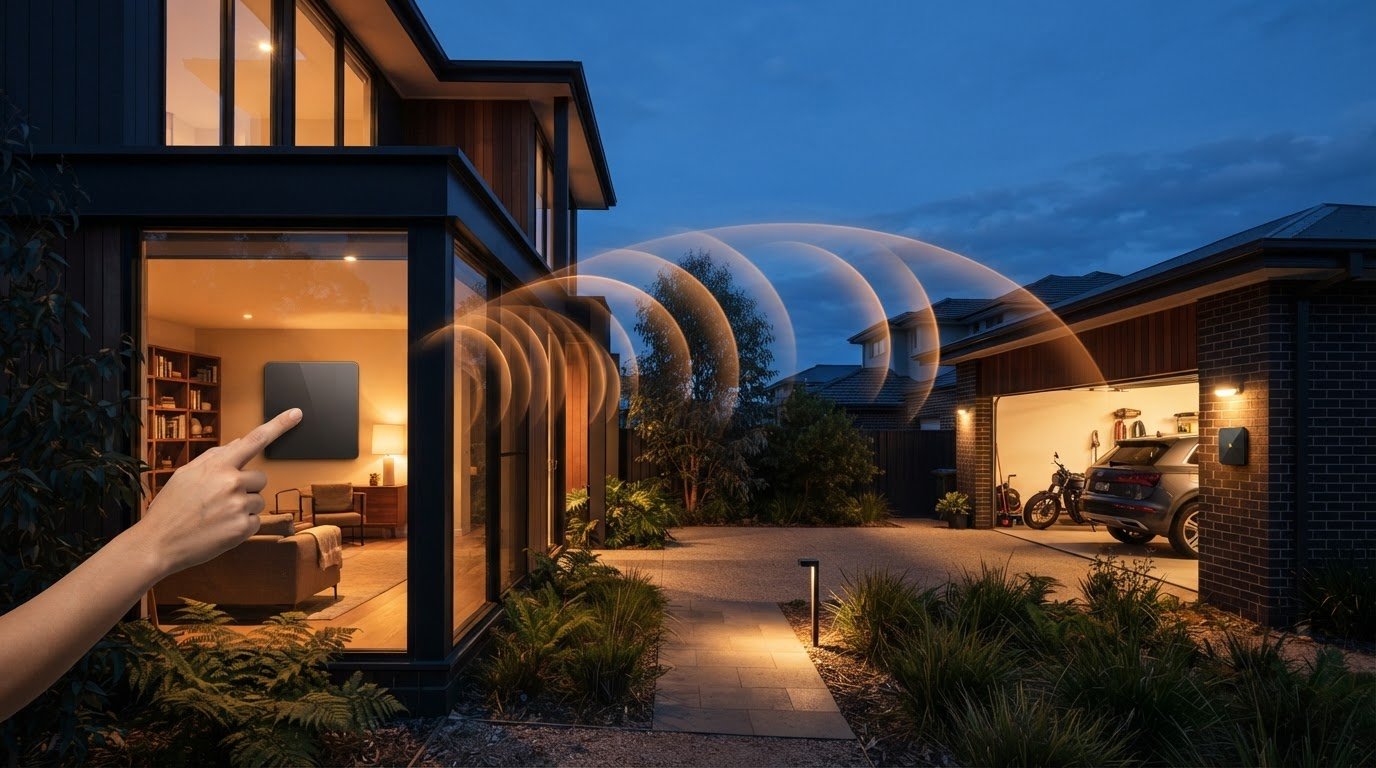
Want to control garage light from house without digging trenches or running new cable between buildings? Wireless switching can add a convenient control point indoors while using the garage’s existing light circuit.
This can be useful when the garage is detached, the existing switch is inconveniently placed or a new cable route would mean extra building work. A typical setup pairs a wireless control inside the house with a switching module connected to the existing light circuit. The control sends a command wirelessly, and the module operates the light. There’s no new switch cable running between the house and garage.
Reliability depends on the layout, distance and materials between the control and module, so the wireless link matters. This guide explains how the setup works, what to check before choosing hardware and how to plan for a suitable installation. Wireless switching avoids a new cable run to the added control point, but fixed electrical work still needs to be handled by a qualified electrician.
Key Takeaways
- You can control garage light from house with wireless switching, provided the existing light circuit suits a compatible switching module.
- Wireless control avoids running new switch cable to the added control point. A wired option may suit a layout where a cable route is already practical.
- Map the indoor control point, garage light and likely signal path to help plan a suitable setup.
- Check that the switching hardware suits the existing light and switch arrangement before installation.
- Compare switch module kits, mains-powered switches and long-range wireless switches against your layout and control needs.
Can you control a garage light from the house without running cable?
Yes. Wireless switching can add a control point inside your home without running new switch cable to the garage. The existing light circuit still needs a compatible switching module and an appropriate electrical connection. The control command travels wirelessly, but the module must connect to and operate the circuit that powers the light.
Wireless switching lets you operate an existing garage light circuit from an additional control point, using a wireless control to send a command to a switching module. A conventional wired switch extension uses cable between the new switch position and the lighting control arrangement. Depending on the route, that could mean work through walls, ceilings or underground between detached buildings. Wireless switching avoids that new switch-cable run, although the module still needs to be connected to the light circuit.
What does a wireless garage-light switch actually do?
The wireless control is the part you operate indoors. It sends a command to a receiver or switching module positioned to operate the garage light circuit. The module then switches the connected light on or off. Together, these components create an additional control point without a new cable connecting the house to the garage. The Wireless light switch overview explains the general idea and different communication approaches.
This doesn’t make the lamp itself wireless. The lamp still receives power through its existing circuit; the wireless link carries the instruction to change the circuit’s state. The connection depends on the switching hardware and the existing setup. A module designed for one type of circuit or control arrangement may not suit another, so identify how the light and switches are currently configured before choosing a kit.
When is wireless control useful between house and garage?
For a detached garage, adding a wired switch inside the house could require a long cable route across the property or through building structures. Wireless control offers another way to add indoor access without that new switch-cable run. Signal reliability depends on the layout and materials in its path, so consider the distance and obstacles between the control and module.
An attached garage can benefit too. The existing switch might be near the garage entry, while you’d prefer another control point near the door from the house or elsewhere indoors. A wireless control can provide that extra point, while the existing switch and light remain part of the setup if the selected hardware supports the arrangement.
This is about operating the garage light, not the garage door. Focus on where you want to use the control, where the light circuit is and how the wireless command can reach its module. For mains-connected switching hardware, have a qualified electrician handle fixed-wiring work.
How wireless control links the house switch to the garage light
A wireless setup has two jobs: carry your command from the house and switch the garage light circuit. Press the control indoors and its transmitter sends a signal to a receiver or switching module. The module changes the state of the connected circuit, turning the light on or off.
A wireless transmitter sends a switching command to a receiver or module, which operates the connected light circuit. The radio signal doesn’t power the lamp. The light still relies on its electrical connection, and the switching module must suit the existing lighting arrangement. That’s how you can control garage light from house without a new cable linking the indoor control point to the garage.
- Press the wireless control at the chosen spot inside the house.
- The transmitter sends a command across the wireless link.
- The receiver or switching module operates the garage light circuit.
Where do the wireless switch and module fit?
The wireless switch is the part you operate. It provides a convenient control point indoors, while the switching module forms part of the garage light’s control arrangement. Depending on the kit, the transmitter and module may be supplied as components designed to work together. The module’s connection depends on the product and existing circuit, so don’t assume every kit installs in the same way or suits every light.
Keep the distinction clear: wireless communication links the control to the module, while an electrical connection lets the module switch the light. For mains-connected equipment, installation involves fixed wiring. Leave that work to a qualified electrician and follow the product instructions for the specific compatibility and installation requirements.
What can affect the signal between house and garage?
Distance is one factor, but it isn’t the whole picture. Walls, floors and other building materials between the transmitter and receiver can also affect a signal. Two points that seem close on a plan may have a less direct route through the actual building layout.
Consider the signal path, not just the straight-line distance. Note whether the command needs to pass through an exterior wall, several internal walls or other substantial structures. Performance depends on the wireless product and site conditions, so don’t treat a general range figure as a guarantee for your garage. The Smart Home Technology Comparison from Silicon Labs outlines how wireless protocols differ, which helps explain why systems don’t all communicate in the same way.
As a practical next step, compare your layout with the requirements of wireless switching hardware. Knowing where the control and receiver need to sit helps narrow the options and gives an electrician useful context for the installation.
Wireless switch or new wired switch: which suits your garage layout?
Both approaches can add a control point for your garage light, but they solve the layout problem differently. A wired extension connects the new switch by cable. Wireless switching uses compatible hardware to add a control point without running new switch cable between the house and garage. The better fit depends on the available cable route, the building work involved and where you want to operate the light.
| Factor | Wireless switching | Wired switch extension |
|---|---|---|
| Cable work | Avoids running new switch cable to the added control point. | Requires a cable route between the switch and lighting control arrangement. |
| Layout flexibility | Can offer flexibility in choosing a control location, within the product’s suitable operating conditions. | Control placement depends on the practical cable route. |
| Disruption | May avoid opening walls or other building work needed for a new cable run. | May involve building work to route and install cable. |
| Control points | Can add an indoor control point using compatible switching hardware. | Can add a fixed, cable-connected switch at the selected location. |
When does wireless switching make more sense?
Wireless switching can suit a detached garage where a cable route across the property would disrupt paving, landscaping or finished building surfaces. It can also help in an attached garage if the existing switch is awkwardly positioned and you want another control point inside the house. First consider whether the proposed position suits the system’s operating conditions, including the signal path. Then check that the switching hardware matches the existing switch and light arrangement.
When might extending a wired switch be preferable?
A wired extension may make sense if a suitable cable route already exists or the work can be included in a planned renovation. It may also suit a preference for a fixed physical connection between the switch and lighting control. The route, circuit and installation requirements need to be assessed for the site. A qualified electrician can advise on the electrical design and carry out fixed-wiring work.
Neither option is automatically cheaper, safer or more reliable in every garage. Wireless switching avoids a new switch-cable run, but still needs compatible hardware and an appropriate electrical connection for the light. A wired option may avoid questions about wireless reception, but its practicality depends on the cable route and any building work required.
To narrow down the options, note where you want the indoor control, where the garage light is and whether a practical cable path exists. For wireless, include walls and other obstacles in your layout notes, not just the distance between points. These details help you compare the approaches and give an electrician a clear starting point for assessing the installation.
Plan a reliable way to switch the garage light from indoors
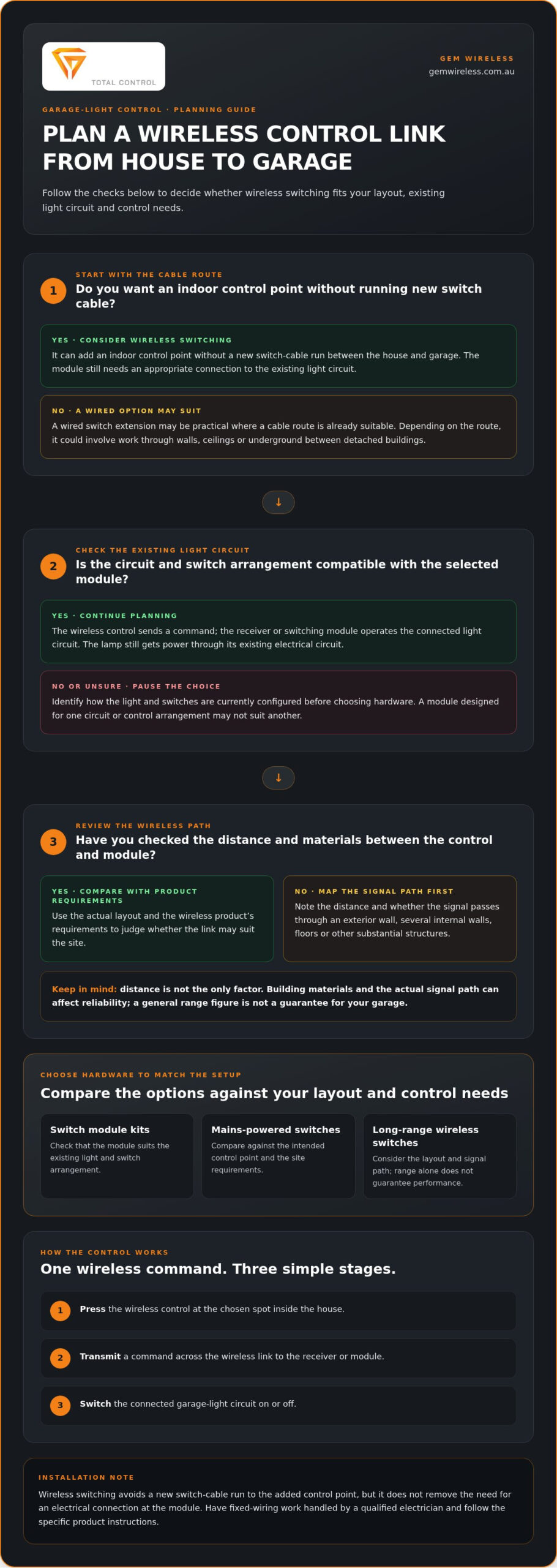
A little planning helps you choose a wireless setup for the route between your house and garage. Before deciding how to control garage light from house, note the proposed control point, the light’s position and what lies between them. Then work through these four steps:
- Map the layout. Note whether the garage is attached or detached, where the light and existing switch are, and the likely signal path between the indoor control and switching module.
- Identify the controls. Choose where people will use the new control. Consider the usual route through the house, whether you need one or more control points, and who needs convenient access.
- Check compatibility. Compare the existing light and switch arrangement with the switching hardware’s stated requirements. Confirm which components the selected setup uses.
- Plan installation. Read the product instructions and arrange for fixed electrical work to be assessed and completed appropriately. Any testing must follow the selected product’s instructions.
Map the house-to-garage route before choosing a setup
Draw a simple plan or mark up a floor plan. Show the house control point, garage light and intended module location. Add walls, doors and other building materials between the control and module, including any separation between an attached home and detached garage. The likely signal path may not match the shortest straight line.
Think about everyday use, too. A control near a house entry may suit someone heading out to the garage, while a position near the internal garage door may be easier for several household members. Your notes help you assess whether the location and wireless link suit the product’s operating conditions.
Check compatibility and keep installation safe
Wireless switching hardware needs to suit the existing light and switch arrangement. Product instructions explain the components, connection requirements and conditions for each setup. Don’t assume every module connects in the same way or that every kit suits every light circuit. Make compatibility part of your planning, not a last-minute check.
Testing must also follow the product instructions. Don’t open fittings, alter fixed wiring or attempt mains electrical work yourself. Electrical work must comply with applicable Australian requirements, which can depend on the state or territory and the work involved. Have a qualified electrician assess the installation and apply the relevant local requirements.
Once you’ve mapped the route and recorded the existing lighting setup, you’ll have a clearer basis for selecting suitable wireless switching hardware. Explore wireless switching options for lighting control, including switch module kits and long-range wireless switches.
Choose a Gem Wireless option for garage-light control
Gem Wireless switching hardware lets you add a garage-light control point without running new switch wiring between the house and garage. The right category depends on the site layout, the existing light and switch arrangement, and where you want to use the control. Start with those details, then compare the hardware with the product instructions rather than choosing on distance alone.
A wireless arrangement typically pairs a control with a switching module that operates the light circuit. Gem Wireless offers switch module kits, mains-powered switches and long-range wireless switches. These are different product categories, not interchangeable solutions: each setup has its own components and connection requirements. Matching the category to the light and existing controls helps you narrow down an option for your home.
Which Gem Wireless product category fits the control point?
Switch module kits are an option for a wireless switching arrangement that uses a control and module together. Mains-powered switches are another category to compare when considering how the control is powered. If the house and garage are separated or the signal path is a key concern, long-range wireless switches may suit your layout. No category guarantees reception at a particular property. Compare the product instructions with the actual route, obstructions and installation conditions.
For example, a control point near the house’s internal garage entry may have a different signal path from one on the other side of the home. The existing switch and light circuit also affect which switching module or kit is suitable. Consider the product guidance alongside the details of your setup: neither the category name nor the layout alone confirms compatibility.
What to do next for a simpler lighting upgrade
Use your layout notes to guide the next decision. Record where you want the house control, locate the garage light and existing switch, and identify the likely route between the control and switching module. Then compare the light and switch arrangement with the relevant product instructions. This gives you a practical shortlist without assuming every wireless option suits every garage.
If distance is your main concern, Gem Wireless has a long-range wireless light switch guide to help you consider that category. For more context on module-based setups, use the wireless switching modules guide. Keep the focus on the light circuit and the control point you want to add.
Ready to compare categories for your layout? Explore Gem Wireless switching hardware and find an option to consider for controlling your garage light from inside the house.
Make the next switch easier to reach
Think about when you most want the garage light within reach: arriving home after dark, heading out to the garage or checking the space from inside. That everyday moment can guide the location of an additional control point and turn a technical choice into a practical improvement.
Before choosing, write down your preferred control location and any details that could affect the setup. A clear picture of how you want to control garage light from house makes it easier to compare suitable wireless switching options and plan the next step.
Gem Wireless sells lighting-control hardware directly and through its stockist network across Australia and New Zealand. Compare the available product categories with your intended control point and existing setup.
Explore Gem Wireless switching options to choose hardware for a more convenient garage-light control point.
Frequently Asked Questions
Can I control a garage light from inside my house without running new cable?
Yes. A wireless switching setup can let you control garage light from house without adding a new switch cable. A transmitter sends a command to compatible switching hardware connected to the lighting circuit. Before choosing, note whether one switch operates the fitting or whether controls are split across locations. The product instructions explain how the hardware suits that arrangement, and fixed electrical connections still need appropriate installation.
Will a wireless light switch work through a brick wall or between a house and detached garage?
It may, but a brick wall or detached garage can affect reception, and the result depends on the setup. Consider the signal route, including walls, doors and other materials, rather than measuring only the gap between buildings. Follow the product’s stated operating conditions. If its instructions describe a testing process, use that method to assess the actual locations before settling on the control point.
Can I use a wireless switch with my existing garage light?
Wireless switching hardware can work with existing lights and switches, but suitability depends on the specific circuit and product. Make a note of the light type, how it’s currently switched and whether another switch also controls it. Compare those details with the product instructions. If the circuit arrangement is unclear, have a qualified electrician assess it rather than opening fittings or guessing how the module connects.
Do wireless garage-light switches need batteries?
It depends on the control. Some wireless controls use batteries, while mains-powered switches draw power from a mains supply. The switching module has its own requirements for operating the light circuit, so don’t assume the control’s power source tells you how the module is powered. Check the specific product information for both components, including any maintenance requirements for a battery-operated control.
Is it safe to install a wireless garage light switch myself in Australia?
Wireless communication doesn’t remove electrical risks. A setup may still involve mains-connected lighting or switching hardware, and requirements for electrical work can vary between Australian states and territories. Don’t work on live wiring or attempt fixed electrical connections unless appropriately qualified. Follow the product instructions and have a qualified electrician assess and carry out electrical work in line with the requirements that apply where you live.
What should I check before choosing a wireless switch for a garage light?
Record the existing switch arrangement, the light fitting and the indoor spot where you want the control. Note whether another switch operates the same light, and mark the likely signal route, including walls or doors. Then compare these details with the product’s compatibility information and operating conditions. This gives you a useful basis for comparing options without relying on a distance claim that may not reflect your building layout.
Can one wireless switch control more than one garage light?
Possibly, but it depends on how the lights are arranged and what the switching hardware supports. If several fittings operate together from one existing control, they may be part of the same lighting arrangement. Separate controls or circuits can require a different configuration. List which lights you want to operate together, then check the product instructions against that setup. Don’t assume one transmitter will control multiple independent circuits.
detached garagegarage lightinghome electricalhome improvementoutdoor lightingsmart switcheswireless light switch