- Empty cart.
- Continue Shopping
Common Home Automation Mistakes: What to Avoid in 2026
- Posted on
 Strong Digital
- 0
- Categories: Uncategorized
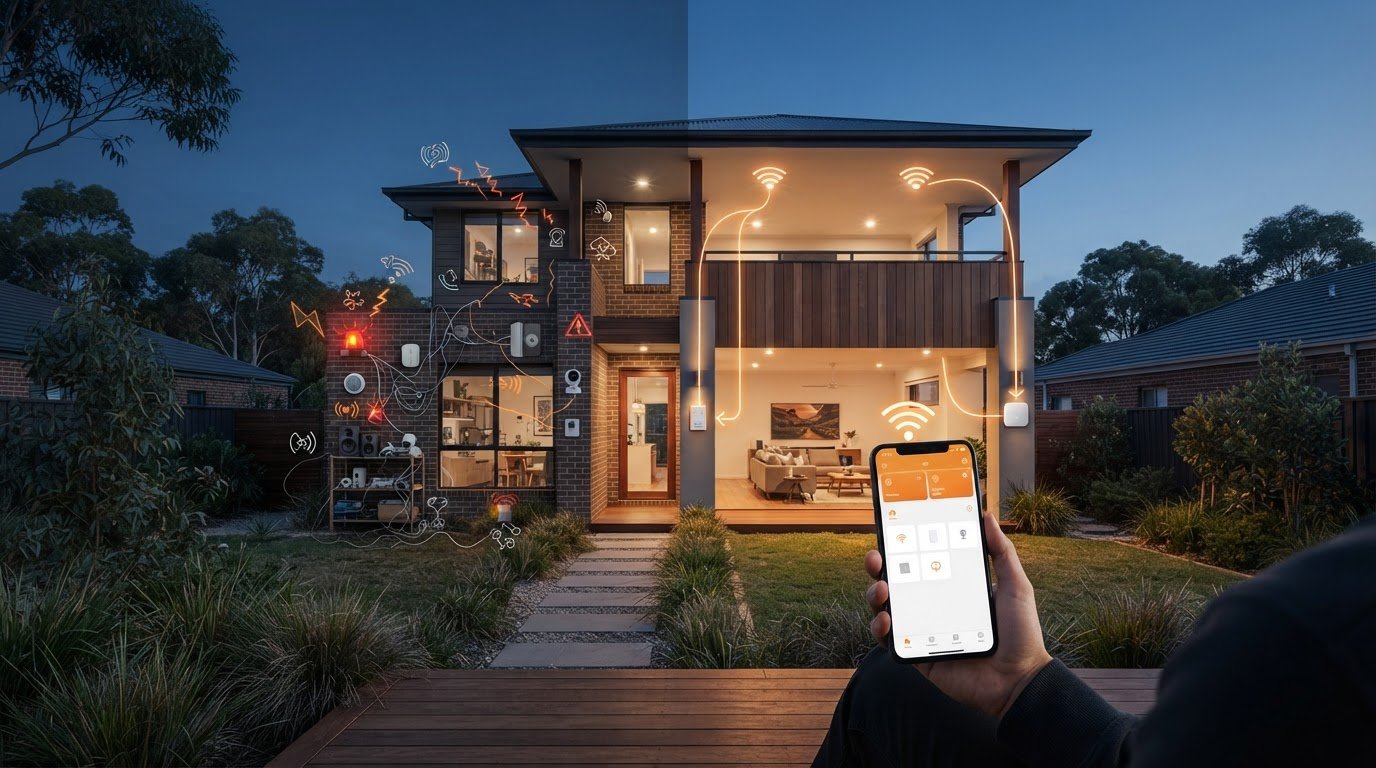
Common home automation mistakes often start with good intentions: buying devices before deciding what problem they should solve, then discovering they don’t work together or need constant troubleshooting. The result can be a home that feels harder to use, not easier.
It’s reasonable to expect lights, switches and routines to work reliably, with controls everyone at home can use. But compatibility, network dependence, privacy and electrical safety all deserve attention before you buy or install anything. A little planning can prevent a collection of disconnected devices and confusing automations.
This guide explains how to avoid common planning, compatibility, security and installation pitfalls in 2026. You’ll learn how to choose a manageable set of automations, check ecosystem and network requirements, and keep everyday controls straightforward. You’ll also see how wireless switching can simplify a lighting upgrade by working with existing switches and lights without rewiring. Start with a real household need, then build from there.
Key Takeaways
- Avoid common home automation mistakes by defining a household problem before choosing devices.
- Check the ecosystem, communication method and control requirements. Wireless connectivity alone doesn’t ensure compatibility.
- Choose controls that suit your household, and consider how apps, voice commands, schedules and physical switches fit daily routines.
- Build carefully: map the task, check compatibility, set up securely, test the automation and expand only when it works reliably.
- Consider wireless switching as a focused way to upgrade lighting while keeping existing switches and lights.
Common home automation mistakes that make everyday life harder
Home automation can make everyday life smoother. A light that switches on when you need it or a routine that saves a few steps can be genuinely useful. Frustration starts when a setup behaves differently than expected, needs frequent attention or leaves household members unsure how to control basic functions.
One common mistake is treating every new device as an improvement by itself. Connected gadgets can add clutter, extra controls and ongoing setup without solving a real problem. Before buying, write down the task you want to simplify, who needs to use the device and what should happen if the automation doesn’t run. This gives you a practical way to judge whether it belongs in your home.
Home automation covers a broad range of connected controls and household functions, as outlined in What is Home Automation? But a useful setup doesn’t need every possible feature. A useful automation is a repeatable action that solves a clear household need. Keep that standard in mind as you plan.
Automating several rooms and routines at once makes faults harder to trace. If a light doesn’t respond, you may not know whether the problem is the device, connection, schedule or a condition in the routine. Change one thing at a time, test it and adjust before adding another layer. This makes troubleshooting manageable instead of turning it into a hunt through multiple settings.
Buying gadgets before deciding what problem to solve
Start with a daily task. Is there a light you regularly forget to turn off, or a switch that’s awkward to reach? A clear use case helps you assess whether a device will make a difference. Buying something simply because it looks clever can leave you with features you rarely use. Begin with one room or routine, then decide whether it genuinely makes the task easier before expanding.
Include the people who share the space in that review. A routine that saves you effort may confuse someone else if its behaviour isn’t obvious. Ask household members whether the change feels natural, and keep a straightforward way to operate the light or device manually. If people need a tutorial for an everyday task, simplify the setup.
Making routines too complicated to use
Routines can become unpredictable when they rely on too many conditions, such as a time, a sensor and a device status all needing to line up. Start with one clear trigger and a simple outcome. Give routines names that explain what they do, such as “Hall light at night”, and make manual controls easy to find. Test the routine during normal household activity, including when someone might override it, before adding more conditions.
Keep a brief record of what each routine is meant to do. If it stops behaving as expected, compare its settings with the original purpose and remove unnecessary steps. A reliable setup should work naturally in the background, not feel like another system the household has to manage.
Avoid compatibility mistakes before choosing home automation devices
A device can connect to your home network and still fail to work with your other devices or preferred controls. “Wireless” describes how something communicates, not whether it can join a particular ecosystem, respond to a hub or be managed through the same app. Checking these details before buying can prevent a common mistake: assuming that connected means compatible.
A shared network lets devices connect to the same router; genuine interoperability lets them work together as intended. These are different things. Also distinguish device compatibility from internet access. A device may communicate locally but rely on the internet for certain features, while its app may need an online account to manage settings.
Check the ecosystem and communication method
Matter, Wi-Fi, Bluetooth and Zigbee refer to different standards or communication methods. They don’t automatically guarantee that two products will work together. Apple Home and Google Home are examples of ecosystems, but support for one doesn’t establish compatibility with every product or feature in it. Check the exact model’s supported standards, compatible ecosystem and whether a separate hub is required.
Use this quick comparison before purchasing:
| Check | What to establish |
|---|---|
| Ecosystem | Which control platform or app supports the device and the functions you plan to use? |
| Communication | Does it use Matter, Wi-Fi, Bluetooth, Zigbee or another method, and does your setup support it? |
| Hub and control | Is a hub needed? Can you control it by app, voice, schedule or a physical switch? |
Read the compatibility details for the exact device, not just the product category or packaging headline. Confirm which functions are supported, too. A device might appear in an app without offering every control or automation you expect.
Plan for internet, power and manual control
Some routines run locally through a hub or other local controller; others may depend on a cloud service, internet access or a particular app. Check what the device and routine require, then consider how you’ll use them if your internet connection drops or the router restarts.
Think about power as well. After an outage, devices may take time to reconnect or need attention, depending on their design. Keep a practical manual control option for everyday tasks, so a light or other essential function isn’t confusing to operate if an app or network is unavailable. Test the setup after a router restart and power interruption to see what happens.
If your priority is adding lighting control while keeping existing switches and lights, Gem Wireless switching hardware offers a focused option without treating switching as a whole-home platform.
Home automation trade-offs: avoid overbuying and choosing the wrong control
A useful automation doesn’t have to mean a smart speaker in every room, a paid subscription or a whole-home platform. Those options can suit some households, but they also add equipment, setup and another layer to manage. Match the control to the task instead. A light you want to switch from the doorway may not need the same approach as a routine you want to run automatically while you’re away.
Common mistakes include buying more technology than the task requires and choosing controls that don’t suit the people using them. Consider what you already have, how the room is used and what feels easiest to operate. You can combine methods, too: an automated schedule doesn’t have to remove a physical switch.
Choose the control method that suits the household
Think about who needs to operate each device, including guests, children and anyone who prefers familiar controls. App access can be handy when you’re away from the switch, but it depends on a compatible device and a phone. A physical switch offers a clear, familiar action. Voice control may help when your hands are busy, but adds little if nobody wants to speak commands.
- App control: Useful for changing settings from a phone, but less direct for visitors or anyone without app access.
- Voice control: Convenient for hands-free commands, provided the household is comfortable using it and the setup supports the feature.
- Scheduled control: Suits predictable tasks, such as switching something on at a set time, but can be inconvenient when the household’s routine changes.
- Physical switching: Familiar and immediate for everyday use, and a practical option for people who don’t want to rely on an app or voice commands.
Before settling on a method, picture an ordinary moment: someone arrives home with full hands, a guest needs the lights, or the usual schedule changes. If the control still feels straightforward, it’s more likely to work for the household.
Use wireless switching where rewiring adds friction
Sometimes the goal is simply to add a convenient place to control a light without running new switch wiring through the walls. Wireless switching hardware is designed to work with existing switches and lights, making it a focused option for a lighting upgrade. It isn’t a whole-home platform, and shouldn’t be assumed to integrate with a particular app or ecosystem.
For practical planning ideas, Wireless Light Switch Kit Guide for Australian Homes 2026 can help you think through the kit approach, while No Rewire Lighting Control: Modernising Your Australian Home Without the Mess explores the no-rewire concept. If you’re considering a focused lighting control change, Gem Wireless switching hardware is an option to explore. Keep the decision centred on the control point you need and how everyone at home will use it.
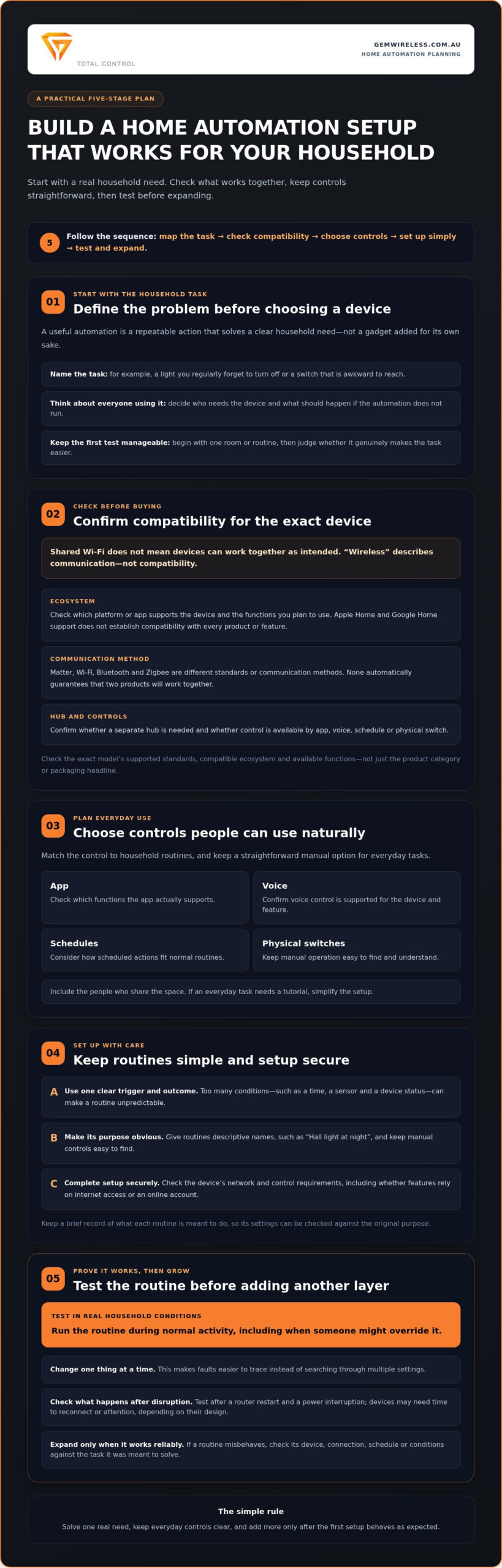
Set up home automation safely, securely and one step at a time
A staged setup is easier to troubleshoot and safer to manage than a rushed whole-home rollout. Work through each step in order, keeping a note of what you changed and what the system did. This helps prevent common home automation mistakes from becoming difficult-to-trace faults.
- Map the task. Write down what you want to happen, where it should happen and who will use the control. Keep the first goal specific, such as switching a particular light on at a chosen time.
- Check compatibility. Confirm the exact device requirements, supported controls and whether a hub, app, internet connection or other equipment is needed for the function you want.
- Install appropriately. Follow the device instructions. For work involving mains electrical wiring, consult current guidance from your state or territory electrical safety regulator and have the work handled in line with Australian requirements.
- Test before expanding. Try the automation during normal household activity. Check what happens when someone uses a manual switch, the internet drops out or the power is interrupted.
- Expand only after review. Once the routine behaves as intended, discuss it with other household members. Add another device or task only if the first change is useful and easy to operate.
Test automations before adding more devices
Don’t judge a routine from a single successful test. Try it at the times and in the situations when the household will actually use it. Note when it works, when it fails and what was happening at the time. A simple record can reveal whether the trigger is unclear or a condition is too restrictive. Keep a straightforward fallback for frequently used controls, such as a physical way to operate a light if an app or routine isn’t available.
Before expanding, ask others at home to use the setup without coaching. If they can’t work out what a routine does or how to override it, simplify the names or controls first. A setup is only practical if it suits the people living with it.
Protect accounts and treat electrical work carefully
Use a strong, unique password for each connected account, and enable extra account protection where it’s offered. Install device and app updates promptly through their official update process. Review who has access to connected accounts, remove access that’s no longer needed and secure any shared login arrangements. These habits help reduce avoidable account and software risks.
Don’t experiment with household wiring. Mains electrical work needs to be handled in line with Australian requirements, so check current advice from the relevant state or territory electrical safety regulator. Follow the device instructions and don’t treat a wireless feature as permission to alter wiring yourself.
For a focused lighting control upgrade, explore Gem Wireless switch module kits, designed to work with existing switches and lights without rewiring.
Make a simpler lighting upgrade with Gem Wireless switching
Home automation doesn’t have to start with a whole-house platform or a long list of connected devices. If the everyday problem is reaching a light switch or adding a more convenient control point, a focused lighting upgrade may be a more practical first step. It keeps the project centred on one clear task instead of adding systems the household may not need.
Gem Wireless switching hardware is designed to work with existing switches and lights without rewiring. That can be useful when you want another way to control lighting but opening finished walls would add disruption. Every home and wiring arrangement is different, so focus on the particular light and switching task you want to address rather than assuming one option suits every setup.
When wireless switching can solve a real household problem
Picture a light that would be easier to control from another point, or a room where running new switch wiring would make a small improvement feel like a major project. Wireless switching can provide a way to add lighting control without running new switch wiring through the walls. It’s a targeted change, not a way to automate heating, security or every other household system. For security specifically, choosing dedicated equipment such as CCTVSecurityPros – Professional Security Cameras and Systems ensures reliable surveillance without overcomplicating your everyday home automation hub.
Before choosing a setup, identify which light you want to control, where you’d like the control point and how people currently use the switch. Then read the relevant product information and consider whether the option matches that specific task. For more context on retrofit control, Wireless Switching Modules: The 2026 Australian Guide to Retrofit Control can help frame the decisions involved.
A staged approach also makes it easier to judge the result. Start with the lighting change that would make the clearest difference to daily use. Once you understand how it works in your home, decide whether another switching change is worthwhile. This avoids a common home automation mistake: adding complexity without a clear household benefit.
Choose a manageable next step
Gem Wireless offers switch module kits, mains powered switches and long range switches. These are different product categories for lighting and switching needs, so begin by writing down the control problem you want to solve. Keep the goal practical: an added control point, a more convenient way to switch a light, or a staged upgrade that works with existing switches and lights.
Explore the product information to understand the options, or use the Australian stockist information if you’d prefer to buy through a stockist. You can also explore Gem Wireless switching solutions to find a suitable next step for your lighting plans. Focus on one useful improvement at a time. A well-considered change can be more valuable than a larger system that’s harder to use.
Make your next automation choice count
Your next step doesn’t need to be a full smart home plan. Choose one lighting or switching task that would make daily life easier, then look for a practical way to address it. That keeps your decisions grounded in how your household lives, rather than the excitement of adding another device. Avoiding common home automation mistakes is less about having fewer options and more about choosing the ones that earn their place.
For a focused lighting upgrade, Gem Wireless switching is designed to work with existing switches and lights without rewiring. You can buy online or through stockists across Australia, giving you a clear way to explore options for your project.
Explore Gem Wireless switching solutions and take the next step towards lighting control that feels useful, straightforward and suited to your home. Start with one practical improvement and let everyday convenience guide what comes next.
Frequently Asked Questions
Can home automation work without an internet connection?
Yes. Some functions can work without internet, while others rely on cloud services. The result depends on the device and how it’s set up, so an internet outage won’t affect every connected product in the same way. Before buying, check whether key actions, such as switching a hallway light on, work offline. Keep an accessible manual control for essential tasks so you’re not relying on an app during a connection drop.
What happens to smart home devices during a power outage?
Mains-powered devices generally stop operating when household power is out. Battery-powered controls may behave differently, but they won’t necessarily keep other devices running. Once power returns, products can reconnect or restore settings in different ways. Check the recovery behaviour for important routines, such as scheduled lighting, and test it after a brief interruption if practical. Don’t assume a connected device includes backup power unless its specifications explicitly say so.
Can you mix different home automation brands?
Sometimes, but using the same Wi-Fi network or app doesn’t guarantee that products from different brands can control one another. A common mistake is overlooking the exact model’s requirements. Before mixing devices, check their supported standards, any hub needed, app or account requirements, and which functions are shared. A pairing may support basic on-and-off control but not every feature, so compare the details with the task you want to automate.
Do smart home devices need regular software updates?
Updates can address security issues, fix faults or change features, though the process varies between devices. Use the manufacturer’s trusted app or update method, turn on suitable update notifications and protect the account with a strong, unique password. Before updating a well-used setup, read the update notes and consider when to apply the update. If household lighting relies on a routine, test it afterwards and keep its manual control familiar.
Can renters use home automation without making permanent changes?
Some options are designed to be portable or avoid permanent changes, but suitability depends on the device, tenancy conditions and existing electrical setup. A plug-in control is different from work involving fixed wiring. Review your tenancy agreement and relevant conditions before making changes, and don’t alter mains wiring yourself. If you want to take the setup with you later, consider how easily the device can be removed and whether it leaves any marks or fittings behind.
How do I stop home automation from becoming difficult for guests or family?
Keep everyday controls familiar and make essential lights usable without relying on one person’s phone or account. Give routines plain names that describe what they do, such as “Porch light”, rather than private shorthand. Show family members how to use the controls, then ask a guest or regular visitor to try them. If they need repeated instructions, simplify the routine or make the manual option easier to find.
common home automation mistakeshome automationhome tech tipssmart homesmart home setupsmart lightingwireless switching