- Empty cart.
- Continue Shopping
Wireless Light Switches: A Bond-Friendly Guide for Renters
- Posted on
 Strong Digital
- 0
- Categories: Uncategorized
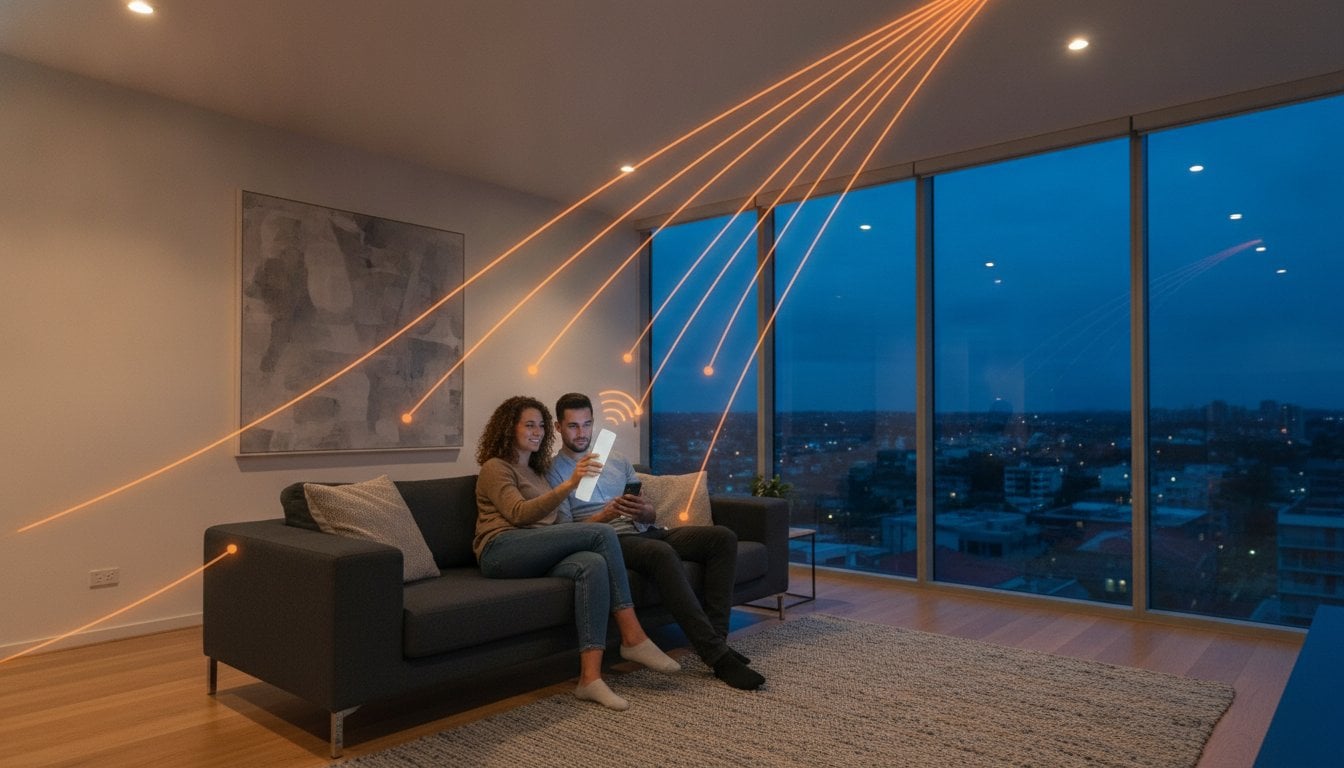
What if the light switch in your rental property wasn’t actually fixed to the wall, but could follow you to your bedside or the front door? Most Australian renters know the daily frustration of fumbling through a dark hallway because the only switch is at the far end of the room. You want modern convenience, but you also want your bond back at the end of the lease. Landlords rarely approve permanent electrical upgrades, and traditional smart bulbs often become useless the moment someone flicks the main wall switch off.
It’s time to take control of your space without the stress of permanent alterations. Using a wireless light switch for renters allows you to add professional lighting control to any room without drilling holes or messing with existing wiring. This guide explores how you can achieve a sophisticated, portable setup that’s entirely reversible and compliant with Australian safety standards. We will look at the best no-rewire kits and switching modules that ensure your lighting stays flexible, even when you decide it’s time to move on.
Key Takeaways
- Learn how to overcome poor switch placement in your rental without needing a landlord’s permission for electrical work.
- Discover how a wireless light switch for renters provides a portable, professional lighting solution that moves with you when your lease ends.
- Understand why switching modules offer better reliability and control than smart bulbs, especially for ceiling fans and downlights.
- Master “no-drill” mounting techniques using temporary adhesives to keep your walls pristine and your bond secure.
- Find out how to integrate modern control into your existing Australian switches for a seamless, smart home experience.
The Renter Lighting Dilemma: Why Standard Upgrades Often Fail
Living in an older Australian rental often feels like a compromise between character and convenience. You might love the high ceilings and original floorboards, but the electrical layout is usually a different story. Poorly placed switches are a common frustration. It’s not unusual to find the only light switch for a large lounge room tucked behind a door or at the far end of a dark hallway. For most people, the solution seems simple: just add another switch. However, for those in the rental market, this is where the “Bond Trap” begins.
Landlords are traditionally hesitant to allow any electrical modifications. From their perspective, even a small change represents a potential liability or a permanent alteration to the property. Drilling holes for new wiring or cutting into plasterboard is a non-starter for most property managers. If you make these changes without written permission, you risk losing a significant portion of your bond to rectification costs when you move out. Finding a reliable wireless light switch for renters is the only way to bypass these restrictions while still gaining modern control over your environment.
Understanding Your Tenancy Agreement Restrictions
Most Australian tenancy agreements are clear about what constitutes a permanent fixture. Anything that requires tools to install and cannot be removed without leaving a mark is usually off-limits. This includes new power points or hardwired switches. To protect your bond, you need a no-rewire solution. Understanding how wireless switches work is essential here; they use radio frequency signals to communicate between the switch and the light, removing the need for physical copper cables behind your walls. This makes the entire setup non-destructive and 100% reversible. The same no-rewire principle that protects renters’ bonds is equally valuable for owners of period properties, where a wireless light switch for heritage homes avoids the risk of damaging irreplaceable original fabric like lath and plaster or double-brick walls.
Why Smart Bulbs Aren’t Always the Smartest Choice
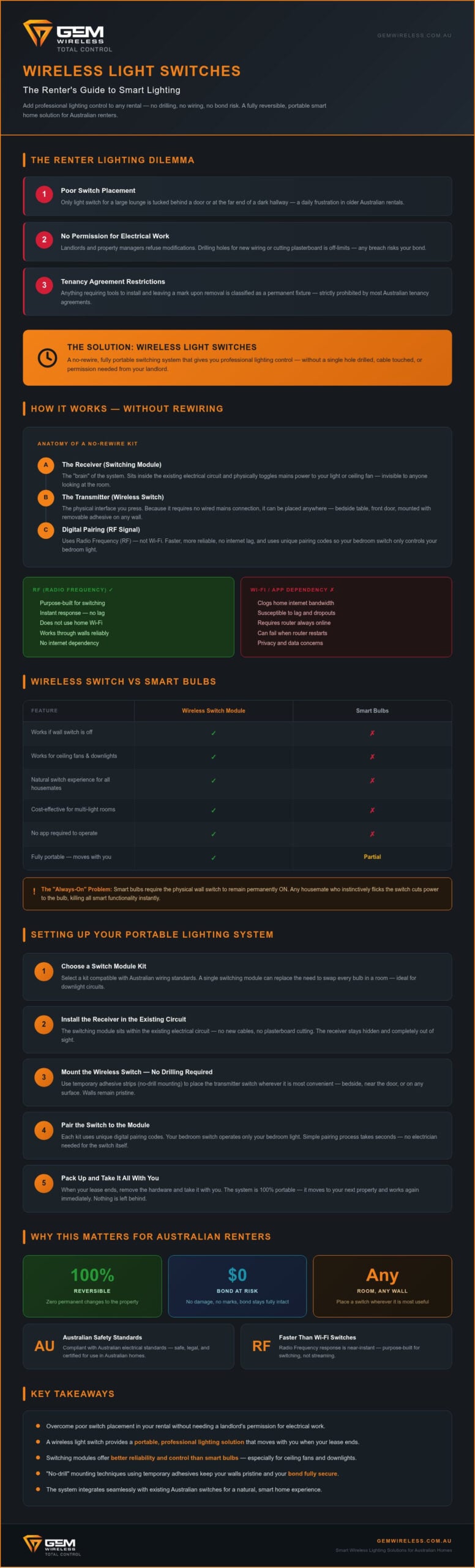
Many tenants turn to smart bulbs as a quick fix, but they often lead to more frustration. The biggest issue is the “always-on” requirement. For a smart bulb to respond to an app or voice command, the physical wall switch must remain in the “on” position. If a housemate or partner instinctively flicks the switch off, the bulb loses power and the smart functionality dies. A dedicated wireless light switch for renters solves this by providing a physical interface that doesn’t rely on the original wall switch being left on. It offers a natural user experience that works for everyone in the house, not just the person with the app. Replacing every bulb in a large unit is also cost-inefficient compared to a single, high-quality switching module.
How Wireless Switching Technology Operates Without Rewiring
Think of a wireless light switch for renters as a sophisticated remote control for your home’s mains power. While many lists of the best renter-friendly smart home devices focus on plug-and-play bulbs, those solutions often fail when a physical wall switch is toggled off. Professional wireless switching technology operates differently. It uses a receiver that sits within the electrical circuit, allowing you to control the light regardless of the physical switch’s position. This setup uses Radio Frequency (RF) instead of Wi-Fi. RF is purpose-built for this task; it’s faster, more reliable, and doesn’t clog your home internet bandwidth or lag when you need a light on immediately.
The beauty of this technology lies in its simplicity. You aren’t pulling new copper cables through the wall or chasing wires behind plasterboard. Instead, the “wiring” is invisible and digital. This makes the system entirely portable. When your lease ends, you can simply take the hardware with you to your next property. If you’re looking to modernise your current space, starting with Switch Module Kits is the most effective way to gain control without the permanent commitment of a hardwired renovation.
The Anatomy of a No-Rewire Kit
A standard kit consists of two primary components that work in tandem to give you control. These parts are designed to be discreet and easy to integrate into existing Australian homes:
- The Receiver (Switching Module): This is the “brain” of the operation. It receives the signal and physically toggles the power to your light or fan.
- The Transmitter (The Switch): This is the physical interface. Since it doesn’t need a wired connection to the mains, you can place it anywhere.
- Digital Pairing: Each kit uses unique pairing codes. This ensures your bedroom switch only operates your bedroom light, not your neighbour’s lounge room.
Mains Powered vs. Battery Options
When choosing your hardware, you’ll encounter two main types of transmitters. Battery-powered switches are the ultimate “place-anywhere” solution. They use long-life cells that typically last several years, making them perfect for sticking to a bedside table or the side of a fridge. Mains-powered wireless switches, on the other hand, are often used to replace an existing switch plate. These provide a permanent feel without the need for new data cables. Some modern innovators even offer kinetic energy switches. These clever devices harvest a tiny amount of power from the physical “click” of the button, eliminating the need for batteries entirely and reducing maintenance to zero.
Comparing Wireless Switches to Smart Bulbs and Plugs
When you search for landlord-friendly upgrades, you’ll likely find endless recommendations for smart bulbs and plugs. While these are popular, they serve very different purposes than a professional-grade wireless light switch for renters. Smart plugs are excellent for a single floor lamp or a coffee machine, but they can’t control your recessed downlights or your ceiling fan. Smart bulbs offer fun colour-changing features, but they rely entirely on software and constant power. If the physical switch is off, the bulb is dead. A wireless switch kit bridges the gap between these temporary gadgets and a permanent electrical renovation by offering reliable, infrastructure-level control.
Feature Comparison for Renters
Installation difficulty varies across these options. Smart bulbs are the definition of plug-and-play, but their utility is narrow. A switching module requires a moment of setup behind a plate or inside a ceiling cavity, yet it provides far more robust control over your existing fixtures. Smart plugs are also limited by the wall socket location. If your lamp is in the corner but your door is on the other side of the room, you’re still walking through the dark. A wireless light switch for renters takes that control and moves it to the entry point, regardless of where the power point sits. Portability is a shared benefit; all these devices can be packed into a box when you move to your next flat. However, only a wireless switch provides a tactile user experience that feels like a natural part of the home.
Long-Term Value and Reliability
Physical switches are inherently more reliable for shared households. In a rental, you want technology that feels invisible. When a guest stays over, they shouldn’t need a tutorial or a specific app to turn on the bathroom light. Physical switches provide that universal accessibility for guests, babysitters, and children. This simplicity is a major advantage. The same intuitive, app-free experience also makes these systems ideal for older residents; a wireless light switch for elderly Australians provides the same familiar tactile control that reduces fall risk in dark hallways without requiring any technical knowledge. Unlike many smart home ecosystems that depend on a central hub or a perfectly stable Wi-Fi connection, RF-based wireless switches work independently. Even if your internet goes down during a storm, your lights will still respond instantly. This hardware-first approach ensures durability that software-dependent bulbs often lack, making it a more pragmatic investment for long-term comfort in any Australian rental property.
Setting Up Your Portable Lighting Control System
Setting up a wireless light switch for renters is less about technical skill and more about strategic placement. Start by walking through your home at night to identify where you naturally reach for a light. Common pain points include the gap between your bed and the door, or the long stretch of a hallway with only one switch at the far end. Once you have identified these spots, you can begin the physical setup. Planning your layout ensures you don’t waste hardware on areas that already have functional control.
The “No-Drill” method is the secret to protecting your bond. Most professional kits are lightweight enough to be mounted using high-quality temporary adhesive strips. To ensure a secure hold that won’t peel paint when you leave, clean the wall surface with rubbing alcohol first. Press the switch firmly for 30 seconds to establish a bond. This approach allows you to place a switch on glass, tile, or timber without leaving a single mark. It is a completely non-destructive way to modernise your rental.
Pairing your modules is the next step. Most systems allow for multi-way control. This means you can pair two separate switches to one receiver, effectively creating a “two-way” circuit without running a single centimetre of new cable. It is perfect for stairwells or large open-plan living areas where you want control from both ends of the room. Before finalising the position, always test the signal strength. While RF is robust, thick Australian internal brick walls can occasionally dampen the range. If you want a reliable system that handles these conditions, check out the Switch Module Kits available for immediate dispatch.
Bedside and Entryway Optimisation
You can create a “Master Switch” by the front door that toggles all main living area lights. This provides a significant safety boost when arriving home late. In the bedroom, you can add a switch directly to your bedhead or side table. This eliminates the need for a lamp if you prefer your main overhead lighting. It also ensures you never have to get out of bed to turn the lights off. These small changes make a rental property feel like a custom-designed home.
Extending Control to Sheds and Garages
Detached rental areas like sheds or garages are often neglected in standard lighting plans. If your rental includes a separate workspace, using a long-range wireless switch allows you to control those lights from the safety of the main house. Standard Wi-Fi often fails to reach these distances. Professional RF modules can penetrate brick and timber to maintain a solid connection across your property, giving you total control over outdoor or security lighting without stepping outside.
Why Gem Wireless is the Smart Choice for Australian Renters
Supporting a local business means you get access to national stockists and expert support when you need it. We don’t just sell modules; we provide a pathway to a more efficient living space. Our hardware is designed for longevity, meaning it isn’t a one-off purchase for a single flat. It is a long-term investment in your comfort. When your lease ends, you simply pack your kits into a box and take them to your next property. Whether you are moving locally or internationally, you can discover Phoenix Supplies UK for high-quality packaging and moving supplies. This portability ensures that you never lose the value of your lighting upgrade, regardless of how many times you move.
We prioritise a pragmatic approach to technology. This means we focus on solutions that just work, without the need for complex software subscriptions or constant troubleshooting. Our user experience is built on simplicity. We believe that turning on a light should be instinctive for everyone in the house, from toddlers to houseguests. We have removed the friction of technical upgrades to give you total control over your environment. Gem Wireless switch kits represent the ultimate bond-friendly lighting upgrade for 2026, offering professional control without a single permanent change.
Getting Started with Your First Kit
Starting your journey toward better lighting is straightforward. You can choose between individual switching modules for specific problem areas or pre-configured kits for a complete room overhaul. If you are unsure which option suits your rental best, our expert team is available to help you navigate the range. You can find our products through our network of national stockists or by visiting the Gem Wireless homepage for latest kit options. Whether you need a simple bedside switch or a long-range solution for a detached garage, we have a kit ready for immediate dispatch. Take the first step toward a more convenient home today without risking a cent of your bond.
Modernise Your Space Without the Bond Risk
Upgrading your rental doesn’t have to mean compromising your bond or dealing with landlord refusals. By choosing a high-quality wireless light switch for renters, you gain the convenience of modern control with a system that’s 100% reversible. We’ve explored how RF technology provides a more reliable experience than smart bulbs; it ensures your lights work every time without complex Wi-Fi setups. Because these kits require no rewiring, they’re the ideal solution for anyone wanting to improve their home’s functionality today while keeping the hardware for their next move.
Gem Wireless provides hardware that’s fully compatible with Australian lighting standards and backed by national support. It’s a pragmatic way to solve the frustration of poorly placed switches without the high cost of a permanent renovation. You deserve a home that works for your lifestyle, regardless of your tenancy status. Start your upgrade today and enjoy a seamless, modern lighting experience that follows you wherever you go.
Browse our Bond-Friendly Wireless Switch Kits
Frequently Asked Questions
Will a wireless light switch leave marks on my rental walls?
A wireless light switch for renters won’t leave marks if you use high-quality temporary adhesive strips for mounting. These adhesives are designed to hold the weight of a lightweight switch plate firmly while peeling away cleanly when it is time to move. To ensure the best results, always clean the wall surface with rubbing alcohol before application. This non-destructive method protects your bond and keeps the property in its original condition.
Do I need a licensed electrician to install a Gem Wireless kit?
Yes, you must engage a licensed electrician to install the switching module into your home’s electrical circuit. In Australia, any work involving mains wiring must comply with AS/NZS 3000 safety standards. While the module requires professional placement, the actual wireless switches are battery-powered and can be placed anywhere by the tenant. This combination ensures your setup is legally compliant, safe, and entirely portable for your next rental property.
Can I take my wireless switches with me when I move house?
Yes, the entire system is designed for portability and long-term use across different properties. When your lease ends, your electrician can quickly remove the switching modules from the ceiling or wall cavity, restoring the original wiring. You can then unstick the wireless switches from the walls without leaving damage. This makes a wireless light switch for renters a smart investment that stays with you rather than becoming a permanent fixture.
Is a wireless switch as reliable as a normal wired switch?
Professional RF switches are incredibly reliable and often outperform Wi-Fi based smart home gadgets. Because they use a dedicated radio frequency, they don’t suffer from the lag or interference often associated with busy home internet networks. The signal travels instantly from the switch to the module, ensuring your lights turn on the moment you press the button. It provides a tactile, consistent experience that feels exactly like a traditional hardwired connection.
What happens if the battery in my wireless switch dies?
Most battery-powered switches use long-life cells that last for several years under normal household use. When the battery eventually runs low, you can simply pop the cover off and replace the cell without losing any of your pairing settings. If you prefer a maintenance-free option, some modern kits use kinetic energy. These clever devices generate a tiny pulse of power from the physical click of the button, eliminating the need for batteries entirely.
Can I control multiple lights with a single wireless switch?
Yes, you can pair a single transmitter to multiple switching modules to create a “Master Switch” effect. This is particularly useful for entryways where you might want to turn on the lounge, hallway, and kitchen lights simultaneously. The digital pairing process is simple and allows for flexible configurations. You can also do the opposite by pairing multiple switches to a single light, providing convenient control points at both ends of a room.
Do wireless switches work with LED downlights?
Yes, Gem Wireless modules are fully compatible with standard Australian LED downlights and fixtures. They sit between the power source and the light driver, toggling the circuit regardless of the bulb type. This compatibility extends to ceiling fans and older incandescent globes as well. Because the module handles the heavy lifting, you don’t need to worry about flickering or compatibility issues often found with cheap smart bulbs and dimmers.
Will my neighbours wireless switch interfere with my lights?
No, interference is not an issue because each kit uses unique digital pairing codes. When you set up your system, the switch and module are locked to each other’s specific frequency ID. This ensures that even if your neighbour installs the exact same system, their switch will never trigger your lights. The signal is secure and private, providing professional-grade lighting control that remains isolated to your specific rental unit or home.
bond friendlyhome improvementno drill solutionsrental hacksrenting tips Australiasmart home for renterssmart lightingwireless light switch