- Empty cart.
- Continue Shopping
Apartment-Friendly Smart Lighting: Practical Upgrades Without Rewiring
- Posted on
 Strong Digital
- 0
- Categories: Uncategorized
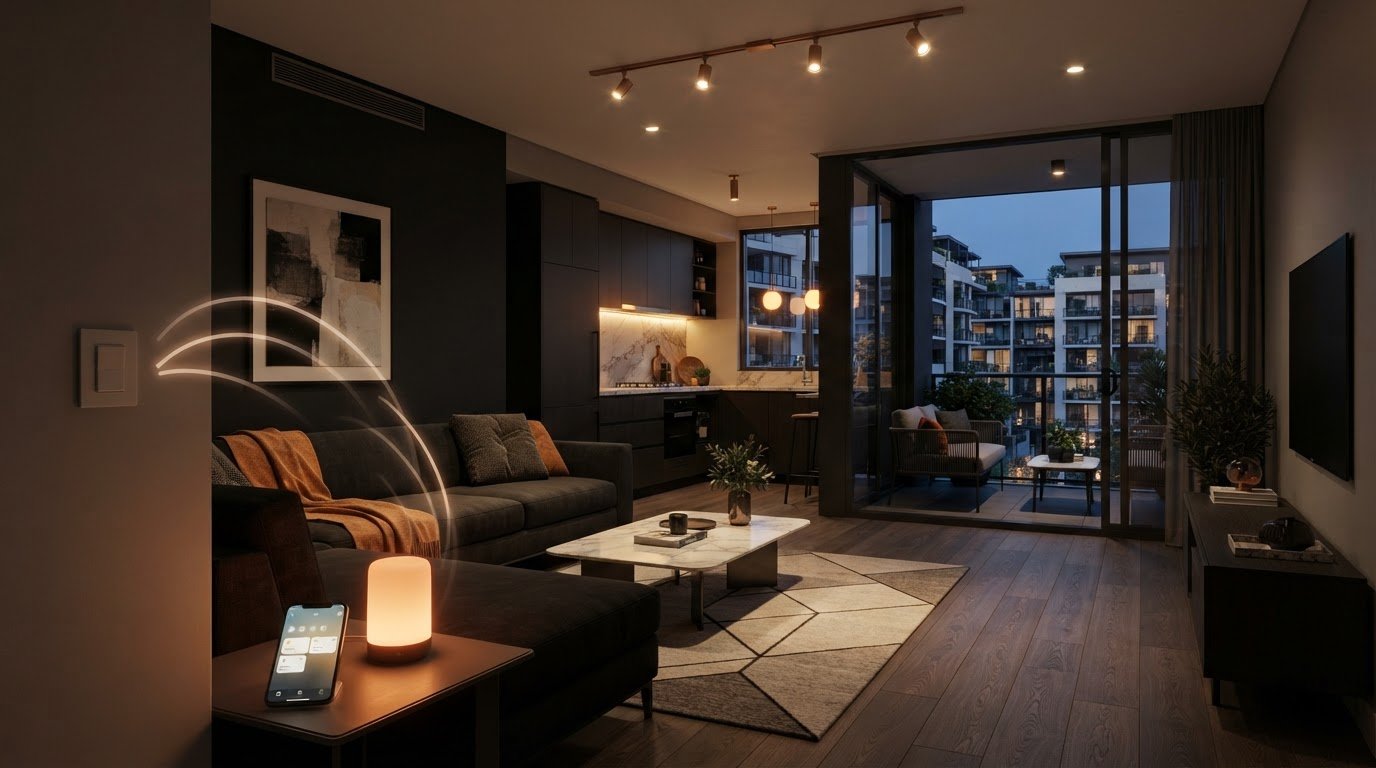
The easiest smart lighting upgrade isn’t always a smart bulb. In an apartment, apartment friendly smart lighting starts with the controls your existing fittings and switches can support, not a plan to change the wiring. A bulb can add app control quickly, but it may be less convenient if someone switches it off at the wall.
If you’re renting or dealing with fixed fittings, it makes sense to avoid upgrades that create disruption or rely on building changes. The right option depends on how you use each room, what your lights can support and whether you want to take the hardware with you when you move.
This guide compares smart bulbs, portable lamps and wireless switch controls, including practical trade-offs around compatibility, everyday use and portability. You’ll also see how wireless switching hardware can work with existing switches and lights without rewiring, and when it may suit your apartment better than replacing every fitting.
Key Takeaways
- Apartment friendly smart lighting is about choosing controls that suit your fittings, space and permitted changes, not just buying smart bulbs.
- Compare smart bulbs, plug-in lamps and wireless switching by what changes, how you’ll control the light and what you can take with you.
- Before choosing hardware, list the lights and switches you want to control and identify what’s inconvenient about the current setup.
- Gem Wireless switching systems are designed to work with existing switches and lights, offering a hardware-based way to add control without rewiring.
What Does Apartment-Friendly Smart Lighting Actually Mean?
Apartment-friendly smart lighting means choosing lighting controls that suit your space, existing fittings and the changes permitted in your tenancy or building. The goal isn’t necessarily to replace every fitting or add a device to every room. It’s to make the lights you use easier to manage in a way that fits how you live.
Smart lighting describes the broader setup; smart control is how you operate it. A connected bulb is one option, but control can also come from a plug-in lamp or wireless switching hardware. Apartment-friendly doesn’t automatically mean fully wireless or app-controlled. Some options use an app, some use a separate switch, and some hardware interacts with the existing lighting circuit.
Smart bulbs, smart lamps and smart switching are different approaches
Smart bulbs build control into a replacement bulb, provided the fitting and bulb are compatible. Smart lamps add convenient control to plug-in lighting without changing a ceiling fitting. Wireless switching uses switching hardware to control lights, which may let you keep the existing light and switch arrangement. A wireless light switch sends a control signal without a conventional wired connection between the switch and receiver, although the hardware used to operate a light can still connect to the lighting circuit.
Gem Wireless systems are designed to work with existing switches and lights without rewiring. Wireless switching is distinct from replacing each bulb: it focuses on how you control the light, rather than replacing the light source.
Why apartment layouts and tenancy change the decision
In a compact room, extra hubs, plugs or visible cables can take up space. Control access matters too. If a smart bulb depends on power staying on at the wall switch, someone using that switch may interrupt app or voice control. Consider who uses the room and which control method will feel natural day to day.
Renters may favour portable or reversible options they can take when they move. Owners may be more open to a longer-term change that improves control across fixed fittings. Tenancy arrangements and building conditions affect which changes are suitable. Consider what can stay untouched, what you want to take with you, and whether you need better control of a lamp, one light or several existing lights. Those answers help narrow the options before you choose hardware.
How Wireless Switching Adds Smart Control Without Rewiring
Wireless switching adds another way to operate a light without running new wiring through the apartment. A control sends a wireless signal to switching hardware, which responds by changing the light’s state. The existing light can stay in place; the upgrade focuses on how it’s switched.
Gem Wireless systems are designed to work with existing switches and lights without rewiring. The control and switching hardware link your action to the light. The arrangement depends on the existing lighting setup and the type of control you want, so wireless doesn’t mean every component is separate from the lighting circuit.
What happens when you add a wireless control?
You press or operate a wireless control. It sends a signal to the switching hardware, which then operates the light. The aim is to gain another way to control existing lighting without replacing the light itself or running new wiring through the walls. This can be useful when you want a different control point while keeping the familiar fitting and switch arrangement.
For a deeper explanation of retrofit approaches, read the no-rewire lighting control guide. It explores how wireless control can modernise a lighting setup while retaining existing lights.
Which apartment lighting situations may suit wireless switching?
Start with the point where control would make daily life easier. Perhaps the existing switch is awkward to reach, or you’d like another convenient way to operate a light without changing the fitting. Wireless switching may suit these needs when the existing lighting arrangement is compatible with the hardware and the control you want.
For renters, portability and reversible changes may be priorities. Consider what can be taken to a future home and whether any part of the setup changes the apartment. Owners may be more comfortable planning for longer-term control, but the building and lighting arrangement still shape what’s suitable. Don’t assume every change is permitted in every tenancy or building.
As an apartment friendly smart lighting option, wireless switching can add control while keeping existing lights in use. Explore Gem Wireless switching options to see the wireless switching hardware and kits.
Smart Bulbs vs Wireless Switching: Which Suits Your Apartment?
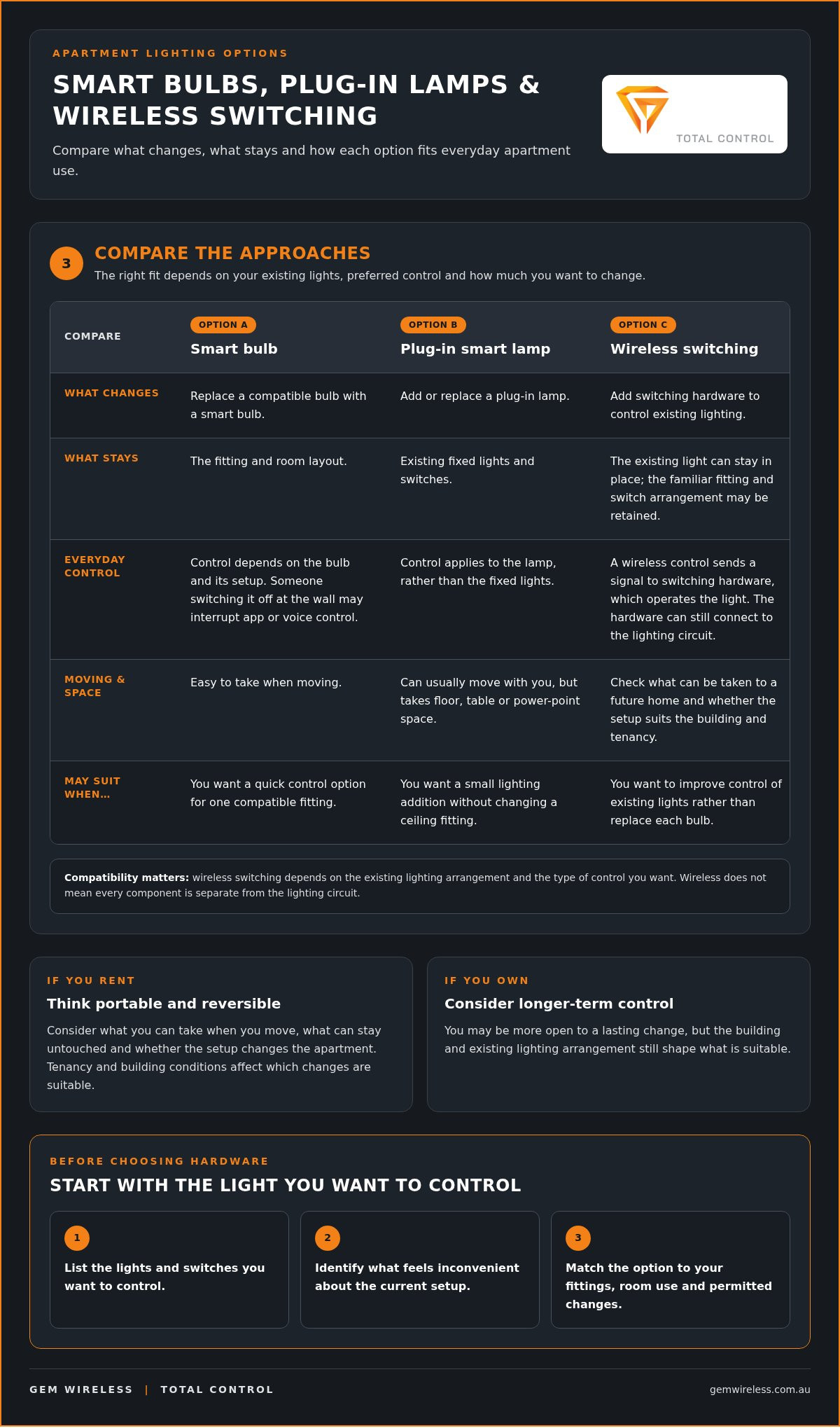
The best choice depends on what you want to control, the lights already in your apartment and how much change feels practical. A smart bulb can be a neat fix for one compatible fitting. A plug-in smart lamp suits a small lighting addition. Wireless switching may suit you if you want to improve control of existing lights rather than replace them.
| Option | What changes | What stays in place | Control and portability |
|---|---|---|---|
| Smart bulb | Replace a compatible bulb with a smart bulb. | The fitting and room layout. | Control depends on the bulb and its setup. The bulb is easy to take when moving, but a wall switch may interrupt convenient control. |
| Plug-in smart lamp | Add or replace a plug-in lamp. | Existing fixed lights and switches. | Control applies to the lamp. It can usually move with you, though it takes up floor, table or power-point space. |
| Wireless switching | Add switching hardware to the lighting arrangement. | Existing lights and switches can remain in use. | Can provide another way to operate existing lights. Portability depends on the setup and what changes are involved. |
When smart bulbs or plug-in lamps may be the simpler choice
For one bedside lamp or a single compatible ceiling fitting, a bulb or plug-in lamp can be a straightforward first step. Sourcing plug-in fixtures from lighting retailers such as Ergovanta allows you to position floor or table lighting wherever extra brightness is needed. It keeps the change focused on one light, which can suit renters who want to avoid broader alterations. But a smart bulb doesn’t necessarily make the wall switch more convenient. If someone turns off the switch, the bulb may lose power and its smart controls may no longer work as intended. Consider who uses the room and how they’ll operate the light.
When wireless switching may be the more practical fit
If the main frustration is how or where an existing light is switched, changing the bulb may not solve it. Wireless switching focuses on control while retaining existing lights. The suitable arrangement depends on the lighting setup and the control you want.
In compact rooms, consider where you naturally reach for a switch, whether another control point would help and whether the setup suits your tenancy. Renters may prioritise reversible changes or portability; owners may weigh a longer-term arrangement. For broader kit considerations, see the Australian wireless light switch kit guide.
Use these differences to narrow down apartment friendly smart lighting: choose a bulb or lamp for a small, self-contained change, and consider wireless switching when control of existing lights is the issue.
Plan an Apartment Smart Lighting Upgrade in Four Steps
A little planning can prevent a simple lighting goal from turning into a collection of devices that don’t suit your apartment. Before buying hardware, record the lights and switches you want to control, then work through these four steps.
- Map the lights. List the rooms involved and note which lights are fixed fittings and which are plug-in lamps. Record the switch or control point for each light. This gives you a clear picture of the existing setup before you consider changes.
- Identify the control problem. Ask where and when extra control would help. Is one switch awkward to reach? Do you want to control a single light differently, or are you planning for several rooms? A specific everyday issue is easier to solve than a broad goal like making the whole apartment smarter.
- Compare approaches. A bulb or plug-in lamp may suit a small, self-contained change. Wireless switching may suit you if you want to adjust how existing lights are controlled. Compare what each option changes, what stays in place and what you may be able to take when you move. For a closer look at the components, read the wireless switching modules guide.
- Plan a compatible setup. Use your notes to compare the lighting arrangement and control you want with the equipment’s compatibility information. Don’t assume one option suits every fitting or switch. If you rent, understand your tenancy requirements before planning permanent changes. Owners should also consider any relevant building requirements.
Keep planning separate from electrical work
Choosing a control approach is different from working on electrical wiring. Don’t attempt mains-wiring changes as a DIY step. Any mains electrical work should be carried out in line with applicable Australian safety requirements. A clear record of your lights, switches and desired control can help define the project without turning product planning into wiring instructions.
This process helps narrow down apartment friendly smart lighting to options that match your daily routine, tenancy and existing setup. Explore Gem Wireless switching hardware and kits as part of your planning.
A Simple Wireless Lighting Upgrade with Gem Wireless
A useful lighting upgrade starts with the problem you want to solve. If your fittings still suit the room but the switching feels inconvenient, you may not need to replace every light. Wireless switching hardware offers another way to improve control while keeping existing lights in use and avoiding unnecessary rewiring.
Gem Wireless sells wireless switching hardware and kits for residential and commercial lighting. Its systems are designed to work with existing switches and lights without rewiring. The approach is hardware-led: switching components support control of the lighting setup, rather than relying on a smart-home software subscription. Gem Wireless sells hardware, not electrical installation services.
What to expect from a hardware-led solution
Think of switching hardware as part of the link between a control and the light. It can work with existing lights and switches, helping address a control issue without automatically changing the fitting itself. This may suit a light that works well but has a switch location or operation that doesn’t fit your routine.
The right configuration depends on the existing lighting arrangement and the control you want. A single room may call for a different setup from several lights across an apartment. Compatibility matters, so consider the details of your existing lights and switches when choosing a suitable kit. “No rewiring” describes the system’s intended retrofit approach, not a guarantee that every apartment arrangement is the same.
Choose the next step that matches your apartment
If you rent, portability and reversible changes may be high on your list. If you own, you may be planning for longer-term control. Either way, use your room-and-switch notes to make the decision concrete: mark the lights you want to operate, the controls you use now and where added control would help. That keeps the focus on a practical improvement rather than adding hardware without a clear purpose.
For apartment friendly smart lighting, choose a next step that fits your fittings, daily habits and tenancy or building situation. Review your notes and consider the control you need, then explore the available Gem Wireless wireless switching options.
Choose a Smarter Way to Control Your Apartment Lights
The right apartment friendly smart lighting upgrade starts with the control problem you want to solve. Smart bulbs and plug-in lamps can suit small, focused changes. Wireless switching is another option if you want to retain existing lights and improve how they’re operated.
The right setup depends on your lighting arrangement and the controls you need, so use your room-and-switch notes to guide your decision. Renters can weigh portability and reversible changes, while owners may plan for longer-term control.
Gem Wireless wireless switching hardware and kits are available to customers in Australia and New Zealand, who can purchase directly or through stockists. Explore the options and consider how they could fit your lighting setup: Explore Gem Wireless wireless switching options.
A more convenient lighting routine doesn’t have to start with a renovation. Take it one room and one control need at a time, and choose an approach that fits your home.
Frequently Asked Questions
What is apartment-friendly smart lighting?
Apartment-friendly smart lighting improves lighting control in a way that suits your space, fittings and tenancy or building requirements. It could mean changing a compatible bulb, adding a plug-in lamp or using wireless switching hardware to control existing lights. The best fit depends on what you want to operate and how. Smart lighting doesn’t automatically mean an app, a fully wireless setup or changes to every light in your home.
Can I make apartment lighting smart without rewiring?
Yes, some options add lighting control without rewiring, including compatible smart bulbs, plug-in smart lamps and wireless switching systems. That doesn’t mean every setup is plug-and-play: the equipment and control arrangement need to suit the existing lighting. If a change involves mains electrical work, don’t treat it as a DIY task.
Are smart bulbs or wireless switches better for an apartment?
Neither is best for every apartment. A smart bulb can suit a single compatible fitting, while a plug-in smart lamp can add controlled light without changing a fixed fitting. Wireless switching may suit you if you want to improve control of existing lights. Consider the current switch, who uses it, the control you want and whether you’re renting or planning a longer-term upgrade.
Can renters install wireless lighting controls in Australia?
It depends on the specific control, tenancy arrangements and relevant building requirements. A portable control or lamp may involve a different level of change from hardware connected to the lighting circuit. Before planning a permanent alteration, renters should understand the requirements that apply to their tenancy. Don’t assume every wireless option is automatically permitted just because it doesn’t require rewiring through the walls.
Will wireless switching work with existing lights and switches?
Gem Wireless systems are designed to work with existing switches and lights, enabling lighting control upgrades without rewiring. The suitable arrangement still depends on the existing lighting and the control you want. Before selecting hardware, note which lights and switches you want to operate and use that information to assess compatibility. Wireless switching can retain existing lights, but it isn’t a universal fit for every setup.
Do smart lights still work if the internet is unavailable?
It depends on how the lighting system communicates and which features you use. Some controls may operate locally, while app, voice or remote features can depend on a network or internet connection. Don’t assume every smart light or wireless control will behave the same way during an outage. Check the specific equipment’s operating requirements and consider whether you need a physical control method as well.
Is it safe to install smart lighting in an apartment myself?
It’s sensible to limit DIY changes to tasks that don’t involve mains electrical wiring, such as replacing a compatible bulb or plugging in a lamp. Don’t open fittings or alter fixed wiring yourself. Mains electrical work should be handled in line with applicable Australian safety requirements. If you’re renting, also consider tenancy and building requirements before planning any permanent change to the lighting.
apartment friendly smart lightinghome automationlighting upgradesno rewiringrenter friendlysmart homesmart lightingwireless switching