- Empty cart.
- Continue Shopping
Are Wireless Light Switches Reliable? 2026 Australian Guide
- Posted on
 Strong Digital
- 0
- Categories: Uncategorized

Can a wireless light switch be reliable without running a new cable through your walls? If you’re wondering, “are wireless light switches reliable?”, the practical answer is yes, when the system suits the space and is set up for the way you use it. Thick walls, metal objects and distance can affect communication. The power arrangement also matters, particularly for controls that use batteries. It’s reasonable to ask whether a wireless switch will respond as consistently as a wired one.
This guide explains what affects everyday performance and what to check before choosing a system. You’ll learn how the signal path, interference, receiver placement and power needs can influence reliability. We’ll also cover how to assess compatibility with your lights and switches, and whether a retrofit system suits your setup. Knowing the trade-offs helps you choose wireless switching hardware based on practical needs rather than guesswork.
Key Takeaways
- To judge whether wireless light switches are reliable for your needs, consider the full setup, including the signal path, power source and installation conditions.
- Trace the control sequence from switch to receiver to light to help identify where an unreliable response may occur.
- Compare wireless and wired controls against your building and intended use. Each needs a suitable, well-planned setup.
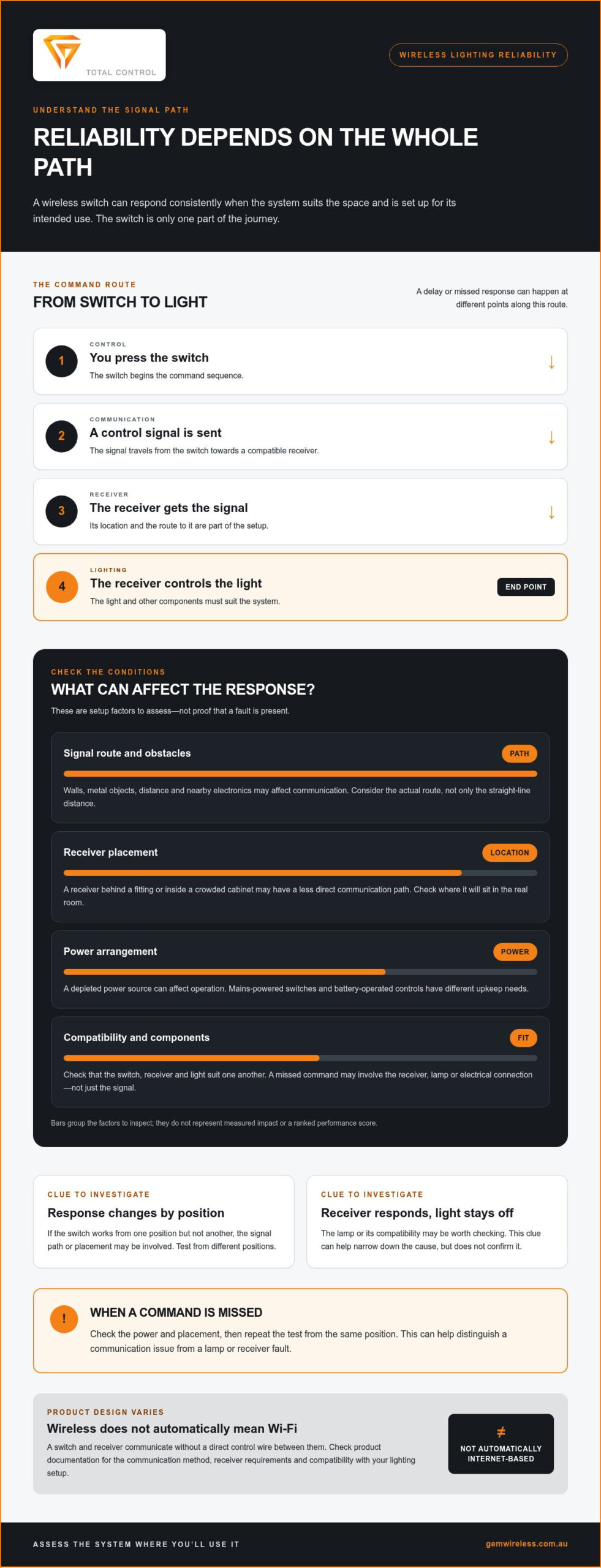
- If a switch misses a command, check power and placement, then repeat the test from the same position to help distinguish a communication issue from a lamp or receiver fault.
- Before choosing a system, assess compatibility with your lights and switches, control location, receiver requirements and product documentation.
Are wireless light switches reliable for everyday use?
Are wireless light switches reliable? They can be, but performance depends on the system, the signal path, the power source and conditions around the switch and receiver. A suitable setup should respond consistently from the location where you intend to use it. No wireless system is immune to interference, depleted power or component faults, so reliability means predictable operation under normal conditions, not flawless performance in every situation.
What does a wireless light switch do?
When you press the switch, it sends a control signal to a compatible receiver. The receiver then controls the light. That communication makes the switch wireless, but it doesn’t automatically mean the system needs internet access, an app or voice control. Designs and power arrangements vary, so check how the switch and receiver in the specific system communicate and operate. For broader context, this overview of home automation systems describes technologies used to connect and control devices.
Wireless switching can also suit retrofit projects. Some switching modules and kits are designed to work with existing switches and lights without rewiring. Compatibility depends on the specific setup, so check the product details against your lighting arrangement.
What does reliability mean in a lighting setup?
In everyday use, reliability means the light responds consistently when you use the control from its intended location. The useful range is the range that works in your actual space, not just a figure quoted under ideal conditions. Walls, metal objects, distance and nearby electronics may affect a wireless signal.
A missed command doesn’t always mean the signal is at fault. The issue could involve the switch’s power source, receiver, lamp or electrical connection. For example, if the receiver appears to respond but the light doesn’t turn on, the lamp or its compatibility may be worth considering. If the switch works from one position but not another, the signal path or placement may be involved. These clues can help narrow down the cause, but don’t confirm it by themselves.
Assess the system in the place you plan to use it. Consider where people will press the switch, where the receiver will sit and whether the power arrangement suits your routine. A mains-powered switch and a battery-operated control can have different upkeep needs. The next sections compare wireless and wired controls, then outline practical checks for assessing performance.
How do wireless light switches communicate, and what can affect them?
A wireless lighting command follows a simple path: you press the switch, it sends a signal, a compatible receiver gets that signal, and the receiver controls the light. A delay or missed response can happen at different points along that route. That’s why signal performance depends on the whole path, not the switch alone.
Wireless systems use different communication methods and product designs. Don’t assume every switch uses the same radio frequency or needs the same supporting equipment. The receiver’s location, the control’s power arrangement and the distance between them all form part of the setup. Check the product documentation for the communication method and any receiver requirements.
Can walls or interference affect wireless switch performance?
They can affect performance, but they don’t make failure inevitable. A signal may travel differently through a clear room than through several walls, around metal surfaces or across a complex floor plan. Nearby electronic equipment is another factor to consider, but its presence alone doesn’t prove interference is occurring.
For example, a switch near a doorway and a receiver behind a fitting or inside a crowded cabinet may have a less direct communication path than the straight-line distance suggests. Assess the actual route in the room where you’ll use the control, including obstacles and receiver placement. If response varies by location, test from different positions to see whether the signal path could be a factor.
Does a wireless switch need Wi-Fi or the internet?
No. “Wireless” means the switch and receiver communicate without a direct control wire between them. It doesn’t automatically mean Wi-Fi, internet access, an app or cloud control. Requirements vary by product and system design, so compare the documentation with how you want to use the lighting. A local switch-to-receiver arrangement, for example, may suit a different need from a setup designed for app-based control.
Some wireless devices also raise security questions beyond everyday signal response. Research from Dakota State University examines security vulnerabilities in wireless devices, including RF-based controls. Review product documentation and security information as well as communication requirements.
For a retrofit, a compatible wireless switching module can provide control without rewiring, but the chosen module and receiver still need to suit the existing lights and intended layout. Explore wireless switching modules as one option when considering how a system could fit your lighting setup.
Wireless vs wired light switches: which is more dependable for your setup?
Neither approach is automatically the best choice for every building. A wired control avoids wireless signal concerns because its command travels through a physical connection. Wireless control removes the need for a new control cable between the switch and receiver, but performance depends on the signal path and equipment placement. Both approaches still rely on compatible components and a sound setup.
| Factor | Wireless control | Wired control |
|---|---|---|
| Communication path | A signal passes from the switch to a compatible receiver. | A physical electrical connection carries the control. |
| Installation disruption | May add a control point without running new switch wiring, depending on the system. | Adding or moving a switch can involve changes to wiring and finished surfaces. |
| Site conditions | Distance, building materials and receiver placement can affect signal performance. | Doesn’t depend on a wireless signal, but still depends on sound electrical installation. |
When can wireless switching be a practical choice?
Wireless switching can suit a renovation where walls are finished, or a room where you’d like a control point closer to an entrance or seating area without running new switch wiring. It can also support some retrofit projects using compatible switching modules with existing switches and lights. Assess the actual control and receiver locations to see whether the system suits the building. For more on retrofit considerations, see this wireless light switch kit guide for Australian homes.
When might a wired control suit the job better?
If an existing wired switch is convenient and works as intended, there may be little reason to change it. A wired setup avoids signal quality as another variable. That can matter where a control must work from a fixed location and the building layout makes a wireless route difficult to assess. Wired controls aren’t fault-proof, though. Their reliability also depends on the condition and installation of the electrical system.
Some wireless systems use a mesh network, where compatible devices can pass communication along. That design may suit certain layouts, but it isn’t a feature to assume for every product. A FacilitiesNet discussion of building automation, How do wireless light switches communicate, offers broader context on wireless network design. Check the specific system’s documentation rather than choosing on the label alone.
So, are wireless light switches reliable compared with wired controls? Match the control method to the building, installation conditions and intended use. Wireless can make a new control location more achievable; wired can be straightforward when existing wiring already does the job.
How can you assess and maintain wireless light switch reliability?
If a wireless switch behaves inconsistently, start with simple checks. Note what happens, review the product’s power requirements, consider the route between switch and receiver, then repeat the test from the usual position. A consistent pattern can help distinguish a missed command from an issue with the lamp or receiver.
What should you check if a wireless switch responds inconsistently?
First, describe the symptom. Does the light fail to respond every time, only from one spot, or only occasionally? Test several times from the normal operating position and note whether the behaviour repeats. Then follow the product instructions to check its power source and any user-level status indicators or troubleshooting steps.
If the switch appears to send a command but one light remains off, the lamp or its compatibility may be involved. If the issue affects multiple lights controlled by the same receiver, the receiver or its power may need attention. These are clues, not a diagnosis. Don’t open electrical equipment or attempt mains wiring checks yourself.
How do placement and installation support dependable operation?
The receiver’s position and the route from switch to receiver can affect how consistently commands arrive. Furniture, metal surfaces, walls or a changed room layout may alter that route. New electronic equipment nearby may also be worth considering if performance changed after it was introduced. Test from the intended control location, and compare results before and after any safe, user-level placement adjustment allowed by the product instructions.
Use the supplied documentation for setup, power and maintenance guidance. If the receiver is hardwired or the issue involves electrical connections, have the work handled by a licensed electrician in Australia. For more on component roles, read the wireless switching modules guide. The no-rewire lighting control guide also explains retrofit considerations.
A reliable result comes from checking the whole setup, not just the switch. Explore wireless switching kits and modules to consider options designed to work with existing switches and lights without rewiring.
Choosing a reliable wireless light switch: what to look for
Start with the lighting you already have and the way you want to control it. Rather than relying on a general claim about reliability, check whether the switch, receiver and light suit your setup. A system intended for one room may not suit a control point on the other side of a building.
Which product details matter most before you choose?
Use the product documentation to check the details that shape everyday use:
- Compatibility: Does the system suit your existing light, lamp and switch arrangement?
- Communication: How does the switch communicate with its receiver, and does the documented setup suit the distance and layout?
- Power: What powers each component, and does that arrangement fit your maintenance preferences?
- Receiver requirements: Where does the receiver need to be placed, and is it suitable for the intended lighting circuit?
- Control needs: Are you controlling one room, adding a control at another location, or updating existing lighting as a retrofit?
These checks help you compare systems on practical fit, not just features. If you want a new control point in a finished room, for example, consider where the receiver can be positioned and whether the system is designed for that arrangement. If you plan to control lighting from multiple locations, check that the product documentation supports the intended configuration.
How can Gem Wireless support a no-rewire lighting upgrade?
Gem Wireless sells wireless switching kits, mains-powered switches, long-range switches and switching modules for residential and commercial lighting. Its products are designed to work with existing switches and lights without rewiring, making them an option for a suitable retrofit. Choose based on compatibility, power needs, receiver location and how you intend to use the control.
So, are wireless light switches reliable? They can provide dependable everyday control when the system suits the building and its intended use. Review the product information against your lighting arrangement before choosing, and consider the actual route between switch and receiver.
Explore Gem Wireless switching options to find kits and modules for your lighting control plans.
Choose the lighting control that fits your space
So, are wireless light switches reliable? They can provide dependable control when the system suits the building, signal path and intended use. Check how the switch communicates with its receiver, what powers each part and whether the setup is compatible with your lights. Then weigh wireless convenience against a wired control’s direct communication path.
For a retrofit or an added control point, wireless switching kits and modules can work with existing switches and lights without rewiring. The right choice depends on the specific lighting arrangement and installation conditions. Planning ahead helps set realistic expectations and makes it easier to compare suitable options.
Gem Wireless supplies lighting control kits and modules through direct sales and stockists across Australia and New Zealand. Explore Gem Wireless switching solutions to find options for your setup.
Frequently Asked Questions
Is a wireless light switch reliable enough for everyday use?
A suitable wireless switch can often provide dependable everyday control. If you’re asking “are wireless light switches reliable?”, consider whether the switch and receiver are compatible, correctly installed and being used in the intended setting. Walls, receiver placement, power supply and communication method can all affect performance. A control that works well close to its receiver, for example, may respond less consistently along a different route through the building. No system is immune to faults.
Can walls interfere with a wireless light switch?
Walls can affect a wireless signal, but the impact depends on the system and the building. Dense or metal materials along the route may influence communication, while other walls may have little noticeable effect. Consider the path between the switch and receiver, including their positions and the room layout. Follow the product instructions and test from the location where you’ll normally use the switch.
Do wireless light switches need Wi-Fi to work?
Not necessarily. “Wireless” means the switch communicates with a receiver without a direct wired connection between them. It doesn’t automatically mean the switch uses Wi-Fi or needs internet access. Communication designs differ between products, so check the specific model’s documentation. Basic switching may work separately from app-based or cloud-connected smart-home features, which can have their own internet, network or hub requirements.
Are wireless light switches less reliable than wired switches?
Neither type is automatically more reliable in every situation. Wired controls avoid wireless signal conditions, while wireless systems depend on factors such as receiver placement and the communication path. Both need compatible components and sound installation. Compare the building, intended use and maintenance requirements before choosing. An existing wired switch that works well may be the simplest option; wireless control may suit a retrofit or an additional control location.
What should I do if my wireless light switch stops responding?
First, note whether the fault is constant or intermittent, and check whether the light responds through another control. Follow the manufacturer’s instructions and review the power requirements for the switch and receiver. Consider whether furniture, equipment or a recent change to the setup could have affected the signal path. Don’t open or alter mains-powered equipment. For electrical work, use an appropriately licensed electrician and follow the product’s support guidance.
Do wireless light switches need batteries?
It depends on the product. Some wireless controls may use batteries, while others have a different power arrangement. Don’t assume every wireless switch needs regular battery replacement, or that every model is self-powered. Check the product documentation to identify the power source for each component and any maintenance or replacement guidance. Knowing this before choosing helps you understand the upkeep involved in everyday use.
Are wireless light switches suitable for Australian homes?
They can suit some Australian homes, including retrofit projects where adding a wired switch could disrupt finished walls. Suitability depends on the existing lights and switches, product compatibility, signal path and installation conditions. One system won’t suit every home. For work involving mains electrical connections, follow current Australian requirements and use an appropriately licensed electrician. Review the product documentation to understand whether its design fits your lighting arrangement and intended control location.
electrical renovationshome automationlighting controlssmart home Australiasmart lightingwireless light switchwireless switch reliability