- Empty cart.
- Continue Shopping
Clipsal Iconic Wireless Alternatives: Compare Your Options in 2026
- Posted on
 Strong Digital
- 0
- Categories: Uncategorized
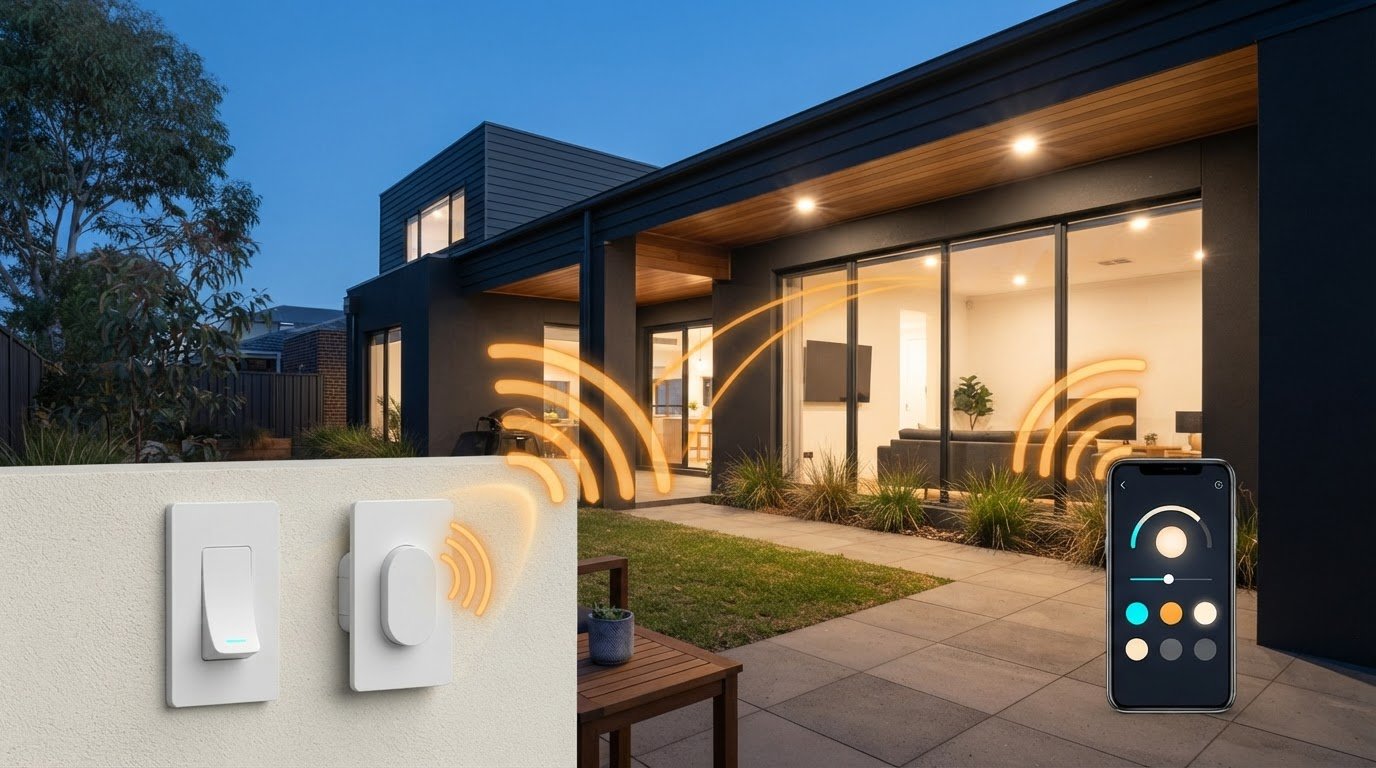
The closest-looking switch may not be the right Clipsal Iconic wireless alternative for your home. If you want to add a control point without opening finished walls, start with how the switch communicates with the light and what your existing wiring can support. Appearance comes later.
Wireless switching doesn’t always mean a full smart-home system, and replacing a switch isn’t the only way to add control. Options range from adding a wireless switch without running new switch wires to choosing connected controls that form part of a wider system.
This guide compares the main Clipsal Iconic wireless alternatives by installation approach, wiring needs and control options, including wireless switching hardware from Gem Wireless. Use it to narrow down options for an existing home or a renovation, then discuss compatibility and installation requirements with a qualified electrician.
Key Takeaways
- Decide whether you need to replace a switch, add a control point or connect lighting to a wider system.
- Compare Clipsal Iconic wireless alternatives by installation approach, wiring changes and control method, not appearance alone.
- Note your existing switch arrangement, lighting and preferred control method before narrowing down products.
- Gem Wireless offers switching hardware and kits to consider when avoiding new switch wiring is a priority.
- Ask a qualified electrician to assess mains wiring and confirm product compatibility and installation requirements.
Clipsal Iconic wireless alternatives: what are you actually comparing?
Are you replacing an existing switch, adding a control point elsewhere or connecting lighting to a wider system? These are different jobs. The right Clipsal Iconic wireless alternatives depend on what you want the switch to do and what’s already installed.
A wireless switch communicates with switching hardware without a new cable running between the switch location and the light. That doesn’t mean the light itself is wireless. The control sends a signal, and separate hardware receives it and operates the lighting circuit. Depending on the setup, that hardware may still need to connect to the circuit.
Wireless switching isn’t the same as app-controlled automation. A wireless control may simply switch a light on or off. A broader home automation system can connect different devices and controls, but features such as app access, schedules or integration with other platforms depend on the specific products. The word “wireless” alone doesn’t confirm that a product has these capabilities.
What does wireless switching mean in a Clipsal Iconic comparison?
Think of the user control and the part that switches the light as separate components. For example, you may want a convenient control point near a new bedroom entrance without chasing a finished wall to run a cable back to the lighting circuit. A wireless control could communicate with switching hardware in another location. Whether that arrangement works depends on the products and installation requirements.
Compare the communication method, switching hardware and control options separately. Don’t assume a wireless control can replace an existing switch or work with a particular lighting circuit simply because both products are described as wireless.
When is an alternative worth considering?
Wireless switching is worth investigating when adding or moving a control point would otherwise involve new wall wiring. This can come up during a retrofit, extension or change to a room layout. It may help avoid disturbing finished surfaces, but it doesn’t guarantee that no electrical work is needed.
Suitability depends on the existing wiring, light circuit and control you want. Check whether the solution is intended to add a control, replace switching hardware or connect to an app-based system. Confirm the exact device’s compatibility, switching load and installation requirements. In Australia, have mains electrical work assessed and completed by a qualified electrician. This helps you compare practical options rather than choosing on the faceplate alone.
The main Clipsal Iconic wireless alternatives and how they differ
A useful comparison looks beyond one switch brand against another. Consider the different ways to add control: a wireless kit with corresponding switching hardware, a module for a suitable retrofit, a mains-powered wireless switch or a connected smart-home system. These categories aren’t automatically interchangeable, even if they’re all described as wireless.
Use the table to narrow down the approach, then check the exact product specifications. Wireless technologies such as Wi-Fi, Bluetooth, Zigbee, Thread and Matter have different characteristics, as outlined in this overview of smart home wireless technologies. A protocol alone doesn’t confirm compatibility with a light, switch or wider system.
| Approach | Installation approach | Control method | Wiring changes to check | Best-fit use |
|---|---|---|---|---|
| Wireless switching kit | Pairs a wireless control with corresponding switching hardware. | Dedicated wireless switch or control. | Check where the switching hardware connects and whether the existing circuit suits it. | Adding a control point without running a new switch cable. |
| Switching module | A component used in a selected existing-switch or lighting arrangement. | Depends on the module and compatible control. | Confirm placement, circuit requirements and installation conditions. | Retrofits where the existing setup can accommodate the module. |
| Mains-powered wireless switch | A switch category that uses mains power. The required configuration varies by product. | Wireless control, subject to the product design. | Check the specified wiring, circuit and installation requirements. | Projects where a powered switch is preferred and the site is suitable. |
| Connected smart-home control | Uses compatible connected devices and may require additional system components. | May include app or voice control when explicitly supported. | Check device, network and ecosystem requirements, as well as any electrical work. | People seeking connected features beyond basic switching. |
Kits, modules and connected systems
A kit lets you assess the wireless control alongside the switching hardware it’s intended to work with. A module may suit a more specific retrofit, but check its compatibility and installation needs rather than assuming it will fit. Gem Wireless supplies switch module kits, switching modules and mains-powered switches among its wireless switching options. These are product categories to compare, not confirmation of direct compatibility with Clipsal Iconic.
A connected system may offer app or voice control, but only when the specific devices support those features. Don’t infer Apple Home, Google Home or Alexa compatibility from the word “wireless”. For a closer look at wireless switching hardware options, compare product requirements with your intended setup. Have a qualified electrician assess mains electrical work and confirm suitability for the site.
Which alternative suits your wiring, control needs and project?
Choose an option based on the job, not the switch name alone. The most suitable Clipsal Iconic wireless alternatives depend on where you need control, what the existing circuit can support and whether you want basic switching or connected features.
- Adding a control: A wireless switching arrangement may let you place a control where it’s convenient without running a new switch cable. Check that the control and switching hardware are designed to work together.
- Avoiding wall work: A retrofit option may help avoid chasing finished walls, but it doesn’t guarantee there’ll be no building work or electrical changes. The existing wiring and light circuit matter.
- Connecting devices: If you want app, voice or other connected functions, choose products that explicitly support the features and ecosystem you plan to use.
Before comparing products, note the current switch arrangement, lighting type and preferred control method. A kit or module suited to one circuit may not suit another. For broader selection considerations, see this Australian wireless light switch kit guide.
If you want to add a switch without opening a finished wall
A wireless control can communicate with switching hardware without a new cable between the control and light. This can be useful if a room layout changes or you want a switch near another entrance. Gem Wireless supplies switching hardware and kits intended to enable switching without rewiring, but suitability depends on the specific products and site. Ask a qualified electrician to assess the circuit and installation requirements. For more retrofit context, read the no-rewire lighting control guide.
If you want app control or a wider smart-home setup
First decide whether you’ll use app access, voice control, schedules or links with other devices. If not, a focused switching upgrade may be simpler than setting up a whole-home automation system. If you want connected features, verify support for the exact product and platform in its documentation. Don’t assume wireless means compatible with Apple Home, Google Home or Alexa.
Smart lighting can meet different needs, from straightforward control to more connected functions. The IEEE Smart Lighting initiative provides broader context on the development of user-focused lighting technology. For your own setup, check the light type, existing switch arrangement, required features and product compatibility. Have any mains electrical work assessed by a qualified electrician.
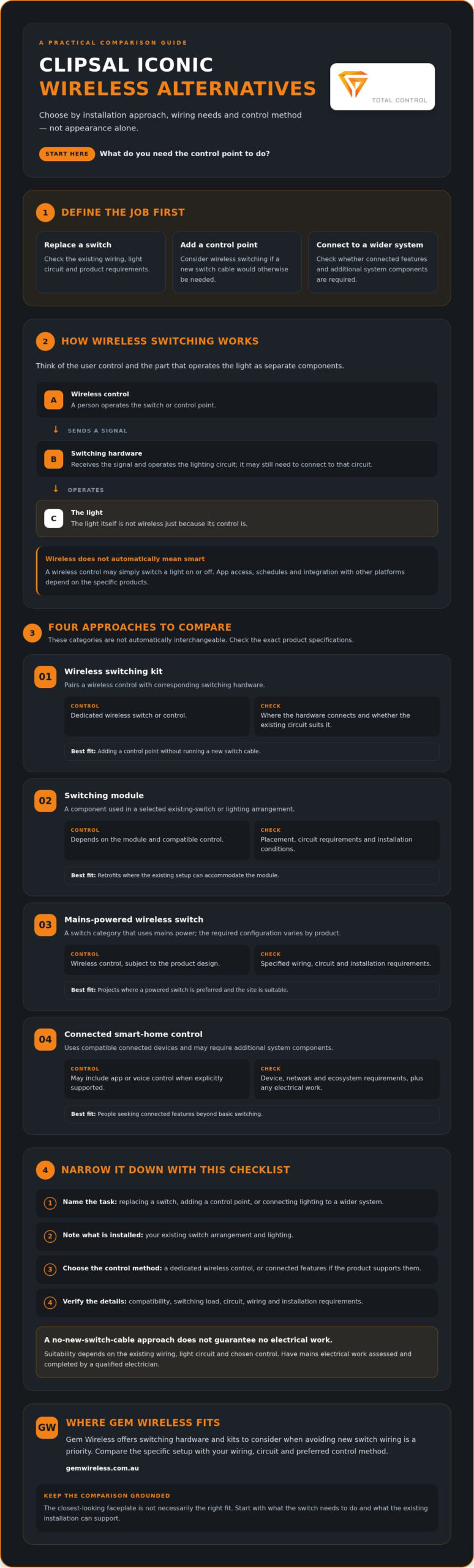
Use this checklist before choosing a Clipsal Iconic alternative
A few details about your setup can make it easier to compare Clipsal Iconic wireless alternatives. Work through this checklist before browsing or asking for advice. You don’t need to inspect wiring yourself. Record what you know, then ask a qualified electrician to assess anything involving mains electrical work.
Questions to answer about the existing setup
- Note the current switch arrangement. Record which switch controls which light or circuit, and whether it operates one light or several. Don’t remove the switch plate to check the wiring.
- Define the change you want. Are you adding a control point, relocating one or replacing an existing switch? Note where you’d like the control and whether you want to avoid new switch cabling.
- Identify the lighting. Make a note of the light type and any existing dimming or other control. The lighting load can affect which switching hardware is suitable. If mains installation is involved, have an electrician check the circuit and load.
- Choose your preferred control method. Decide whether a dedicated switch is enough or whether you also want app, voice or other connected functions. These are separate requirements, not features that come automatically with wireless switching.
Questions to ask before buying
- Check what’s included. Does the kit contain both the wireless control and its corresponding switching hardware, or are separate components needed? Confirm how the parts are intended to work together.
- Verify the exact requirements. Use current product documentation to check compatibility, power needs, operating range, switching load and installation conditions. Don’t assume a product suits your circuit because it looks similar to another switch.
- Confirm the installation plan. Ask a qualified electrician to assess the existing wiring and confirm the work meets applicable Australian requirements. Clarify who will complete any installation, as buying hardware doesn’t mean installation is included.
- Compare support and purchase channels. Check where the product can be purchased and what product guidance is available. Ask any compatibility and installation questions before ordering.
Keep your notes together. They’ll help an electrician assess the setup and make it easier to compare products against your needs. To review available wireless switching hardware, compare the product details with your checklist before choosing.
How Gem Wireless can fit a no-rewire switching comparison
If your priority is adding or changing switch control without running new switch wiring, Gem Wireless is one option to investigate alongside Clipsal Iconic wireless alternatives. Its wireless switching hardware and kits are compatible with existing switches and lights and require no rewiring. This may suit some retrofit projects, but it doesn’t confirm that a particular product suits your circuit or is compatible with Clipsal Iconic equipment.
When a Gem Wireless option may be worth investigating
Consider a room where a switch would be more useful near a different doorway, or a finished wall where you’d prefer to avoid running a new switch cable. Wireless switching may offer another way to control the light. The arrangement depends on the existing installation and product specifications, including operating range, power requirements and suitability for the lighting circuit.
Gem Wireless sells switch module kits, mains-powered switches, long-range switches and switching modules. These are hardware categories, not a promise of a particular installation outcome. Confirm the intended use and compatibility of the exact product before buying. Don’t assume a wireless switch will work with every Clipsal Iconic device or connect to an app or smart-home ecosystem. Gem Wireless supplies hardware, not electrical installation services or standalone software subscriptions.
What to do next
Use your checklist to identify the change you need: adding a control point, changing where control is located or replacing existing switching. Compare product documentation with your notes on the switch arrangement, lighting and preferred control method. If the installation involves mains wiring, ask a qualified electrician to assess the circuit and confirm the work required. Product guidance and an electrician’s assessment can help you distinguish a suitable no-rewire approach from one that needs a different solution.
Gem Wireless products can be purchased directly or through stockists across Australia and New Zealand. If this type of switching suits your project, compare Gem Wireless switching options.
Choose the switching approach that fits your home
The right Clipsal Iconic wireless alternatives depend on what you’re changing: the switch, its location or the level of control you want. Compare installation approach, wiring needs and control features, then check the exact product documentation for compatibility with your lighting and existing setup.
If avoiding new switch wiring is a priority, Gem Wireless supplies switching hardware and kits for residential and commercial use. Its products work with existing switches and lights without rewiring. You can buy directly or through stockists across Australia and New Zealand. Suitability still depends on the product and installation, so have a qualified electrician assess any mains electrical work.
Ready to explore a no-rewire switching option? Compare Gem Wireless switching options and check whether the available hardware fits your project.
Frequently Asked Questions
What are the best alternatives to Clipsal Iconic wireless switches?
The right option depends on whether you want to add a switch, replace existing hardware or connect lighting to a wider smart-home system. Compare wireless switching kits, switching modules and mains-powered wireless switches for a focused control change. Choose a connected smart switch only if you need its features. The best Clipsal Iconic wireless alternatives for your setup depend on the circuit, lighting load, control method and product requirements.
Can I add a light switch without rewiring?
Some wireless switching systems let you add a control point without running a new switch cable to the light. The control communicates with switching hardware, which still needs to suit the existing installation. Gem Wireless supplies hardware and kits that work with existing switches and lights without rewiring. This doesn’t mean every setup needs no electrical work. Confirm product requirements and ask a qualified electrician to assess mains installation.
Are wireless switches compatible with Clipsal Iconic?
Not automatically. “Wireless” describes how a control communicates, not whether it works with a particular switch, module or lighting circuit. Check the exact product documentation for compatibility with your existing equipment and intended installation. Don’t assume a wireless switching product can be fitted to or integrated with Clipsal Iconic hardware. If the documentation doesn’t clearly answer your question, ask the product supplier and a qualified electrician to confirm suitability.
Do wireless light switches need an electrician in Australia?
It depends on what the installation involves. A wireless control that doesn’t connect to mains wiring may not require electrical work, but switching hardware connected to a mains circuit should be assessed and installed by a qualified electrician. Don’t open a switch or handle wiring yourself to check what’s behind it. Give the electrician the product instructions and details of the existing light circuit so they can assess the work.
Are wireless switches the same as smart switches?
No. A wireless switch communicates without a new switch cable, but it may provide only basic on-and-off control. A smart switch or connected system may also offer app access, scheduling or voice control if those features are explicitly supported. Check the product documentation rather than assuming “wireless” means smart. If you only need another convenient way to control a light, a focused wireless switching setup may be enough.
Can I use a wireless switch with any light?
No. Compatibility depends on the switching hardware, light circuit and lighting load. Dimming, multiple lights on one circuit and other existing controls can affect suitability. Check the product specifications for supported loads and installation requirements, then ask a qualified electrician to assess the circuit if mains work is involved. Don’t assume a wireless switch will operate every light simply because both products use wireless technology.
Do wireless light switches work without Wi-Fi?
Some can, but it depends on how the system communicates. A dedicated wireless switching setup may operate without a home Wi-Fi network, while app-based features may rely on a network or other system components. Check the product documentation for its communication method and any required hub, network or power supply. Don’t assume Wi-Fi is needed, or that a product works without it, based on the word “wireless” alone.
What should I check before buying a Clipsal Iconic wireless alternative?
First, note which light or circuit the existing switch controls and whether you’re adding, moving or replacing a control point. Then check the exact product’s included hardware, compatibility, power requirements, operating range and supported lighting load. Decide whether basic switching or connected features matter to you. Confirm installation requirements in current product documentation, and have a qualified electrician assess any mains work before choosing.
Clipsal Iconic alternativeselectrical wiringGem Wirelesshome renovationretrofit switchessmart home Australiasmart lightingwireless light switches