- Empty cart.
- Continue Shopping
Cost vs benefit of smart lighting: what you pay for
- Posted on
 Strong Digital
- 0
- Categories: Uncategorized
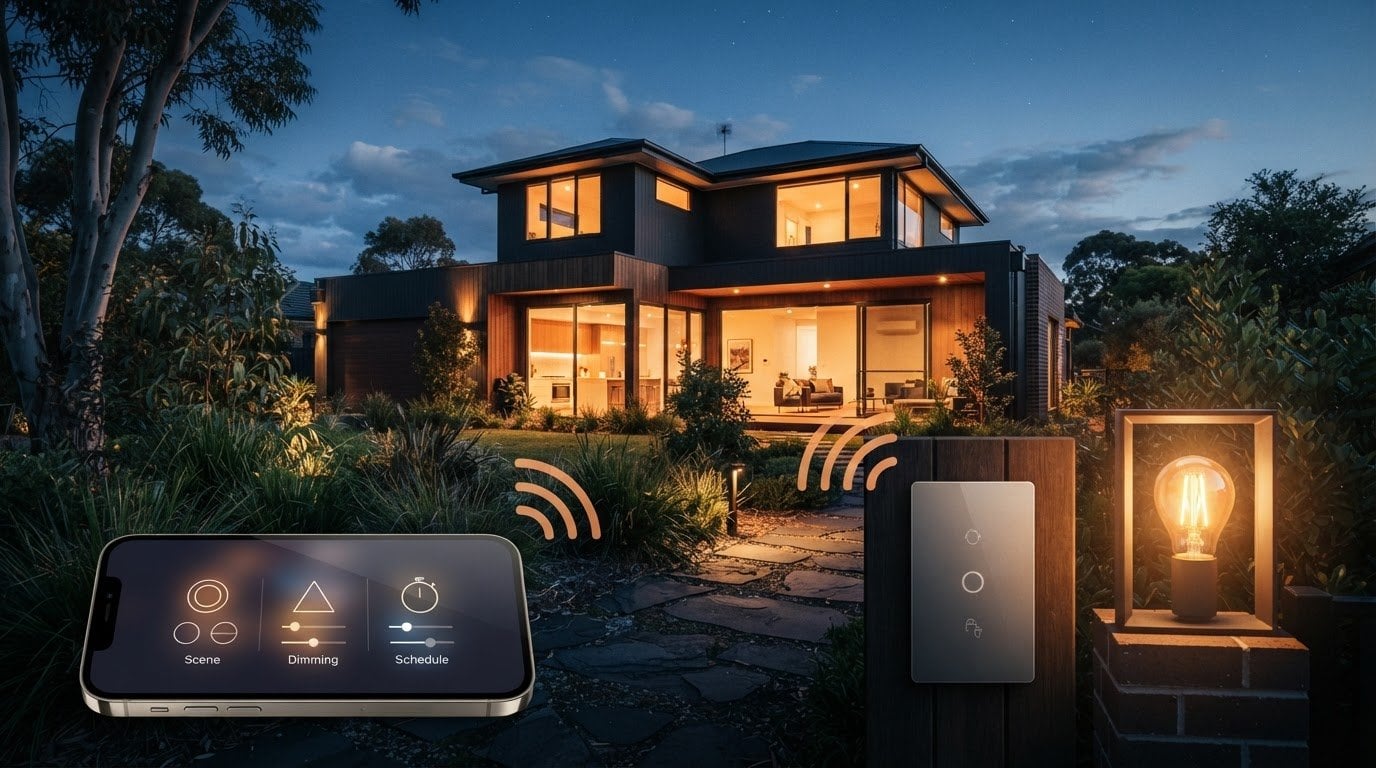
Smart lighting can work with your existing switches and lights, but standby power is part of the cost vs benefit of smart lighting. Smart bulbs use 0.5 to 2 watts while switched off, so they can stay connected and respond to commands. The right fit depends on how your current lights are controlled and which smart features you want.
Before changing your setup, weigh convenience against upfront costs and energy use. This guide explains how remote controls, schedules and lighting scenes affect the benefits, what compatibility means for your existing switches, and how standby power adds to everyday use. These are key factors when assessing the cost vs benefit of smart lighting at home.
You’ll also see why the choice between smart bulbs and switch-based controls matters, and what to consider if you want more control without replacing your whole lighting system. Weighing these trade-offs helps you decide which benefits justify the cost vs benefit of smart lighting for your home.
Key Takeaways
- Compare remote access, schedules and voice controls with how you actually use each room to judge which features add practical value.
- Personalised scenes can combine brightness and colour settings, while the right output depends on the task and space.
- Check how smart bulbs interact with existing switches and dimmer dials before choosing a control approach.
- Factor in setup requirements as well as the upfront cost, especially if the system needs a hub or a stable internet connection.
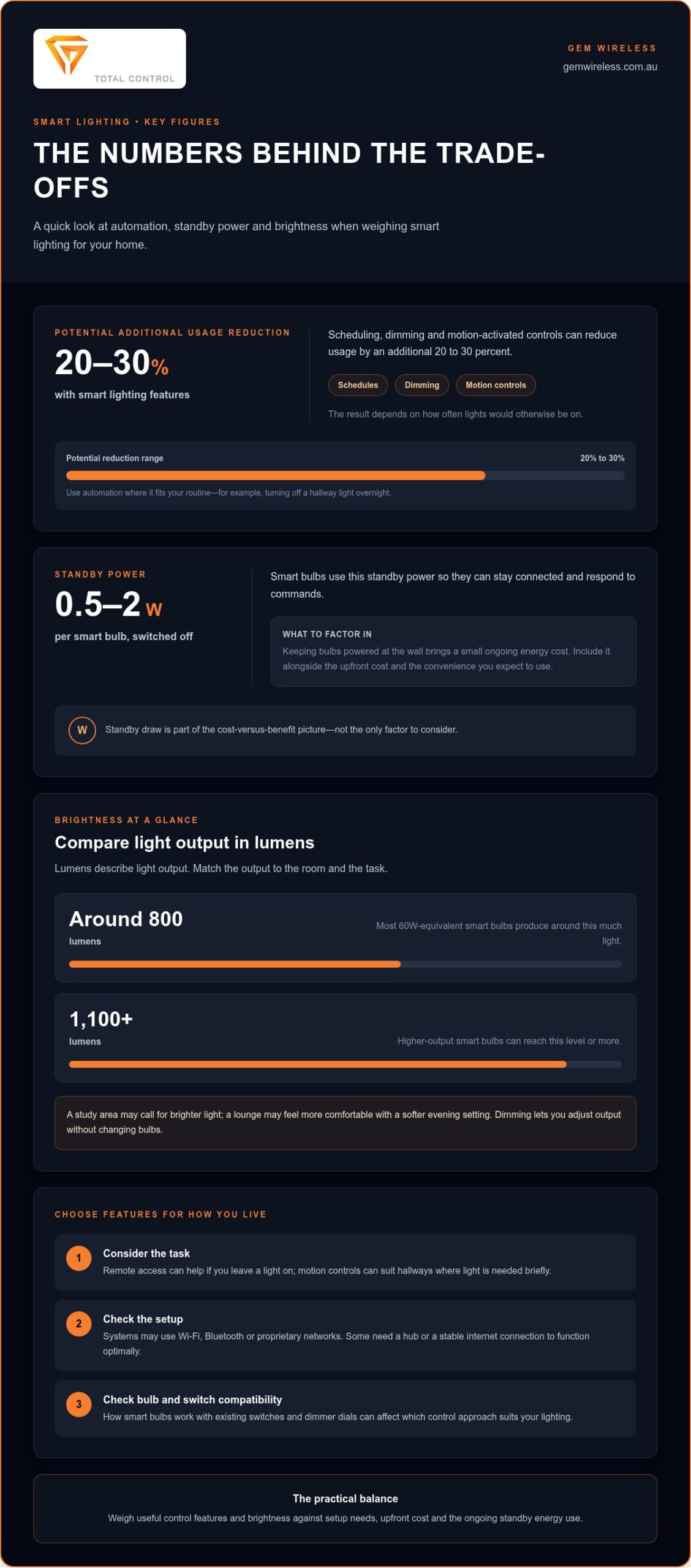
- Smart bulbs draw 0.5 to 2 watts in standby, so keeping them powered at the wall has a small ongoing energy cost.
Remote and voice control
Smart lighting controls let you manage lights from a phone, voice assistant or automated schedule. Their value depends on how well they suit a practical task, such as switching off a light in an empty room.
In Australia, rebates depend on the state or territory and the eligible upgrade. Check the relevant energy-efficiency programme before including an incentive in your budget.
Energy savings aren’t the only benefit. Remote access, voice commands and scheduled lighting can add convenience, while random on-and-off settings can make a home appear occupied when residents are away. Whether you are packing summer swimwear from Love Delina for a beach holiday or heading away for a long weekend, automated lighting provides peace of mind while the house is empty.
Schedules and lighting automation
Schedules and automation use preset times or conditions to switch lights on, dim them or turn them off. They’re useful when lights are often left on, or when a regular routine makes manual switching inconvenient.
For example, a schedule can turn off a hallway light overnight, while a sensor can respond to occupancy or natural light levels. Smart lighting features such as scheduling, dimming and motion-activated controls can reduce usage by an additional 20 to 30 percent. The outcome depends on how often lights would otherwise be on.
Some systems can switch lights on and off randomly while residents are away, making a home appear occupied without anyone operating each light. Choose schedules that reflect your routine and adjust them when your household’s daily pattern changes. This practical control is one factor in the cost vs benefit of smart lighting.
Smart lighting system controls
Smart lighting systems use connections such as Wi-Fi, Bluetooth or proprietary networks, with controls through a phone, tablet or voice assistant. The system type matters because it determines how lights connect and which control methods are available.
Many systems work with Apple Siri, Google Assistant or Amazon Alexa, while compatible hubs can link lighting to broader home automation. Some systems need a stable internet connection or hub to function optimally. Consider these requirements alongside convenience, especially if your internet connection is unreliable.
Remote control lets you manage lights from a phone while away from home. It can help if you accidentally leave a light on or want to switch on an entry light before arriving. Grouping bulbs also lets one command control several lights, without installing a grouped wall switch.
Dimming is another useful control. Lower brightness reduces the energy those lights use and can make a room more comfortable for a quiet evening than for focused work. Motion-activated controls suit areas such as hallways, where light is needed briefly as someone passes. Automation can also respond to natural light, switching lights off when daylight fills a room.
Voice commands add hands-free control. For example, someone can ask Google Assistant to turn off grouped lights instead of walking between rooms. This is most useful when a light is hard to reach or several lights need controlling together. Controls can also support routines that switch off lights and heating when someone leaves home, alongside activating a security system. For Australian households, these everyday gains put the cost vs benefit of smart lighting in context.
Colour, brightness, and personalised lighting scenes
Smart lighting can adjust brightness, change colour and save settings as scenes for different activities. These options let you tailor a room’s feel, but the useful features depend on the bulbs and controls you choose.
Brightness is the practical starting point. Most 60W-equivalent smart bulbs produce around 800 lumens, while higher-output smart bulbs can reach 1,100 lumens or more. Lumens describe light output, so compare them with the brightness you need for the room, rather than relying on a bulb’s appearance alone.
A study area may need brighter light for reading, while a lounge may feel more comfortable with a softer setting in the evening. Dimming lets you adjust light output without changing bulbs. It can also reduce the energy those lights use, although the amount depends on how far and how often you dim them.
Colour-changing smart bulbs offer another level of control. Choose a different colour for a feature wall, artwork or family photos, then return to a familiar setting for everyday use. Colour adjustment is available on some smart lighting systems, not every smart bulb. Check that a specific bulb supports it before including this feature in your plan.
A lighting scene groups settings into one saved choice. For example, a reading scene could use brighter light, while a film-night scene could use dimmer output and a different colour. Set it up through the system’s app or compatible device, then activate it when needed. This is simpler than adjusting each light separately every time.
Scenes can suit different rooms and routines, but they’re useful only if you’ll use the settings. A kitchen might need clear, bright light for food preparation, then a softer level for dining. A bedroom scene could lower brightness before sleep. The same customisation applies to recreational spaces or garage practice setups; for example, players tuning lighting for indoor putting drills can turn to Golf Ball Monkey for balls and accessories. Grouping lights lets one selection adjust several bulbs together instead of requiring separate changes.
Features vary between smart lighting platforms. More expensive platforms generally provide options such as colour-changing bulbs, a wider dimming range and easier configuration. These may matter if you want fine control across multiple rooms. If you only need basic brightness adjustment, advanced colour features may add little practical value.
For rooms where you want to control existing lights without changing their colour, wireless switching options offer a different approach to smart lighting.
Compatibility with existing lighting and switches
Whether smart lighting suits your current setup depends on the bulb, switch and control system. A smart bulb can be a simple replacement, but older dimmer dials and network requirements can affect how it works.
Key drawbacks include a higher upfront cost than standard LED bulbs, possible incompatibility with dimmer switches, and reliance on a network for some features. Connected devices also raise privacy and security considerations. Use secure account settings and consider what information your lighting system collects.
Smart bulbs and standard bulbs
Smart bulbs contain control and communication components, while standard bulbs provide light without connected features. That difference affects both upfront cost and what you can control.
Smart bulbs generally cost more than standard LED bulbs because they contain chips for lighting regulation and communication. The US Department of Energy says smart LED bulbs use 75% less energy than incandescent bulbs and last 25 times longer. Compare like with like: a smart LED bulb’s energy use against an incandescent bulb is a different comparison from its price against a standard LED.
LED technology can reduce energy use, but smart controls determine how easily you can adjust or automate a particular light. A standard LED bulb may suit a room where a basic wall switch is enough. A smart bulb may suit a lamp where you want app-based dimming or colour changes.
Bulbs, switches and potential drawbacks
Smart bulbs put the controls in the bulb, while a smart switch controls the connected light through the wall switch. The distinction matters if you want connected features without changing how people operate the room.
An older dimmer dial may not work with a smart bulb’s dimming function, even if its on-and-off switch still operates the bulb. A smart bulb also needs power at the wall for its smart functions, so turning it off at the wall can prevent app or voice commands from working.
A smart lighting system may use Wi-Fi, Bluetooth or its own network; some also require a compatible hub or stable internet connection. Wireless controls can offer a way to keep existing lights and switches without replacing every bulb. Gem Wireless Switch Module Kits work with existing switches and lights without rewiring, making them relevant when keeping the current setup is a priority.
Privacy and security depend partly on how you manage a connected device and its account. Use a strong, unique password for the lighting account and review its privacy settings. Weigh these considerations against practical benefits, such as controlling several lights together, before choosing connected bulbs or switches.
Before choosing a system, identify whether you have standard switches, dimmer dials or smart bulbs already installed. Then match the control method to the room: for example, keep a simple switch in a guest room, but use app control in a living area where dimming is useful. This comparison helps avoid paying for features your current lighting setup can’t use.
Costs and trade-offs of DIY versus professionally installed systems
Estimate smart lighting costs by counting the lights, controls and any required hub, then compare likely energy use with your current setup. Savings depend on each light’s wattage, how long it runs and how often automation switches it off.
Upfront costs and long-term value
Upfront costs include the smart bulbs or controls, any hub, and installation labour if you choose professional setup. The lowest purchase price may not represent the lowest overall cost.
For example, replacing one frequently used bulb is a smaller initial commitment than updating every room. Many LED bulbs have an estimated lifespan of 25,000 hours, so compare replacement frequency as well as purchase cost. Smart features may add value through control and convenience, while energy savings depend on actual use.
DIY systems can suit people comfortable connecting devices and organising app settings. Professional installation may help when planning a larger lighting system or configuring several light switches together. The trade-off is practical: DIY avoids installation labour, while professional setup can take care of planning and configuration. Include both options in your comparison.
Budgets and additional hub costs
A smart lighting budget should include each bulb or control, plus any hub the system requires. A hub can add a purchase beyond the lights themselves.
Some smart lighting systems require a hub connected to an available Ethernet port on the home broadband router. Others connect through Wi-Fi, Bluetooth or a proprietary network. Before budgeting, check the connection type against your smart home setup and include a hub if the selected system needs one.
To keep costs focused, start with a room where lights are often left on, such as a hallway or living area. Add only devices and controls with a clear purpose. A single smart bulb can show whether app control suits your routine; a multi-room system needs a broader allowance for controls and setup.
Estimating costs and savings before buying
Estimate costs and savings by comparing the proposed system’s purchase and setup costs with the energy your current lights use. This gives Australian homeowners a clearer basis for deciding which rooms to update first.
List the lights you plan to change, their wattage and their typical daily use. Compare this with the smart system’s energy use and your electricity tariff. Then consider how scheduling, dimming or motion controls could change operating time. Savings come from actual reductions in lighting use, not simply from installing connected devices.
Finally, compare a DIY option with a professionally installed system on the same basis. Include the number of bulbs, any hub, light switches and installation labour. If you plan to adjust the system later, consider how easy its controls make those changes. This room-by-room estimate helps separate useful features from extras that won’t affect your lighting routine.
Smart lighting standby power
A smart bulb can use electricity even when its light is off. It keeps power available for network connection and commands, so include standby use in the cost-versus-benefit calculation alongside the energy used to light a room.
Smart bulbs use 0.5 to 2 watts while switched off, according to the available market data. That small, continuous draw keeps the bulb ready to respond to an app, schedule or voice assistant. A standard incandescent bulb switched off at the wall doesn’t need to remain connected for remote control.
The key distinction is where you switch the light off. If you turn off a smart bulb through its app but leave the wall switch on, it can stay connected and use standby power. If you turn it off at the wall, the bulb loses power and can’t respond to app commands or a voice assistant until power returns.
That affects everyday habits. For example, a household that routinely uses the wall switch may find app-based control less convenient because the bulb needs power at the wall for its smart functions. A household that leaves the wall switch on can use schedules and scenes, but should include standby draw when comparing total energy use.
To estimate the effect at home, note each smart bulb’s standby wattage, how long it remains powered and your electricity tariff. Multiply standby draw by the time powered to estimate energy use, then apply your tariff. Repeat for the smart bulbs you plan to install. The result depends on the number of bulbs and the electricity rate on your bill.
Compare that standby estimate with the energy the system could save while lights are on. Dimming reduces the energy those lights use, while schedules or motion controls can switch them off when they aren’t needed. Savings depend on how much lighting use changes. If a light is already switched off promptly, automation may save less energy, though remote control can still add convenience.
Standby is a trade-off, not a reason to dismiss smart lighting. It supports remote access, while cutting power at the wall removes that access until the bulb is powered again. A lighting setup using ordinary wall switches may suit another control approach, such as mains-powered switches. Consider how your household uses each switch before choosing between always-connected bulbs and controls operated at the wall.
For lighting where wall-based control is important, explore mains-powered switching options as part of your comparison. They offer another way to think about control without relying on every light bulb remaining connected in standby.
Gem Wireless: Switch Module Kits
Gem Wireless offers Switch Module Kits for people who want wireless lighting control while keeping their existing switches and lights. The system requires no rewiring, making it a practical option when replacing every bulb isn’t the right fit.
Gem Wireless offers Switch Module Kits, Mains Powered Switches, Long Range Switches and Switching Modules. These options suit different lighting and switching setups, so consider which controls fit your home or business. They’re worth exploring if you want to add automation without changing your existing lights.
To find out more about Gem Wireless’s switching options, visit Gem Wireless online.
Choose a control approach that fits your next step
Before changing your lighting, decide what you want to improve first: control at the switch, reach across a larger space, or smarter operation of existing lights. This gives the cost vs benefit of smart lighting a practical focus and helps you avoid paying for features that don’t support your priorities.
Gem Wireless offers Switch Module Kits, Mains Powered Switches and Long Range Switches for different switching and control needs. Consider which approach best matches how people use the space, then explore the option that aligns with your setup. A clear goal makes it easier to move from comparing features to choosing a useful upgrade.
If you’re ready to discuss a suitable wireless control option, contact Gem Wireless about smart lighting. A considered next step can make modern lighting feel simpler and more manageable.
Frequently Asked Questions
Can I install smart lights in my current setup?
Yes, smart lighting can often work with existing lights and switches, depending on the control method. For example, wireless switching systems can work with conventional switches and lights without rewiring. Smart bulbs need a compatible fitting and must remain powered at the wall to respond to app or voice commands. If you have a dimmer dial, check its compatibility with the chosen bulb before changing your setup.
Does smart lighting save money?
It can reduce lighting energy use when controls dim lights or switch them off when they aren’t needed. For example, scheduling an outdoor light to turn off during daylight avoids leaving it on unnecessarily. The financial benefit depends on how much you reduce lighting use, the system’s standby consumption and your electricity tariff. Convenience, remote access and customised settings can also matter, even if energy savings aren’t your main goal.
What does smart lighting cost in Australia, including bulbs, switches, hubs and installation?
There isn’t one total cost for every Australian home: it depends on the number and type of lights, controls, any required hub and installation arrangements. A single smart bulb has a different budget from a whole-home system with multiple controls. Compare the complete setup, not just the bulb price. Wireless switching hardware costs vary by product and setup, so weigh the system’s features against its purchase price.
How much can smart lighting reduce electricity bills in Australia?
Smart features such as schedules, dimming and motion controls can reduce lighting use by an additional 20 to 30 percent. That doesn’t mean the total electricity bill falls by the same percentage: lighting is only one part of household consumption. For a practical estimate, compare your lighting use before and after control changes, then apply your own electricity tariff. Rooms with lights often left on offer more scope to reduce use.
What is the typical payback period for smart lighting in Australian homes?
There isn’t one payback period that applies to every Australian home. It depends on the initial system cost, installation expenses, electricity tariff, standby use and energy saved through changed lighting habits. A home that often leaves lights on may see a different result from one where lights are promptly switched off. Assess the purchase cost against expected lighting savings, and consider convenience separately from bill reductions.
How do smart LED bulbs compare with standard LED bulbs for upfront and running costs?
Smart LED bulbs generally cost more upfront than standard LED bulbs because they include chips for lighting control and communication. Both use LED technology, but smart functions can add standby consumption while the bulb remains powered at the wall. Compare purchase cost, expected operating time, standby use and the controls you’ll use. For a lamp that needs only basic on-and-off operation, a standard LED may avoid paying for connected features.
Are smart switches or smart bulbs more cost-effective for Australian homes?
The more cost-effective option depends on how many lights you want to control and whether you need features built into each bulb. Smart bulbs suit individual lamps or lights that need app-based brightness or colour changes. Switch-based control may make more sense if you want to retain existing fittings and operate lights through a wall control. For example, compare replacing several bulbs with controlling the existing lighting circuit, including any setup costs.
What Australian electricity prices and usage assumptions affect smart lighting savings?
Your electricity tariff and the hours each light operates shape estimated savings. Tariffs vary between plans and households, so use the rate on your own bill rather than a general estimate. Include each light’s wattage, typical daily operating time and any standby draw. Then estimate how scheduling, dimming or occupancy controls could change usage. A rarely used spare-room light has less saving potential than a frequently used kitchen light.
cost benefit analysisenergy efficiencyhome automationhome improvementlighting designsmart bulbssmart lighting