- Empty cart.
- Continue Shopping
No Neutral Wireless Light Switch: The Complete Australian Reference Guide 2026
- Posted on
 Strong Digital
- 0
- Categories: Uncategorized
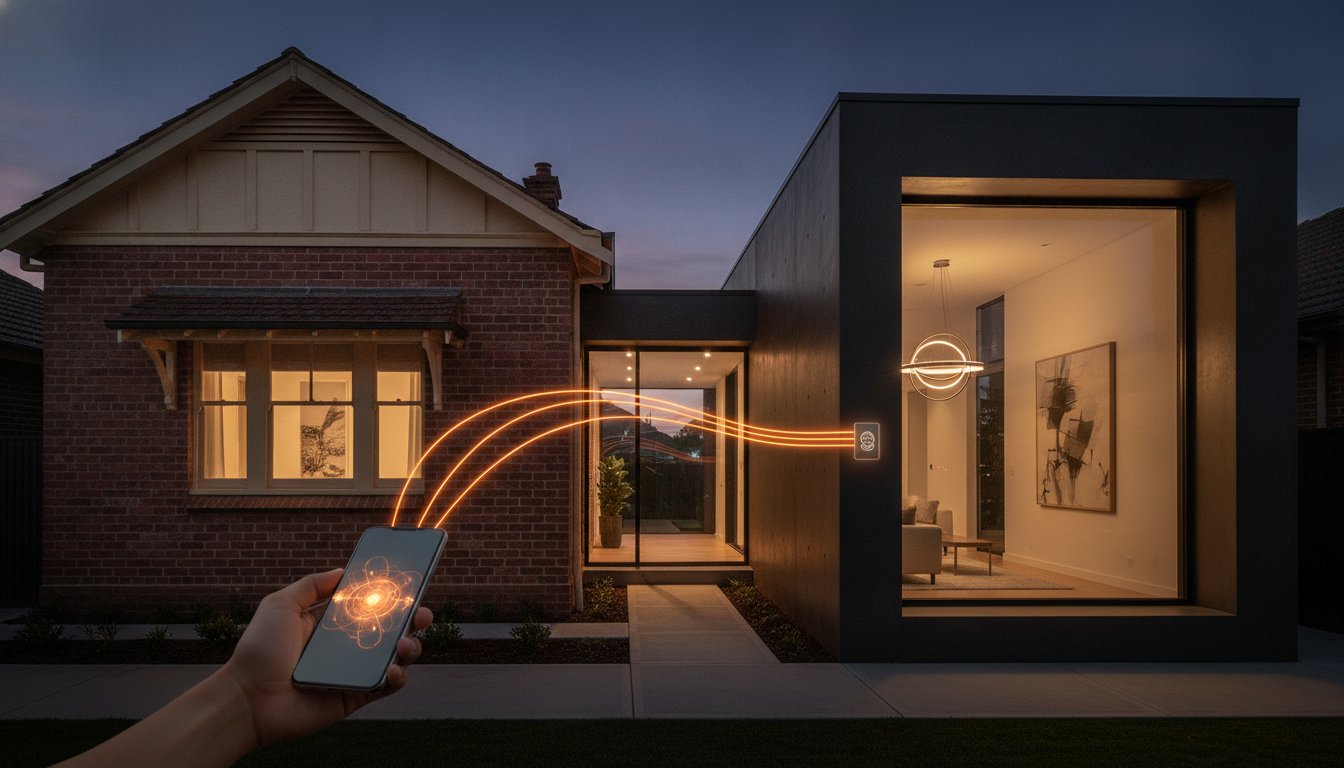
Why should a simple lighting upgrade require you to tear through heritage brick walls or pay a small fortune in electrical labour? If you live in a classic Australian home, you’ve likely hit a wall when trying to install smart tech. Most older properties use “loop-at-the-light” wiring; this means your wall box lacks the neutral wire required by standard smart devices. Forcing a traditional upgrade often means chasing walls and repainting rooms, turning a small improvement into a messy renovation. It’s a common frustration that leaves many homeowners stuck with outdated, manual switches.
The good news is that you don’t need to pull new cables to get the control you want. By using a no neutral wireless light switch, you can modernise your lighting system without damaging your home’s character. This guide provides the complete 2026 reference for Australian retrofits. We will cover how to maintain compliance with the latest AS/NZS 3000 standards, how to eliminate LED flickering with bypass modules, and which wireless kits work best with existing AU fittings. You’ll learn how to achieve a seamless, professional result that respects both your budget and your building’s structural integrity.
Key Takeaways
- Understand why older Australian homes lack neutral wires at the switch and how “loop-at-the-light” wiring creates barriers for standard smart upgrades.
- Learn how a no neutral wireless light switch uses power-stealing technology and receiver modules to bypass the need for chasing walls or pulling new cables.
- Compare kinetic, battery, and mains-powered switching modules to find the right balance between upfront cost and long-term maintenance for your property.
- Discover how to prevent LED flickering and “ghosting” by having a licensed electrician install a bypass capacitor in your lighting circuit.
- Explore how Gem Wireless retrofit kits provide a compliant, non-invasive way to modernise lights, fans, and pumps while protecting your home’s finished surfaces.
Understanding the “No Neutral” Challenge in Australian Homes
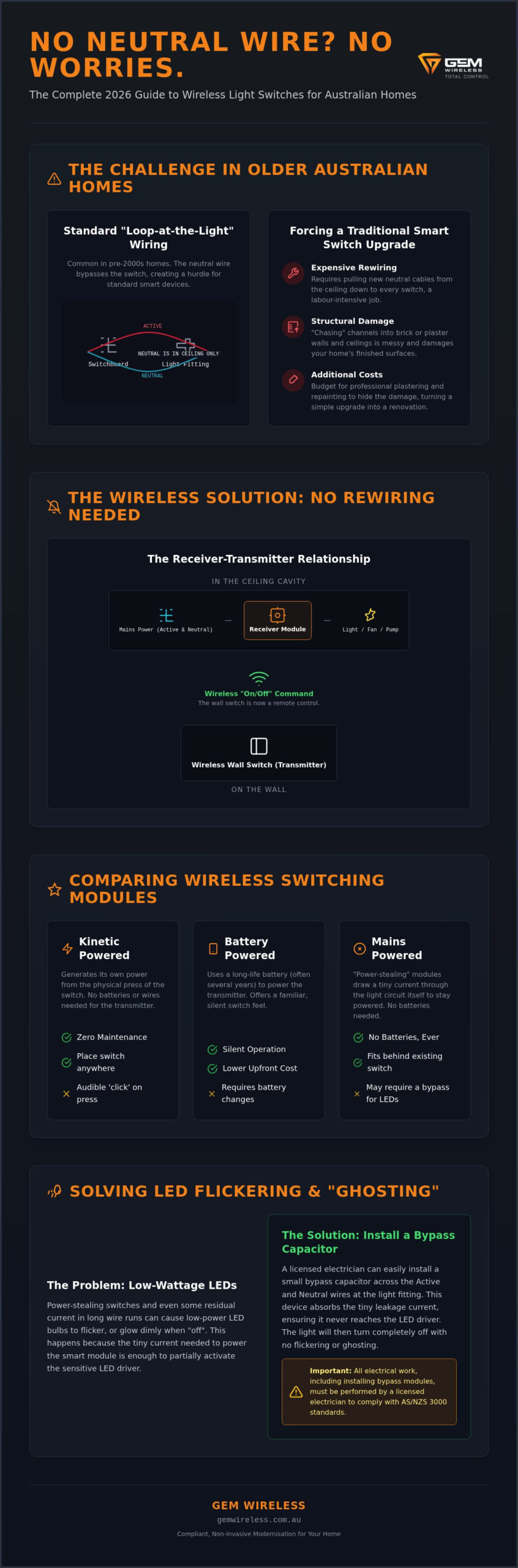
Most Australian homes built before the mid-2000s share a common electrical quirk: the light switch on your wall is a “dead end” for power. In a standard Australian circuit, you’ll find an Active wire bringing power in and a Switched Active wire taking it to the globe. The Neutral wire, which completes the circuit and returns power to the switchboard, usually stays tucked away in the ceiling cavity. This is known as “looping at the light.” It’s a simple system that has worked for decades, but it creates a significant hurdle for modern automation.
A traditional “dumb” switch doesn’t mind this setup. It’s a basic mechanical lever that physically connects or disconnects two wires. However, a modern wireless module or smart switch is an electronic device. It needs constant power to keep its internal radio and processor running. Without a neutral wire at the switch point, these devices have nowhere to send the electricity after it passes through their circuits. This is precisely why installing a no neutral wireless light switch is the preferred choice for retrofitting finished Australian properties.
Australian wall boxes are also notoriously cramped. Even if a neutral wire is present, squeezing a standard smart switch into a shallow plaster bracket or a narrow brick-recessed box is a struggle. These physical limits often force homeowners to choose between a bulky, protruding switch or an expensive wall modification. Wireless technology removes this friction by allowing the control module to sit where the space is; usually in the ceiling cavity near the light fitting.
Why your light switch lacks a neutral wire
Historically, Australian electrical standards prioritised efficiency and material costs. Running a neutral wire down to every switch plate was seen as an unnecessary expense when the same result could be achieved by looping at the ceiling rose. While this saved on copper and labour decades ago, it now presents a challenge for home modernisation. Because smart devices need to stay “awake” to receive wireless signals, they require a complete circuit. Without that neutral return path, a standard smart switch simply cannot function unless it’s specifically designed for no-neutral environments.
The cost of rewiring vs. wireless switching
Fixing the neutral wire problem through traditional means is rarely a simple job. Pulling new cables through timber frames or chasing channels into solid brick walls is labour-intensive. It often leads to a cascade of extra costs, including professional plastering and repainting to hide the damage. A Wireless light switch offers a far more pragmatic path. By using a no rewire lighting control system, you bypass the physical constraints of the wall box entirely. You get modern functionality without the mess of a renovation, making a no neutral wireless light switch the logical choice for maintaining the integrity of your home’s interior.
How No Neutral Wireless Technology Operates
Understanding the mechanics of a no neutral wireless light switch begins with moving the control point from the wall to the ceiling. In a traditional setup, the wall switch is the primary gatekeeper of electricity. In a wireless system, we install a receiver module, or relay, directly at the light fitting where both active and neutral wires are already available. This receiver becomes the new gatekeeper. The wall switch then becomes a wireless transmitter that sends “on” or “off” commands through the air, removing the need for a physical wired link between the two points.
For setups where the module must sit behind the switch plate without a neutral wire, some devices employ a “power stealing” technique. These modules allow a minuscule amount of electricity to flow through the circuit even when the light is officially “off.” This tiny current is just enough to keep the wireless radio active so it can listen for the next command. Because this current passes through the light globe, high-quality modules are essential to prevent low-wattage LEDs from glowing or flickering. This clever engineering allows the device to stay “awake” without a dedicated return path for power.
The Receiver-Transmitter relationship
The switching module acts as the intelligent core of your lighting. It’s wired into the permanent power at the light fitting, meaning it never loses its connection to the grid. Your wall switch then functions as a dedicated remote control. It requires no physical connection to the light itself, allowing you to place switches on glass, brick, or timber without drilling. A wireless relay is a remote-controlled bridge between the power source and the lamp. This decoupling of the switch from the wiring is what makes retrofitting so efficient.
Signal reliability through Australian walls
Reliability is a major concern in Australian properties featuring double-brick construction or thick concrete floor slabs. Standard Wi-Fi often struggles to penetrate these dense materials, leading to “ghost” switches that don’t always respond. Professional systems often utilise lower frequencies, such as 433MHz, or mesh protocols like Zigbee to ensure signals reach their destination. These frequencies are far more effective at navigating through structural barriers than high-frequency Wi-Fi signals which tend to bounce off solid surfaces.
Long-range wireless switches are particularly useful for sprawling single-storey homes or multi-level builds where the signal must travel through several walls. Gem Wireless modules are designed to maintain this rock-solid connection without relying on your home’s busy Wi-Fi network. This prevents lag and ensures your lights respond instantly every time you press the button. If you’re planning a retrofit, choosing the right switching modules is the first step toward a frustration-free smart home. This approach ensures your lighting remains functional even if your internet connection drops out.
Comparing Wireless Switching Modules: Kinetic, Battery, and Mains
Choosing the right interface is the final step in your lighting modernisation. While the receiver module handles the heavy lifting at the lamp, the switch on your wall determines your daily experience. In Australia, you generally choose between three power sources: kinetic energy, batteries, or mains power. Each has distinct advantages depending on whether you’re a homeowner looking for a permanent fix or a renter needing a non-destructive solution.
The choice often comes down to a trade-off between upfront investment and long-term maintenance. A no neutral wireless light switch using kinetic technology might cost more initially, but it removes the hidden cost of replacement batteries over the next decade. Conversely, mains-powered options offer a familiar look and feel but require a specific installation context. Understanding these differences ensures your lighting system remains reliable for years to come.
Kinetic (Energy Harvesting) Switches
Kinetic switches are the pinnacle of maintenance-free technology. Every time you press the button, the physical movement generates a tiny burst of electricity. This energy is just enough to power the internal transmitter and send a signal to the receiver. It’s a “fit and forget” solution. You’ll never need to pry the switch off the wall to replace a coin cell battery, making it ideal for high-traffic areas like hallways or kitchens.
These modules are also the most environmentally friendly option. By eliminating batteries, you reduce the amount of hazardous electronic waste heading to Australian landfills. The tactile feel is slightly firmer than a traditional switch; it provides a satisfying, positive click that confirms your command has been sent. This robust design is perfect for families who want a system that just works without ongoing attention.
Battery-Powered vs. Mains-Powered Switches
Battery-powered switches offer unmatched flexibility. They are thin enough to be stuck onto glass partitions, mirrors, or bedheads using simple adhesive strips. This makes them a favourite for renters or owners of heritage homes where drilling into polished timber or marble is out of the question. For anyone who wants to add convenient bedside control, a wireless bedroom light switch mounted on the headboard is an ideal no-rewire solution. While they require a battery change every few years, the installation is completely tool-free and non-invasive.
Mains-powered wireless switches are the best choice when you want to replace an existing wired switch with something that looks identical to the rest of your home’s fittings. These are wired into the active line but communicate wirelessly with the relay. Use this selection framework to decide which is right for your room:
- Bathrooms and Laundries: Choose kinetic or mains-powered modules to avoid moisture affecting battery contacts.
- Bedrooms: Use battery-powered switches for convenient placement on bedside tables or headboards.
- Entryways: Opt for long-range kinetic switches that don’t rely on temperature-sensitive batteries in drafty areas.
By selecting the right power source for each zone, you create a no neutral wireless light switch network that is both functional and cost-effective. This tailored approach prevents the frustration of dead batteries in critical areas while keeping your installation costs manageable.
Installation and Compatibility: Solving the Flickering Issue
Installing a no neutral wireless light switch is an efficient way to modernise your home, but it can sometimes lead to a frustrating phenomenon known as “ghosting.” This occurs when your LED globes flicker or glow faintly even when the switch is in the off position. It is not necessarily a sign of faulty hardware. Instead, it is a byproduct of how no-neutral circuits maintain their wireless connection. Because the module must “steal” a tiny amount of power to stay active, that current has to go somewhere, and sensitive LEDs are often the first to react.
Why LEDs flicker in no-neutral setups
Modern LEDs are incredibly efficient, requiring very little energy to produce light. In a no-neutral configuration, the smart module allows a miniscule leakage current to pass through the circuit to keep its internal radio powered. This small current can act like a slow-drip tap, gradually “charging” the capacitor inside a low-wattage LED driver. Once the driver reaches a certain threshold, it attempts to fire up the globe, resulting in a brief flash or a persistent dim glow. If you are experiencing this, our wireless light switch troubleshooting guide offers deeper technical insights into resolving these specific circuit behaviours.
The Bypass Capacitor: Your secret weapon
The standard solution for ghosting is the installation of a bypass capacitor. This small, inexpensive component acts as a “buffer” for the leakage current. Your electrician installs it at the light fitting, wired in parallel to the load. It works by absorbing the tiny amount of electricity required by the switch module, preventing it from reaching the LED driver. This ensures your lights stay completely dark when they should be. A capacitor is usually only required for loads under 5-10 Watts, as higher-wattage fittings typically have enough internal resistance to handle the leakage current without flickering.
To ensure a smooth installation, follow this compatibility checklist before starting your project:
- Check total wattage: Ensure the combined wattage of your globes meets the minimum load requirement of your specific switching module.
- Verify dimming: If you are using dimmable LEDs, confirm the receiver module supports your specific dimming protocol (trailing edge is most common in Australia).
- Assess space: Ensure there is enough room in the ceiling cavity or the light base to house the receiver and the bypass capacitor safely.
- Standardise globes: Avoid mixing different brands or types of LEDs on the same circuit, as this can cause inconsistent switching behaviour.
In Australia, all mains-powered electrical work must be performed by a licensed professional to comply with AS/NZS 3000:2018 standards. While the wireless switches themselves can be mounted by anyone, the receiver module and bypass capacitor must be wired in by an electrician. This ensures your home insurance remains valid and your system operates safely. To find the right hardware for your next project, explore our switching modules designed specifically for Australian electrical conditions.
Modernising Your Property with Gem Wireless Retrofit Kits
Modernising a home should feel like an upgrade, not a structural overhaul. Gem Wireless retrofit kits are designed to bridge the gap between traditional Australian wiring and modern convenience. By choosing a no neutral wireless light switch solution, you eliminate the need for costly wall chasing and the subsequent mess of plastering and painting. These kits are engineered to integrate seamlessly with standard Australian switch plates. This ensures your home’s aesthetic remains consistent while your control becomes significantly more flexible and responsive.
The pragmatic appeal of these systems lies in their compliance and reliability. Every component is designed to work within the specific constraints of Australian electrical standards, providing peace of mind for both homeowners and commercial property managers. Whether you are updating a single room or an entire office floor, the installation process is streamlined to respect your time and budget. You get the benefits of a smart home without the friction of a major renovation.
From Residential Bedrooms to Commercial Warehouses
The versatility of these modules extends far beyond simple bedroom lighting. Because we offer long-range switches, you can control lights in detached sheds, garages, or outbuildings without digging trenches for new cables. This makes them a pragmatic choice for rural properties or commercial sites where distance is usually a barrier to traditional wiring. You can mount a switch on a gate post or a workshop bench and have instant, reliable control over distant light fittings.
These switching modules aren’t limited to globes. You can also use them to control exhaust fans in bathrooms or ceiling fans in living areas. This allows you to add a control point exactly where you need it, such as next to a bed or at the entrance of a large warehouse. For a deeper look at which setup fits your specific needs, consult our Ultimate Wireless Light Switch Kit Guide. It provides specific recommendations for various Australian property types.
Getting Started: Your No-Rewire Roadmap
Modernising your property is a straightforward process when you have a clear plan. You don’t need to be a tech expert to start the transition. Follow these three steps to achieve a more efficient lighting system:
- Step 1: Identify your lighting load and wiring type. Check if you are using low-wattage LEDs and confirm that your wall box lacks a neutral wire.
- Step 2: Select the appropriate Gem Wireless receiver and transmitter kit. Choose between kinetic, battery, or mains-powered switches based on your room’s requirements and maintenance preferences. If you need to add a second control point to an existing circuit, a wireless 2 way light switch kit lets you achieve a professional multi-way setup without running new cables through your walls.
- Step 3: Consult a licensed electrician for the module installation. While you can mount the wireless switches yourself, a professional must handle the receiver and any necessary bypass capacitors to ensure safety and insurance compliance.
You don’t have to settle for outdated wiring or expensive, invasive renovations. With the right no neutral wireless light switch, you achieve professional results in a fraction of the time. It’s an empowering way to take control of your environment. Browse our range of wireless switching kits at Gem Wireless to find the perfect match for your next project.
Modernise Your Lighting Without the Renovation Mess
Modernising your home lighting shouldn’t involve invasive construction or expensive labour. By adopting a no neutral wireless light switch, you bypass the structural limitations of older Australian wiring while gaining full control over your environment. We’ve explored how receiver modules and bypass capacitors eliminate common issues like LED flickering, ensuring your system remains reliable and professional. These solutions respect your home’s finished surfaces and your budget, providing a seamless path to a smarter property. Whether you’re managing a heritage residential build or a large commercial space, the technology is now accessible and compliant.
Ready to start? Upgrade your home with Gem Wireless No-Rewire Kits today. Our range is fully compatible with Australian standard fittings and supported by a national stockist network. You don’t have to wait for a major renovation to enjoy modern convenience. With the right hardware and a licensed electrician for the module install, you can achieve a sophisticated, modern result without pulling a single new wire through your walls. It’s a pragmatic way to future-proof your property today.
Frequently Asked Questions
Do I really need an electrician to install a no neutral wireless light switch?
Yes, you must engage a licensed electrician to install the receiver module and any bypass capacitors. While you can safely mount the wireless switch plates yourself, the actual wiring into the 240V circuit falls under regulated electrical work in Australia. This ensures your installation complies with AS/NZS 3000 standards and keeps your home insurance valid. Attempting a DIY installation on the mains side is illegal and potentially dangerous.
Will a no neutral wireless switch make my LED lights flicker?
Flickering only occurs if the combined wattage of your LEDs is below the minimum threshold required by the module. This “ghosting” happens because the no neutral wireless light switch draws a tiny amount of power through the globe to stay active. To resolve this, your electrician can install a bypass capacitor in parallel with the light fitting. This component absorbs the leakage current and ensures your low-wattage LEDs remain completely dark when switched off.
Can I use a wireless light switch in a bathroom or wet area?
Wireless switches are an excellent choice for bathrooms because they don’t require high-voltage wiring inside the wall. Kinetic or battery-powered options are particularly safe as they operate on extremely low voltage or generate their own signal. You can mount them in areas where traditional wired switches might be restricted by safety zones. However, ensure the specific switch plate you choose is rated for the moisture levels typically found in Australian laundries and bathrooms.
How many wireless switches can I pair to a single light module?
Most receiver modules allow you to pair up to 10 separate switches to a single light circuit. This flexibility makes it easy to create multi-way switching in hallways or large open-plan living areas without running complex “strapping” wires. You can have one switch at the entrance, another by the sofa, and a third near the kitchen. Pairing is a simple process that your electrician can complete in seconds during the initial module setup.
What is the maximum range of a Gem Wireless long-range switch?
Long-range switches typically achieve a line-of-sight distance of up to 100 metres in open spaces. In a standard Australian residential environment, you can expect a reliable range of 30 to 50 metres through internal walls and structural timber. This makes them ideal for controlling outdoor floodlights or workshop power from inside the main house. The signal is designed to be robust enough to penetrate common building materials like plasterboard and brick without significant signal loss.
Do wireless switches work during a power outage?
Wireless switching systems require mains power to function because the receiver module at the light fitting must be energised. If your home loses power, the receiver cannot actuate the relay to turn the lights on. However, kinetic and battery switches don’t rely on your home’s Wi-Fi network. This means that as long as the mains power is active, your no neutral wireless light switch will work even if your internet router is offline or your NBN connection drops out.
Can I install a wireless switch in a rental property without losing my bond?
You can absolutely use wireless switches in a rental property because the transmitter plates are non-invasive. They can be mounted using simple adhesive strips that won’t damage the paintwork or wallpaper when removed. While the receiver module must be installed behind the light fitting by an electrician, it can be easily uninstalled when you move out. This allows you to modernise your lighting control without making permanent structural changes that might jeopardise your rental bond.
Is there a delay between pressing the switch and the light turning on?
There is no perceptible delay when using professional wireless switching hardware. The communication between the transmitter and the receiver happens at the speed of radio waves, resulting in a response time of less than 100 milliseconds. It feels just as responsive as a traditional hard-wired switch. Unlike some Wi-Fi-based smart globes that rely on cloud servers, these local wireless signals are processed instantly by the module, ensuring your lights react the moment you press the button.
AS/NZS 3000Australian homeselectrical wiringhome automationhome improvementno neutral switchsmart lightingwireless light switch