- Empty cart.
- Continue Shopping
Wireless Relay for Lights: Australian Retrofit Guide
- Posted on
 Strong Digital
- 0
- Categories: Uncategorized
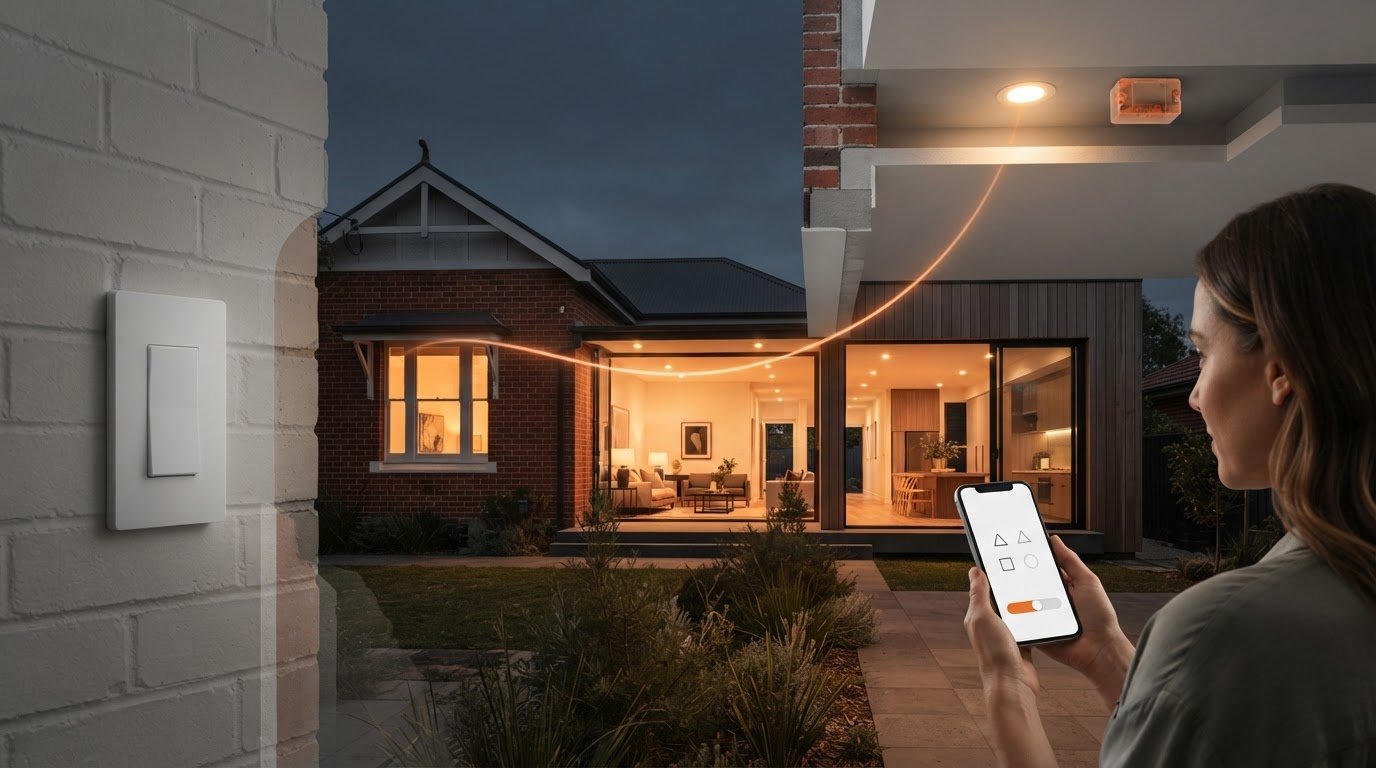
What if adding a light switch didn’t mean chasing a channel through the wall? If you want to move or add a switch without the dust, damage and cost of running new cables, a wireless relay for lights could be a simpler retrofit option.
This can be useful in double-brick and heritage homes, where access behind walls may be limited. A wireless relay pairs with a compatible switch to send a lighting command without new switch cabling. The light still needs to be connected safely, so any work involving mains wiring must be handled by a licensed electrician.
This guide explains how wireless relays work, what to check when choosing a setup and how compatible kits can make use of existing switches. It also covers how wireless switching can add a control point in a new location without cutting into walls or installing unnecessary wiring.
Key Takeaways
- See how a wireless relay for lights can add a control point without running switch cables through walls.
- Learn where the relay sits in a lighting circuit and how a wireless switch communicates with it.
- Compare switch options, including mains powered and battery powered transmitters, to find what suits your space.
- Understand why mains wiring must be handled by a licensed electrician, even when the switching system is wireless.
- Explore how compatible switching modules and kits can help modernise existing switches in an Australian home.
What is a Wireless Relay for Lights?
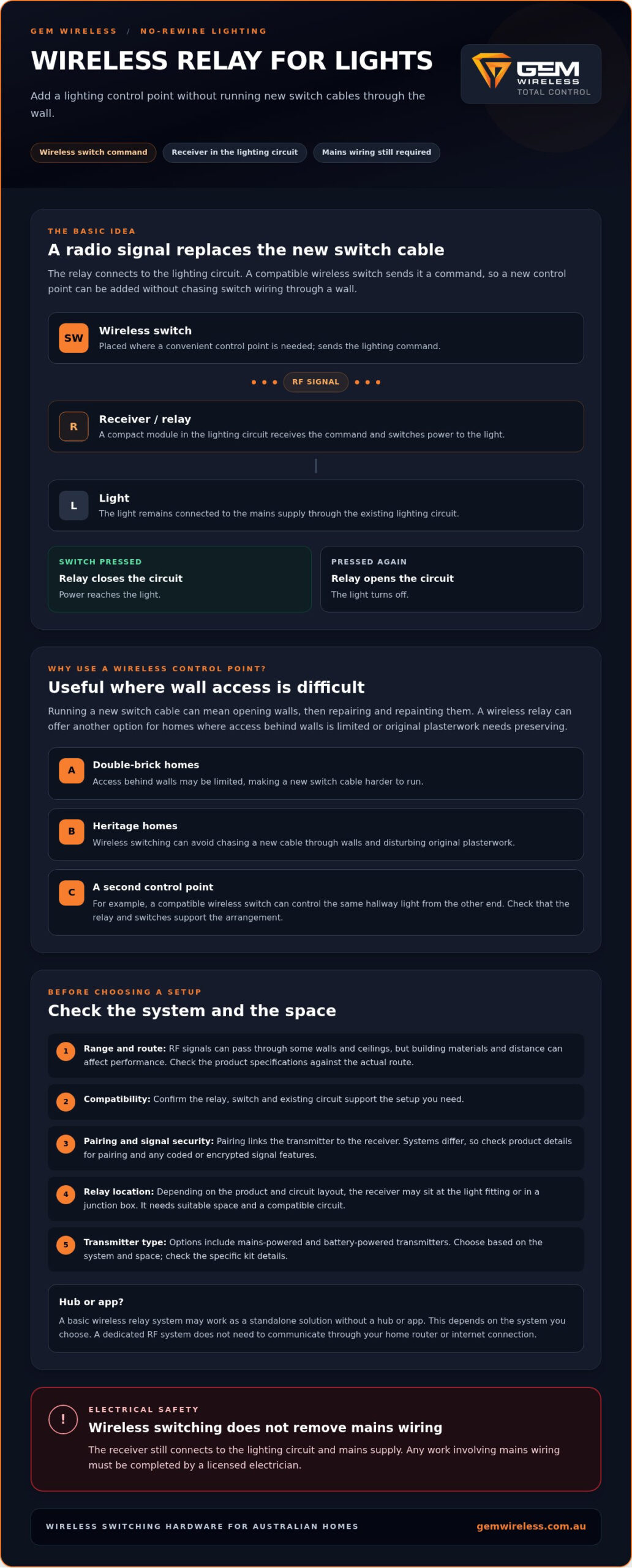
A wireless relay is a receiver module fitted into a lighting circuit, often at or near the light fitting. It acts as a remote controlled link between the mains supply and the light. When it receives a command from a compatible wireless switch, the relay switches power to the light. Because the switch communicates with the relay wirelessly, you can add a control point without running new switch wires through the wall.
Think of the relay as the control point in a no rewire lighting circuit: it receives the switch’s command and controls the light. Unlike a full smart home setup, a basic wireless relay system may work as a standalone solution, with no hub or app required. This depends on the system you choose. For a foundational overview, see What is a wireless light switch.
The Components of a Wireless Switching System
A typical setup has a receiver, a transmitter and a way for them to communicate:
- The receiver: A compact module connected to the lighting circuit. It receives the command and switches the light on or off.
- The transmitter: A wireless wall switch or remote that sends the command. It can be placed where it’s convenient, including at a new switch position.
- RF technology: Radio frequency carries signals between the switch and receiver. Unlike Wi Fi based controls, a dedicated RF system doesn’t need to communicate through your home router or internet connection. Check the system specifications for its range and compatibility.
The receiver still connects to mains wiring. A wireless system removes the need for new switch wires, not the need for safe electrical work. A licensed electrician must handle installation involving mains wiring.
Why Australian Homeowners Are Choosing Wireless
Running a new cable to a switch can mean opening walls, then repairing and repainting them. That can be especially difficult in double-brick homes, where access is limited, or heritage homes where preserving original plasterwork matters. A wireless relay offers another way to control a light without chasing a new switch cable through the wall.
It can also help create a second control point in a hallway. For example, you could use one switch near the entry and add a compatible wireless switch at the other end, so you can control the same light from either location. Check that the relay and switches support the arrangement you need. Gem Wireless offers wireless switching hardware designed for retrofits and compatible with existing switches, giving homeowners an option to consider for a no rewire setup.
How Wireless Light Relays Work Without New Cables
A wireless relay for lights replaces the control cable between a switch and the light with a radio signal. The receiver still needs a suitable connection to the lighting circuit and mains power. Once installed, it waits for a command from its paired wireless switch.
When you press the switch, it sends an RF signal to the receiver. The relay responds by closing the circuit, allowing power to reach the light. Press the switch again and the relay opens the circuit to turn the light off. It feels much like using a conventional switch, but the command travels wirelessly instead of through new switch wires.
Wireless switching modules are the working core of this arrangement. They connect the wireless command to the existing lighting circuit, making it possible to add a control point without running a cable from the new switch position. The same principle applies when considering a wireless switch for exhaust fans, where a receiver connects to the fan’s circuit and responds to commands from a compatible transmitter.
From Switch Signal to Light
Range depends on the particular module and the building. RF signals can pass through some walls and ceilings, but materials and the distance between transmitter and receiver can affect performance. Check the system specifications and consider the actual route the signal needs to travel.
The switch and relay also need to be paired. Pairing links a transmitter to the receiver, so the receiver responds to the intended switch rather than every signal it detects. Some systems use coded or encrypted signals to help prevent unintended operation. Don’t assume all relays use the same method. Check the product details for information about pairing and signal security.
Fitting a Relay into an Existing Circuit
A receiver may be installed at the light fitting, such as in an appropriate ceiling space, or in a junction box, depending on the product and circuit layout. If your setup involves upgrading enclosures or circuit protection, specialist retailers such as Asthome Smart Electrical Supplies provide quality distribution and switchboard gear. The location matters: there must be suitable space, and the module must be compatible with the circuit. A licensed electrician must complete mains wiring work.
A no rewire setup can keep an existing wall switch in use while adding a compatible wireless switch elsewhere. The precise arrangement depends on the module and existing wiring, so confirm compatibility before choosing a system. For more on retrofit options, read Gem Wireless’ guide to no rewire lighting control. You can also explore Gem Wireless switching modules when comparing hardware for your setup.
Choosing the Right Relay: Mains Powered vs Battery Options
In a wireless lighting setup, the receiver still needs a suitable connection to the lighting circuit. The choice is usually about how the transmitter, or the switch you press, gets its power. It may connect to mains power, use a battery or generate a small amount of energy when pressed.
Match the switch to how you’ll use the space. For a permanent home upgrade, consider whether you want to avoid battery changes or need a slim switch that can be mounted on a glass panel. For a rental or a spot where you can’t alter the wall, a wireless transmitter may offer more flexibility in where you place the control. Check that the receiver and switch are compatible before choosing a wireless relay for lights.
Battery Powered Transmitters
A battery powered switch can be positioned where it’s convenient, including on a glass or mirror surface if its mounting method allows. Its slim profile can suit locations where a conventional wall switch isn’t practical. The trade off is ongoing battery maintenance. Battery life varies with the device and how often it’s used, so check the manufacturer’s guidance rather than assuming a set replacement schedule. For a closer comparison, read the mains powered wireless switch vs battery options guide.
Kinetic and Long Range Solutions
Kinetic, or self powered, switches use the energy from a press to send a signal, so the transmitter doesn’t need a battery. That can reduce maintenance, but check the system’s compatibility and operating range for your setup.
A long range wireless switch may be useful when the control point is a long way from the receiver, such as at a shed or gate. Don’t choose on range alone. Walls, building materials and the path between the switch and receiver can affect signal performance, so check the specified range and suitability for the installation.
For outdoor use, look for clear information about weather resistance and the conditions the switch is designed to handle. Exposure to rain, sun and temperature changes can affect equipment, so don’t assume an indoor switch is suitable outside.
Gem Wireless sells mains powered switches, long range switches, switching modules and switch module kits. Compare the options against the location, power needs and existing switch arrangement, then check the product details for compatibility. Explore Gem Wireless switching hardware to see the types of components available for no rewire retrofits.
How to Set Up Your Wireless Lighting Relay System
A wireless relay can remove the need to run new switch wires, but the receiver still connects to mains wiring. In Australia, installation of a mains powered relay must be carried out by a licensed electrician. The steps below explain the process at a high level, so you know what to discuss and what to expect. Don’t open fittings, handle conductors or attempt to isolate and test a circuit yourself.
- Plan the location. The electrician checks the existing circuit, the relay’s compatibility and whether there’s suitable space for the module near the light fitting or in an appropriate enclosure.
- Isolate and install. The electrician isolates the circuit, verifies it is safe to work on, then connects the receiver to the lighting circuit according to the device instructions. This includes the relevant supply and light load connections.
- Secure the receiver. The module is positioned and secured in a suitable location, such as an appropriate ceiling space or switch back box, where the product and circuit allow.
- Pair and test. Once the installation is complete, the electrician or user follows the manufacturer’s pairing instructions. These commonly involve putting the receiver into pairing mode and pressing the intended wireless switch, then testing operation.
Pairing procedures vary between systems. Use the instructions supplied with your wireless relay for lights, especially if you plan to connect more than one switch to the same receiver.
Mounting the Wireless Switch
Choose the switch position before fixing it in place. Adhesive mounting may suit a smooth surface such as glass or tile, or a rental where you want to avoid screw holes, but check the switch’s mounting guidance and the surface condition first. For a more permanent, flush looking finish, a screw mounted switch may be a better fit where the surface allows. A bedside position or either end of a hallway can make an added control point more convenient.
Before final mounting, test the switch from its intended position. A signal that works nearby may be less reliable once walls, ceilings or other obstacles sit between the transmitter and receiver.
Troubleshooting Common Setup Issues
If the light flickers, don’t add a load resistor or change wiring yourself. Flickering can have several causes, including a mismatch between the relay and the light’s load. Stop and ask a licensed electrician to check the installation and confirm compatibility, including any minimum load requirements in the product instructions.
If a switch won’t pair, follow the manufacturer’s reset and pairing sequence rather than trying random button combinations. To add another switch, first check the receiver’s supported pairing capacity and process. Gem Wireless offers switching modules and kits for no rewire retrofits. Explore wireless switching options and compare the product instructions with your setup.
Modernising Your Australian Home with Gem Wireless
Adding a switch doesn’t have to mean opening up a finished wall. Gem Wireless focuses on no rewire switching hardware, including modules and kits designed for residential retrofits. Compatible setups can work with existing switches, helping you add a control point or change how you operate a light without running new switch cabling.
A wireless relay for lights is one option when a room needs a more convenient switch position. It may suit a renovation where you want to preserve existing walls, or a retrofit where access behind them is limited. The right arrangement depends on your wiring, the light and the specific module, so check compatibility before choosing hardware.
The Gem Wireless Advantage
You don’t need to start with a whole home automation system. Begin with the switching need in one room, such as adding another control point in a hallway or making a bedroom light easier to reach. Before planning to expand, confirm that additional switches and modules can work together in the arrangement you have in mind.
Gem Wireless supplies switching hardware to customers across Australia and works with stockists across Australia and New Zealand. Its kits are designed to work with existing switches where compatible. For residential renovations, that can provide a retrofit option to consider without assuming every wall or circuit needs to be altered. Commercial fit outs have different requirements, so check each product’s suitability for the intended circuit and application.
Wireless doesn’t mean the receiver is disconnected from mains power. A mains powered module still needs to be installed safely and correctly. In Australia, work involving mains wiring must be carried out by a licensed electrician. Ask them to confirm the module’s compatibility with the light and circuit, and follow the product instructions.
Ready to Upgrade Your Switching?
Start by identifying the problem you want to solve: a switch in an awkward spot, a second control point or limited access for new cabling. Then compare switching modules, switch module kits, mains powered switches and long range switches against the location, required range and existing switch setup. Check product specifications carefully, especially if you need a particular lighting or switching configuration.
A considered choice can help you modernise lighting without committing to a larger system or unnecessary wall work. Explore the Gem Wireless range to compare wireless switching hardware for your retrofit, and confirm technical or installation questions before proceeding.
Make Your Next Lighting Upgrade Simpler
A wireless relay for lights can provide another way to add or move a switch without running new switch cabling through your walls. The receiver connects to the lighting circuit, while a compatible wireless switch sends the command. Choose a transmitter to suit your space, and check that the system works with your existing switches and lighting.
Gem Wireless offers switching modules and kits designed for no rewire retrofits. Its hardware is compatible with existing home switches where the setup allows. Mains wiring still needs safe, suitable installation, so confirm the circuit and product requirements before getting started.
Start with the switching problem you want to solve, then compare the options available for your home. Explore Gem Wireless switch kits to find wireless switching hardware for your retrofit.
Frequently Asked Questions
Do I need a neutral wire to use a wireless relay for lights?
It depends on the relay’s design and the wiring at the light fitting. Some receiver modules need active and neutral connections, while available conductors and circuit arrangements can vary between homes. Don’t assume a wireless switch removes the receiver’s power requirements. Check the wiring diagram and product specifications, then have a licensed electrician confirm whether the module suits your circuit before it’s selected or installed.
Can one wireless relay be controlled by multiple switches?
Often, yes, if the relay supports pairing with multiple compatible switches. This can let you control one light from two positions, such as either end of a hallway. The supported number of transmitters and pairing steps depend on the specific system. Check the receiver’s instructions before buying extra switches, and have any changes involving mains wiring assessed and completed by a licensed electrician.
How far can the wireless switch be from the relay module?
There’s no single range that applies to every system. The distance depends on the transmitter and receiver, as well as obstacles such as walls, ceilings and building materials. A long range system may suit a more distant control point, but check its stated range and test the signal from the intended switch location before fixing the switch permanently. Actual performance can differ from an open space range specification.
Will a wireless relay work with LED downlights and dimmers?
It may work with LED downlights, but compatibility depends on the relay, the light’s electrical load and whether dimming is required. An on/off relay isn’t automatically a dimmer, and not every module is suitable for every LED load. Check the product specifications for LED and dimmer compatibility, along with any minimum load requirements. Ask a licensed electrician to assess flickering or other unexpected behaviour.
Is it legal to install a wireless relay myself in Australia?
No, not if the relay is hardwired to mains power. Installation of mains powered wireless relays must be carried out by a licensed electrician in Australia. Wireless control doesn’t remove the electrical connection or the need to work safely on the circuit. You can compare products and plan where a switch would be useful, but leave mains wiring and installation to a qualified professional.
What happens to the wireless relay during a power outage?
A mains powered receiver loses its supply during a power outage, so it can’t operate the light while power is off. What happens when power returns depends on the relay’s design and settings. The light may remain off or return to a previous state, so check the product instructions rather than assuming. A battery powered transmitter may still send a signal, but the receiver needs power to control the light.
How long do the batteries last in a wireless light switch?
Battery life varies by switch model, battery type and how often the switch is used. Check the manufacturer’s stated battery life and replacement instructions for the specific transmitter. If you’d rather avoid replacing batteries, consider whether a compatible mains powered or self powered switch suits the location. Always check the system requirements, as the receiver and transmitter may use different power sources.
Can I use a wireless relay for outdoor garden lighting?
Possibly, but the relay, receiver enclosure and switch must all be suitable for their intended outdoor conditions. Check the manufacturer’s specifications for protection against moisture, dust and temperature exposure, and confirm the equipment is compatible with the garden lighting circuit. Outdoor mains wiring requires particular care. Have a licensed electrician assess the installation rather than placing an indoor rated module or switch outdoors.
electrical tipshome renovationlighting controllighting retrofitsmart switcheswireless lightingwireless relay