- Empty cart.
- Continue Shopping
Budget Home Automation: Australian Buyer’s Guide for 2026
- Posted on
 Strong Digital
- 0
- Categories: Uncategorized
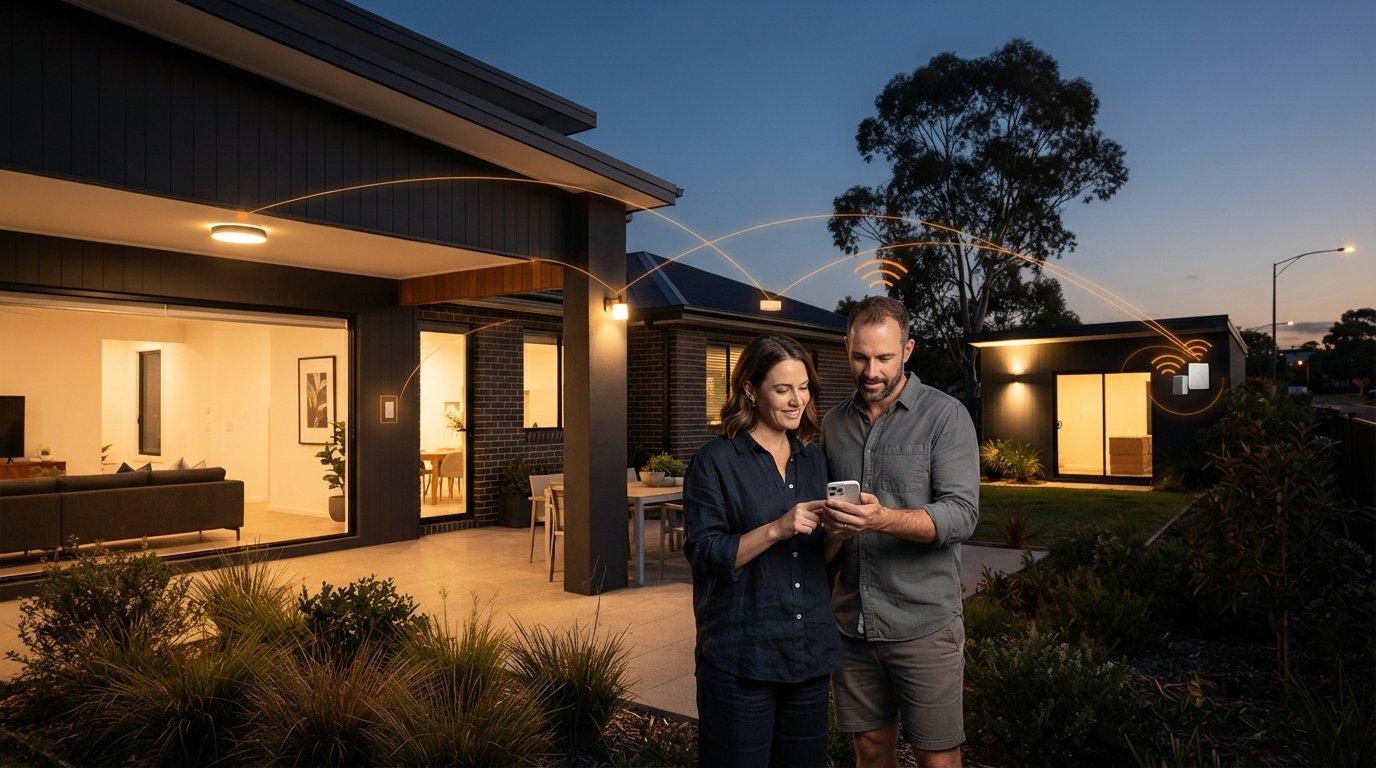
What if modernising your home lighting didn’t require cutting channels through finished gyprock or paying thousands in electrical trade labour? Most Australian homeowners assume upgrading their switches means facing eye-watering quotes, messy wall repairs, and finicky Wi-Fi gadgets that demand ongoing cloud subscriptions. It is deeply frustrating to feel trapped between rigid legacy wiring and delicate smart ecosystems that drop offline whenever the broadband hiccups. Fortunately, practical budget home automation solutions have rewritten the rules for retrofit projects across Australia.
You don’t need a massive renovation budget to create a clean, responsive lighting setup that feels permanent and intuitive. In this 2026 buyer’s guide, you’ll discover how modular, no-rewire hardware fits seamlessly into your existing household circuits, eliminating chasing labour expenses while giving you dependable local switching without recurring subscription fees. Here is how to upgrade your home, room by room, with total confidence.
Key Takeaways
- Understand why genuine budget home automation solutions prioritise local, subscription-free hardware over cloud-dependent platforms with hidden recurring fees.
- Discover how compact receiver modules installed directly in ceiling cavities bypass destructive wall chasing and protect your renovation budget.
- Learn the core hardware criteria for Australian homes, including signal penetration across dense materials like double brick and tin roofing.
- Master room-by-room layouts to resolve complex lighting challenges, from awkward multi-way staircase switching to detached sheds.
- Follow a practical audit framework to map your existing circuits and choose the right modular kits for a stress-free, staged upgrade.
What Defines True Budget Home Automation in Australia?
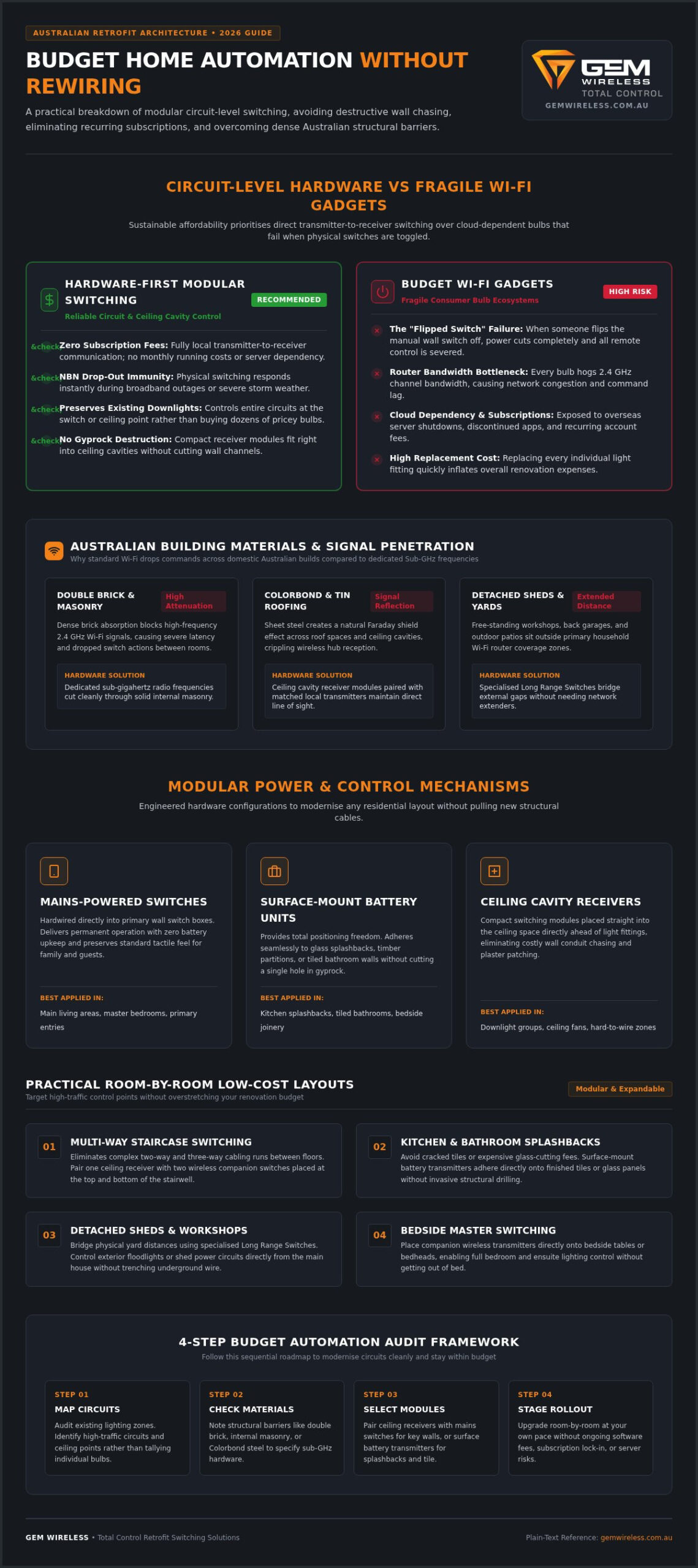
True budget automation isn’t about collecting the cheapest gadgets from online bargain bins. It’s about achieving maximum daily convenience with minimal structural expenditure. In practical terms, effective budget home automation solutions target household control points rather than replacing dozens of individual light fittings. Automating a circuit at the switch or ceiling level allows your existing downlights and lamps to become instantly responsive. You avoid replacing every standard bulb throughout the property, and you bypass expensive wall modifications entirely. By adopting a resilient home automation architecture that controls the circuit directly, you can upgrade high-traffic zones at your own pace without overstretching your renovation budget.
The Hidden Trap of Budget Wi-Fi Gadgets
Many households start by filling light sockets with cheap Wi-Fi bulbs, only to discover their practical limitations. Every connected bulb demands router bandwidth on the 2.4 GHz band, eventually creating network congestion and frustrating command delays. More annoyingly, individual smart bulbs fail the household usability test: the moment someone flips the traditional wall switch off, the bulb loses power, severing all remote capability. Add the ongoing security vulnerabilities of unsupported overseas servers and abandoned companion apps, and these bargain gadgets quickly turn into frustrating clutter.
Hardware-First Automation vs Subscription Ecosystems
Sustainable affordability requires decoupling your lighting controls from ongoing cloud fees. Dedicated switching modules and hardware-based solutions deliver genuine peace of mind by communicating directly between transmitter and receiver. Because they operate locally, there are no ongoing software subscriptions, account renewal fees, or surprise server shutdowns. When an NBN connection drops out during bad weather, your home controls continue to respond instantly at the press of a switch. You gain reliable, low-latency physical operation without signing up for endless monthly running costs.
Evaluating Affordable Automation: The Key Hardware Criteria
Choosing practical budget home automation solutions requires balancing upfront costs against real-world reliability and physical build quality. Many entry-level setups look affordable on the shelf, yet they struggle once installed behind solid domestic structures. Rather than chasing complex ecosystems, successful retrofits depend on three clear hardware benchmarks: physical transmission strength, flexible power mechanisms, and modular circuit integration. Aligning your setup with official Australian Government smart home guidance ensures your controls streamline daily household efficiency without complicating basic electrical maintenance.
Range, Signal Penetration, and Reliability
Australian residential architecture presents distinct structural obstacles for wireless controls. Dense double brick, internal masonry, and Colorbond steel roofing rapidly absorb standard 2.4 GHz Wi-Fi frequencies, causing dropped commands and lag. Dedicated sub-gigahertz radio frequencies cut through solid barriers far more effectively. For detached spaces such as free-standing workshops, back garages, or outdoor patios, specialised Long Range Switches bridge the distance cleanly, ensuring switches communicate without needing separate network extenders or signal repeaters.
Mains Powered Switches vs Modular Battery Units
Every home layout presents different installation hurdles, which is why modular power choices matter:
- Mains Powered Switches: Hardwired directly into primary switch boxes, these switches provide permanent operation with zero battery upkeep. They preserve standard tactile response so family and guests never have to guess how to turn on a light.
- Surface-Mount Battery Transmitters: These provide total positioning freedom. You can adhere them to glass splashbacks, timber partitions, or tiled bathroom walls without cutting a single hole.
- Modular Adaptability: As your domestic needs shift, modular designs let you reposition switch points or add companion controls without touching structural wiring.
For an in-depth breakdown of component specifications and wiring diagrams, review our analysis on wireless switching modules. Exploring engineered kits from Gem Wireless will help you select hardware that pairs directly with your existing circuits right out of the box.
The No-Rewire Advantage: Cutting Renovation and Electrical Labour
Traditional renovations quickly run into trouble when you decide to add or relocate light switches. Chasing channels through double brick or cutting into finished gyprock creates a domino effect of trade expenses, requiring plaster patchers, sanders, and painters to restore the damage. Placing compact receiver units directly inside ceiling cavities circumvents this chaos entirely. Under Australian electrical safety regulations, a licensed electrician must wire fixed 240V connections at the fixture or junction point. However, because the electrician works strictly at the accessible ceiling point rather than pulling cables down cavity walls, trade hours shrink dramatically. For a deeper look at this installation approach, explore our guide to no rewire lighting control.
Bypassing Invasive Wall Chasing and Plaster Repairs
Tearing into finished plasterboard to run traditional twin-and-earth cable produces dust, structural disruption, and costly remedial patch-up jobs. In contrast, modern wireless switches mount flush against any flat surface using adhesive tape or slim fixings. You can position a new switch on timber panelling, exposed brick, or glass partitions without cutting a single hole. As highlighted in the CHOICE smart home buyer’s guide, eliminating structural wall modifications is one of the most effective ways to protect your overall upgrade budget. Preserving your existing architectural finishes keeps the installation fast, tidy, and predictable.
Solving Older Australian Wiring Challenges
Homes built before the mid-2000s present another common hurdle: missing neutral wires behind the switch plate. Most vintage properties rely on active switch loops, leaving standard smart switches without the complete circuit needed to operate. Rather than paying a contractor to pull fresh multi-core wiring through tight wall cavities, smart renovators locate compact Switching Modules at the ceiling light fitting. The ceiling fixture already contains both active and neutral lines, providing an immediate connection point. This makes modular wireless hardware one of the most versatile budget home automation solutions for older builds, preserving decorative cornices and lath-and-plaster walls while delivering effortless, modern switching.
Room-by-Room Guide: Practical Low-Cost Automation Setups
Tailoring control points to the daily rhythms of your household turns basic circuits into intelligent living spaces. Rather than investing in complex touchscreens or tablet displays that quickly become obsolete, effective budget home automation solutions target specific domestic bottlenecks. By placing lightweight wireless transmitters exactly where you naturally reach for them, you solve awkward floor plans without pulling a single extra cable through your walls.
Bedrooms, Hallways, and Multi-Way Switching
Stairwells and long hallways often lack practical two-way switching, forcing occupants to cross dark rooms to reach the nearest wall plate. Pairing multiple surface-mounted transmitters to a single receiver solves this issue instantly. In bedrooms, you can mount an additional switch directly onto the bedside table or headboard, eliminating the late-night stumble across the room to switch off the main light. Parents can also position battery transmitters at a lower, accessible height for younger children without altering permanent infrastructure. To explore pre-paired multi-point configurations, consult the comprehensive wireless light switch kit guide.
Living Areas and Open-Plan Lighting Zones
Modern Australian living spaces combine the kitchen, dining room, and lounge into broad, open-plan zones. Unfortunately, this often results in confusing wall plates crowded with four to six individual rocker switches. Multi-channel wireless switches declutter these walls by consolidating multiple lighting groups onto streamlined, labelled plates. Placing a dedicated wireless switch right beside the sliding door to your outdoor deck lets you illuminate entertaining areas before stepping outside, creating seamless indoor-outdoor transitions during evening barbecues.
Outbuildings, Sheds, and Garden Features
Running power and switching cables across an open backyard to a detached garage or garden shed usually demands expensive ground trenching and heavy conduit work. Hardware-based long-range switches bypass this physical challenge completely. From inside the warmth of your kitchen or entryway, you can reliably trigger outdoor floodlights, workshop lighting, or festoon patio circuits across substantial outdoor distances. Learn more about overcoming outdoor structural obstacles in our guide to long range wireless light switches. Ready to modernise your property zone by zone? Order your modular switch kits today to establish reliable, cable-free control across every room.
How to Implement Your Budget Automation Upgrade
Executing a cost-effective lighting upgrade comes down to methodical preparation. When you eliminate guesswork before tools leave the van, you keep labour minimal and avoid purchasing unnecessary hardware. Successful budget home automation solutions follow a logical path: inspect your floor plan, acquire pre-configured hardware kits, and execute a structured trade installation. This systematic approach transforms troublesome lighting circuits into an intuitive network without scope creep or spiralling costs.
Auditing Your Home and Choosing Hardware
Start by identifying your home’s daily friction points rather than trying to automate every fixture at once:
- Target Awkward Switch Locations: Note rooms where the wall switch sits behind an open door, at the far end of an unlit corridor, or away from the bed.
- Map the Physical Circuits: Determine which specific lighting circuits feed these zones so you purchase the exact count of Switch Module Kits required.
- Select Matching Transmitters: Choose standard compact modules for standard indoor rooms, and assign Long Range Switches to exterior runs, perimeter security floodlights, or outbuildings.
Working with Your Licenced Electrician
Australian regulations legally require a licenced electrician to perform fixed 240V mains work. Fortunately, briefing your contractor for modular wireless hardware is remarkably straightforward compared to a conventional rewiring job. Hand them the pre-configured Switching Modules alongside a simple diagram showing the target lighting points. Because the electrician wires the receivers directly into accessible ceiling roses or junction boxes, there is no need for them to chase cables down wall cavities or fish wires through timber noggins.
Once the electrician completes the mains connections and issues your compliance certificate, the remaining setup takes minutes. Surface-mount your wireless wall switches using adhesive strips or standard screws, test the tactile action, and enjoy instant, responsive switching. Starting with a single room or hallway allows you to experience the reliability of modular hardware firsthand before expanding your setup across the rest of the home.
Modernise Your Home Switching Without the Renovation Overhead
Upgrading your household controls doesn’t have to trigger messy plaster repairs, structural wall chasing, or endless cloud subscriptions. By focusing on circuit-level receivers rather than fragile Wi-Fi gadgets, you achieve permanent, intuitive control that respects both your home’s architecture and your budget. Direct local transmission keeps your lighting instantly responsive every single day, whether you’re adding convenient bedside controls, fixing an awkward dark stairwell, or switching shed lights from indoors.
Implementing effective budget home automation solutions allows you to modernise your property at your own pace without unnecessary disruption. Engineered specifically for quick retrofits across Australian residences, this modular hardware integrates cleanly with existing circuits and standard fittings, completely removing wall repairs from your renovation scope. Ready to streamline your lighting with dependable, subscription-free hardware? Explore Gem Wireless Switch Module Kits and transform your living spaces with effortless simplicity.
Frequently Asked Questions
Can I install budget home automation solutions myself in Australia?
You can mount the wireless wall switches yourself, but a licensed electrician must install the receiver units into your 240V mains circuits. Under Australian electrical safety standards, fixed mains wiring must be handled by a licensed professional. Fortunately, these budget home automation solutions drastically reduce trade time because your electrician only wires the module at an accessible ceiling junction or fixture, avoiding hours spent cutting wall channels.
Do wireless switching modules require an active internet connection to function?
No, wireless switching modules operate independently of your internet connection and home Wi-Fi network. They use dedicated radio-frequency communication between the transmitter switch and the receiving relay. If your broadband goes down or your router restarts during bad weather, your physical lighting controls remain completely responsive. This offline functionality also ensures you never encounter recurring platform subscription fees or unexpected cloud outages.
How long do the batteries last in wireless wall-mounted switches?
Most battery-powered wireless wall switches operate reliably for five to eight years before needing a fresh battery. Because the transmitter only draws a micro-pulse of power when physically pressed, passive power drain remains virtually zero. Replacing standard coin-cell batteries takes less than a minute without removing the faceplate from your wall. For permanent, zero-maintenance setups, you can also opt for hardwired mains powered switches where existing wiring is accessible.
Will wireless light switches work through double brick or tin shed walls?
Yes, dedicated wireless switches penetrate solid domestic materials far better than standard Wi-Fi devices. Sub-gigahertz radio frequencies cut through double brick, plasterboard, and internal masonry without dropping commands. For challenging outdoor scenarios, such as triggering lights inside a detached Colorbond garage or tin workshop, Long Range Switches provide the added signal output needed to pierce metal sheeting and span open garden spaces reliably.
What is the main difference between smart bulbs and wireless switching modules?
Smart bulbs automate individual globes, whereas switching modules control the underlying electrical circuit. When a smart bulb loses power from a flipped wall switch, it becomes unresponsive to remotes or schedules. Modules sit at the fixture or switch box, ensuring the circuit remains controllable regardless of physical switch positions. This approach makes hardware-based kits ideal budget home automation solutions, allowing you to automate downlights and standard fittings cleanly.
Can I use wireless switches if my older home does not have neutral wires at the switch?
Yes, older Australian homes with active-only switch loops are ideal candidates for wireless switching modules. Instead of paying an electrician to pull new neutral wiring through finished wall cavities, the receiver module connects directly inside the ceiling rose or junction box. The ceiling location always provides access to both active and neutral wires, giving you full remote control without altering your vintage plaster or architraves.
Is it possible to control one light from multiple wireless wall switches?
Yes, you can easily pair multiple wireless switch transmitters to a single receiver module. Traditional two-way switching requires complex, expensive multi-core cabling run through internal wall cavities. With modular wireless setups, synchronising additional switches takes seconds. This lets you place companion switches at both ends of a hallway, top and bottom of staircases, or right beside your bed without chasing a single extra wire.
budget home automationelectrical renovationhome automation Australiano rewire switchesretrofit lightingsmart home guidesmart lighting